


Known Participant
November 23, 2018
Question

Bridge CPU Usage

  • November 23, 2018
  • 10 replies
  • 22858 views

Hi,

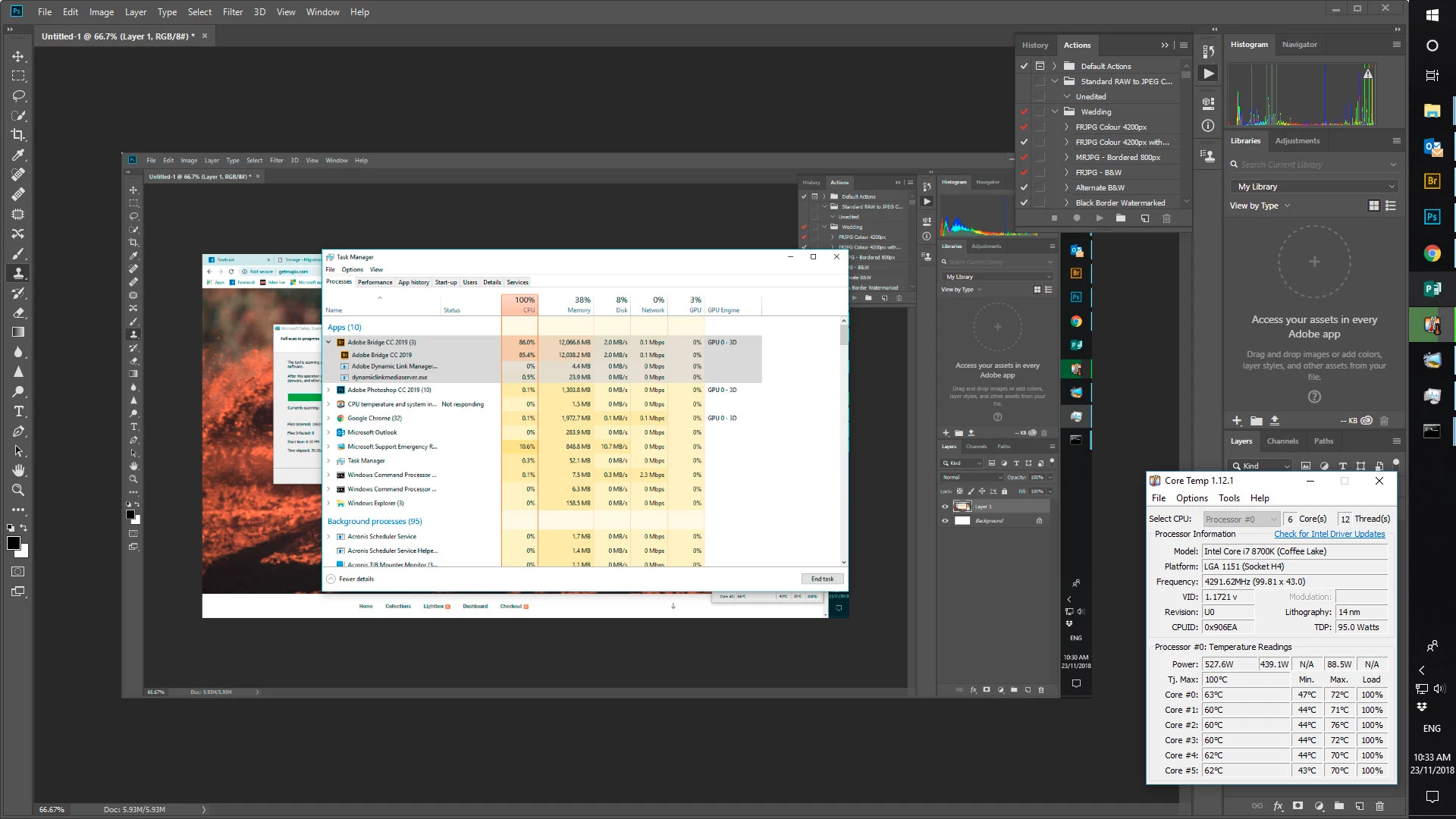
I am wondering how I get Bridge to use the GPU more, rather than having it hammer my CPU.  At the moment, Bridge is causing my CPU to run at 100% for hours on end, but uses very little GPU resources.  I've set the Hardware Accelerator in Bridge and in Photoshop, but neither use the GPU as much as Google Chrome does.  Any suggestions?

My setup is as follows:

Gigabyte H370 Aorus Gaming 3 motherboard

Intel Core i7-8700K CPU watercooled

64 GB DDR4 2333mhz RAM

Galax GTX1070 8Gb DDR5 RAM GPU air cooled

Boot Drive 500GB mSATA SSD

OS is Windows 10 x64 Pro

Bridge CC2019 with RAW Cache on a separate WD HDD

Here's a screen shot to show what's going on.
This topic has been closed for replies.

10 replies

New Participant
March 25, 2023

Why do we have no control over the background cpu use in the preferences? Are they spying on what is on our discs? I normaly work in one folder with maybe ten photo's. Why doing the recalculation of tousands of photo's? Maybe the virus program alters these photo's for security reasons or the backup system amters these photo's. Why can't we control to only renew previews in the working folder?

New Participant
February 16, 2022

I have used Bridge faithfully for years in preference to Lightroom.
However the latest Bridge release12.0.1 246  has a aserious BUG which sends the CPU in overdrive..
CPU use by Bridge is typically 95% which causes  Photoshop to behave irratically especially Adjustment Layers sliders which freeze.  I have tried Adobe suggestions from May 2020 to switch OFF Ruler and move the Adjustment Layer panel off the Photoshop panel. Neither worked.   I run i7   64 RAM  and previously old Bridge and Photoshop worked fast.
I have now returned to Lightroom Classic and sidelined Bridge until Adobe engineers apply a long overdue Fix to this Bug.
My Photoshop works percetly with Lightroom and NO Bridge.
Adobe need to address this issue quickly, I work with Photoshop / Bridge / ACR for a living.

Brainiac
February 16, 2022

Whatever the issue is, it appears that 1. most users are not affected and 2. Adobe hasn't been able to reproduce it.

I've used Bridge in production on multiple computers for the past eight years, both Mac and Windows, and have never seen this CPU loading happen. Bridge does have some serious problems but this in particular is not happening to everyone.


Known Participant
December 5, 2020

So I just read through too much of this thread as a person that pays $600 a year for this software. Why is this happening? When will it be fixed?

Known Participant
January 7, 2021

Three versions later and this problem persists.  From reading through various sources on the Adobe website I gather that version 2019 incorporated changes in the way Bridge handles its Camera RAW Cache.  They did this to accommodate shared users if I read it correctly.  Since then however, the Bridge product has been nothing but a dog, running like treacle but consuming as much CPU processing power as it could get.  I and many other users have reported this and Adobe has done squat.  Each new version of Camera RAW behaves the same way.  Subscriptions still get paid and they do nothing for those paying.  As soon as a viable alternative appears, Adobe will experience what the owners of WordPerfect and Lotus1-2-3 did, and they'll deserve it.

New Participant
February 13, 2021

Yes, you are right. It's really annoying.

Relosa1978rr
New Participant
July 15, 2019

Under "Options for thumbnail quality and preview generation" uncheck or deselect "Generate 100% Previews". This fixed it for me.

Brainbug
Inspiring
May 27, 2019

I finally pulled the plug on the Adobe C(asual) C(rap). I cancelled my subscription of the Creative Cloud Photographers Plan and will use my old CS6 Version, Affinity Photo and Corel Painter from here on.

I couldn't stand it anymore. I have been using Photoshop for 23 years now, but this subscription atrocity and the way this company behaves since the marketing took over is no longer bearable.

Just wanted to let you know that I did what I proclaimed earlier in this thread:)

Of course, CC will stay with me at work, because I have no influence over the software they give me, but for my freelance work, it's back to the last version that I feel comfortable with.

Onlybrandino
New Participant
April 14, 2019

So I was having the same problem, The way I fixed mines is I went to "Camera RAW Preference" Under the Edit tab And increased my Camera Raw Cache from the default to 128gbs. Now I'm pretty sure that the reason behind the high CPU is because the computer is constantly deleting and making new space for the files. But give this a try and tell me if this works for you. Oh, and I tried it on the 2019 version of Adobe bridge so I'm pretty sure it might work on 18.

DonaldtheDuck
New Participant
April 22, 2019

that finally solved the problem. Thanks   

DonaldtheDuck
New Participant
May 30, 2019

I stand corrected. Problem's not solved.

After changing to the Nikon Z7, bridge uses 99% of CPU and computer is stuck when I open a folder containing RAW files of the Z7.

Even with only 50 files or so in it. Raw cache is set to 200(max).

The problem does not occur when looking at Nikon D850 files.

Stephen Marsh
Adobe Expert
January 1, 2019

I would suggest taking the discussion to the feedback website:

Bridge | Photoshop Family Customer Community

New Participant
December 26, 2018

I have Adobe Bridge 9.0.2.219 X64 on Windows and it just about locks up my computer when generating previews on a large folder of images.  E.g., a lake shoot with 1790 images. CPU usage is absurdly high; I can barely control the mouse. It did not do this with previous version.  I'm going back to an old version pending some sort of fix 8-(

-Dick Locke

Known Participant
December 31, 2018

I have a folder with 15,000 PSD files in it.  Bridge does not go over about 30% CPU usage generating previews from these very large files.  The problem only occurs with RAW files on my computer.

Known Participant
January 11, 2019

I've reverted to CC2018.  Bridge is happily rendering full sized previews for nearly 200,000 RAW files from my 7DMkII.  It is not taxing the computer at all, and it is a hell of a lot quicker than cc2019.  It hasn't crashed yet either.  About time Adobe fixed their crappy programming job.

Known Participant
November 25, 2018

And now Bridge doesn't even appear in the Windows Task Manager even though it is clearly running on screen.  Who programmed this POS?

jbm007
Adobe Expert
November 26, 2018

Thats a OS issue not a Bridge issue. And yes I have seen that happen as well.

Brainbug
Inspiring
November 26, 2018

I did some more testing on the cpu load issue with bridge. I reinstalled the 2018 Version again. It seems, that Bridge uses the CPU cores for the creation of Thumbnail-Previews. I opened a folder containing ca. 6000 Images and the cpu load immediately went up to 99%-100% on ALL cores. I don't understand why adobe does not use the GPU for tasks like this. Creating this kind of load seems not be optimized at all.

Bridge has never been a very ressource friendly program in the first place. I still have the impression, that the whole adobe app range has become more and more sloppy since they discovered the generation instagram as their main customer base, neglecting the needs of power users (e.g. 32-bit workflow is still a mess..., most of the filters have never been updated since the stone age, etc)

Anyway. I would appreciate a more balanced solution for this kind of task. No other image-organizer that I tested (Thumbs Plus, Xnview, XnviewMP, Faststone, Irfanview, Zoomviewer) uses this amount of ressources. Even Bridge Version CS6 handles the same folder with a cpu load of around 20%-30% (having purged the cache for all of the 6000 images and letting Bridge CS6 recreate all previews).

jbm007
Adobe Expert
November 23, 2018

Have noted the same thing. Its a obvious bug.

Seems to only happen when you have Bridge and PS open at the same time.

Known Participant
November 23, 2018

It happens even when Photoshop is not open, on my machine.  I also can't edit photos opened from within Bridge unless I run them through an existing action.  I can however edit when I open them using Photoshop.  None of the menu commands are available in Photoshop for images opened via Bridge.  CC was a clean install on a new computer.

Brainbug
Inspiring
November 25, 2018

I noticed the same behaviour today. CPU Load at 80%-100% when bridge is open. Doesn't happen with older versions of bridge.