


hobbytobiz
Inspiring
April 29, 2020
Answered

Bridge CS6 Fails To Recognize Camera Raw Files

  • April 29, 2020
  • 5 replies
  • 3131 views

When Apple released Catalina, I upgraded. That's when ALL my trouble started. PS/Bridge CS6 woud not operate - AT ALL! After a call to Apple Care Technical Support, the solution was to revert back to Mojave. Because the downgrade process failed, my only choice was to re-install Mojave from scratch. So I also had to reinstall PS CS6.


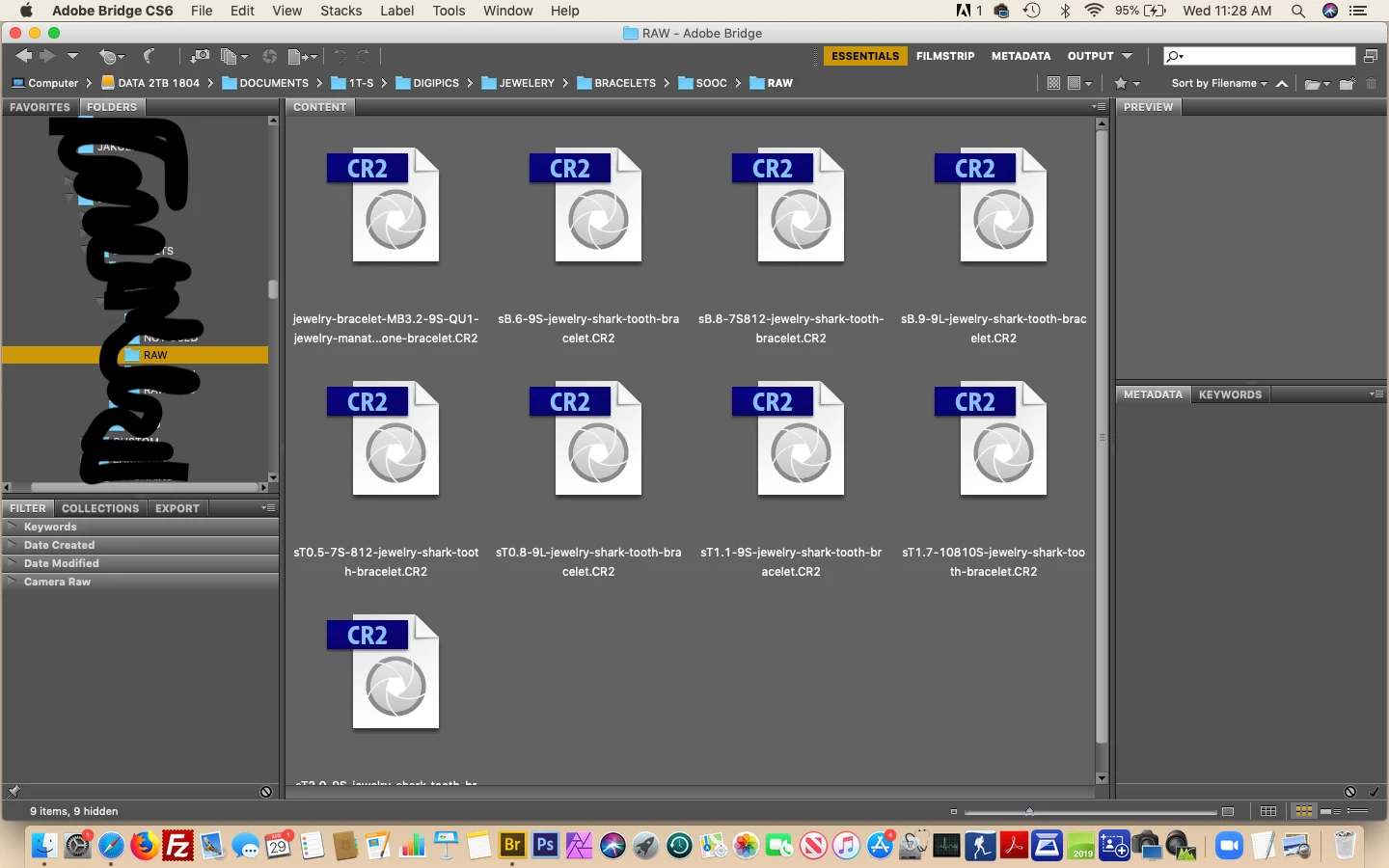
I had been using Dr. Brown's Image Processor Pro prior to the "crash". After downloading Image Processor Pro, neither the downloaded version nor the Bridge version Image Processor would work. Error message: could not find image processor.jsx. This lead me to believe it was time to re-install PS CS6. After Adobe sent me a link to the PS CS6 download because my order was No Longer listed in my History, I began downloading PS CS6. Now Bridge will only recognize earlier .CR2 camera raw files. I'm not sure where the time cut off is but recent raw file only dispay a Bridge icon to represent the file. In addition, the file will not open from Bridge to PS. 
 

I called Adobe tech support on 3 occassioins a total of 12 hours total spent on the phone troubleshooting. The result, they suggested searching the "community forums". So the experts have no clue.


First - If you're running PS CS6 on Mojave, don't bother upgrading to Catalina. It's all over then. Make sure you check forums for viable experiences.


Second - Has anyone experienced this and discovered a fix? Don't suggest I use Adobe DNG Converter. I've already downloaded it and it's a pain-work-around.


Thirdly - If you don't have a viable solution, don't post your comment just to have your comment listed. I don't have time for you to sound like the pro you're not!

This topic has been closed for replies.
Correct answer hobbytobiz

UPDATE:

After posting my dilemma on the LinkedIn PS group, I got a lead. After almost giving up, I made one last push to find a link to Adobe Camera Raw V8.2. After doing a clean install of PS CS6, I loaded ACR 8.2. Viola it's running great. All my .CR2 files are visible and will open in Bridge. I'm back in business. So in summary here's the lessons learned:


  1. If you wish to continue running a paid for license of Adobe Creative Suite application on a MAC, do not upgrade beyond Mojave.
  2. Make sure you have copies of PS CS6 applications and plugins backed up and available for reloading.
  3. I have purchased a copy of Affinity Photo and will continue to use it occasionally to build my skills. Looking for a digital asset management system compatible with Affinity is a priority.


Thanks to all of you for your input and suggestions.

5 replies

hobbytobiz
hobbytobizAuthorCorrect answer
Inspiring
May 2, 2020

UPDATE:

After posting my dilemma on the LinkedIn PS group, I got a lead. After almost giving up, I made one last push to find a link to Adobe Camera Raw V8.2. After doing a clean install of PS CS6, I loaded ACR 8.2. Viola it's running great. All my .CR2 files are visible and will open in Bridge. I'm back in business. So in summary here's the lessons learned:


  1. If you wish to continue running a paid for license of Adobe Creative Suite application on a MAC, do not upgrade beyond Mojave.
  2. Make sure you have copies of PS CS6 applications and plugins backed up and available for reloading.
  3. I have purchased a copy of Affinity Photo and will continue to use it occasionally to build my skills. Looking for a digital asset management system compatible with Affinity is a priority.


Thanks to all of you for your input and suggestions.

Jeff Arola
Community Expert
May 2, 2020

That "Note 5" is about Mac OS X 10.6 Snow Leopard, a far older operating system (circa 2009) and doesn't apply to newer mac os's like Mojave which can use camera raw 9.1.1 in both Photoshop cs6 and Bridge cs6. That chart is wrong about the newest compatible version of acr for Bridge cs6.


If in photoshop cs6 you go to Help>Updates, does that install any updates for cs6?

hobbytobiz
Inspiring
May 2, 2020

After downloading 9.1.1 I found it doesn't work with Mojave. I think Mojave is too close to Catalina. Catalina won't load CS6 PS or Bridge.

Jeff Arola
Community Expert
April 30, 2020

Most likely by reinstalling cs6 you lost the updates to cs6 like camera raw 9.1.1


In photoshop cs6 go to Help>Updates and see if camera raw 9.1.1 will install along with any other listed updates.

jbm007
Community Expert
May 1, 2020
hobbytobiz
Inspiring
May 1, 2020

Thanks, but 9.1.1 is not compatible with CS6 according to Adobe. See: Camera Raw-compatible Adobe applications Note 5


jbm007
Community Expert
April 30, 2020

Sorry CS 6 is no longer supported.

There is no solution available to you.

Stop wasting your time trying to continue working with CS 6 as part of your workflow unless you are willing to live with its limitaions now.

Chuck Uebele
Community Expert
April 30, 2020

Moved to Bridge forum, from the Photoshop forum.