


Bridge is not exact in its sorting of orientation or aspect ratio.
For my purposes, I need exactly square images.
Luckily Bridge lets me sort by orientation or even more precisely by aspect ratio. However, Bridge is not exact, and has a tolerance for images that are close to square, but are not actually square, that it will filter into the square category.
I have not found a way to make the filter be exact, nor have I found what the tolerance is. My preference would be no tolerance, but there is no way to edit this in the preferences, let alone find out what the tolerance is before it starts listing the image as portrait or landscape.
This is also true of aspect ratio, and while it is slightly less reasonable to list every exact ratio, I would still like to be the one setting that option rather than not having any option or insight into what the exact cross-over point is.
As an example, this image is listed as both square and 1:1. I know it is a small difference but I need that exact accuracy.
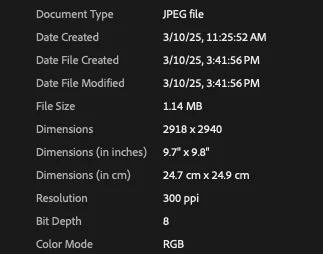
If there is a different way to fillter to exact squares, please let me know. If there is not, perhaps this could be added somewhere in the settings, like an "Image orientation tolerance" slider starting at whatever percent it is at now down to 0%.
 AdChoices