


New Participant
August 4, 2017
Answered

Bridge losing file extensions during batch rename

  • August 4, 2017
  • 2 replies
  • 4236 views

Issue in Bridge CC when doing a batch rename renames the files but they have no file extension after.

Ex. 12345.jpg  becomes 12345  (unknown file type)

Another rename step must be done to add the appropriate extension afterwards. Otherwise they don't know which program to open with.

Has anyone encountered this? Solution?

I don't want to enter a "new extension" field each time because I rename different file types each time, and it should just work like it used to changing the prefix.
This topic has been closed for replies.
Correct answer Stephen Marsh

I am on the latest version of CC2017 and I am not seeing this behaviour.

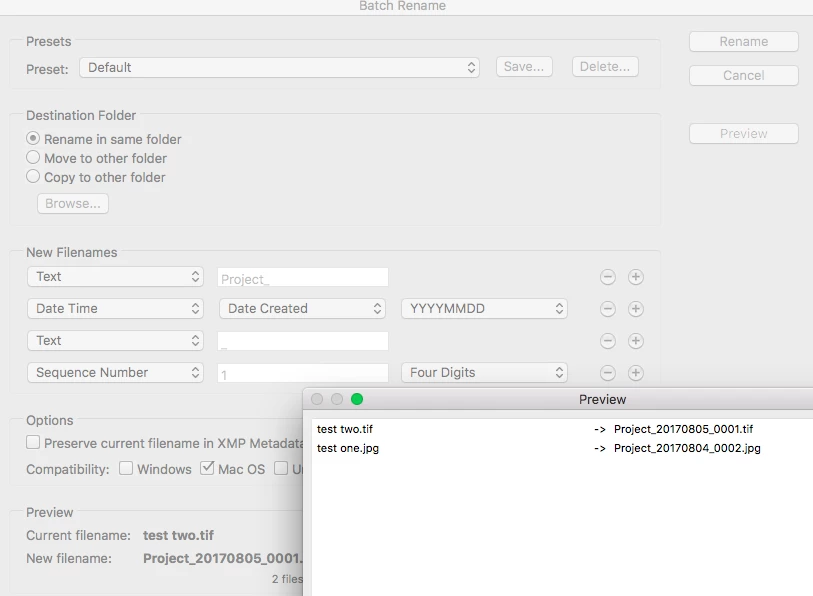
Here is a screenshot using the defaults, the preview button indicates that the filename extensions will be there and that they are correctly handled from the source:

2 replies

tamis80987976
New Participant
January 31, 2019

I have the same problem...grrr

Stephen Marsh
Adobe Expert
January 31, 2019

Can you provide screenshots of the setup and preview button results?

olwo1983
New Participant
November 19, 2019

I just got this problem too. It appeared after upgrading to cc2020. Real PITA.

Stephen Marsh
Stephen MarshCorrect answer
Adobe Expert
August 4, 2017

I am on the latest version of CC2017 and I am not seeing this behaviour.

Here is a screenshot using the defaults, the preview button indicates that the filename extensions will be there and that they are correctly handled from the source:

Known Participant
September 15, 2017

I have just had exactly the same thing. Never used to be a problem now it is! Just left off extensions. Multiple formats, what a pain. Why is this?

Prevented my changing metadata also - worked for about half. No apparent reason. Had to re-batch name with a separate field and manually change extension. Time consuming and VERY irritating. Why does this always happen when you're on a deadline?!

Stephen Marsh
Adobe Expert
September 15, 2017

I can't force this without intentional incorrect setup. It has not happened to me with correct setup.

I have not been able to find a semi-auto or auto Bridge fix.

I do have an automated fix using ExifTool!

EDIT: More here:

ExifTool - Automatically Adding Missing File Type Extensions

Mac OS:

exiftool -ext '*' '-filename<%f.$fileTypeExtension' '/Path/To/File Or Folder'

Win OS:

exiftool -ext "*" "-filename<%f.$fileTypeExtension" "C:\Path\To\File or Folder"