

Participating Frequently
December 29, 2024
Answered

bridge metadata

  • December 29, 2024
  • 4 replies
  • 7388 views

How to add words in the description field on multiple selected photos without deleting previously inserted parts

Correct answer Stephen Marsh

@bersani_4639 


Here is an example of 3 files, each with different, unique Description metadata.


When all 3 files are selected, the Metadata Panel indicates "(Multiple values)" in the Description field.
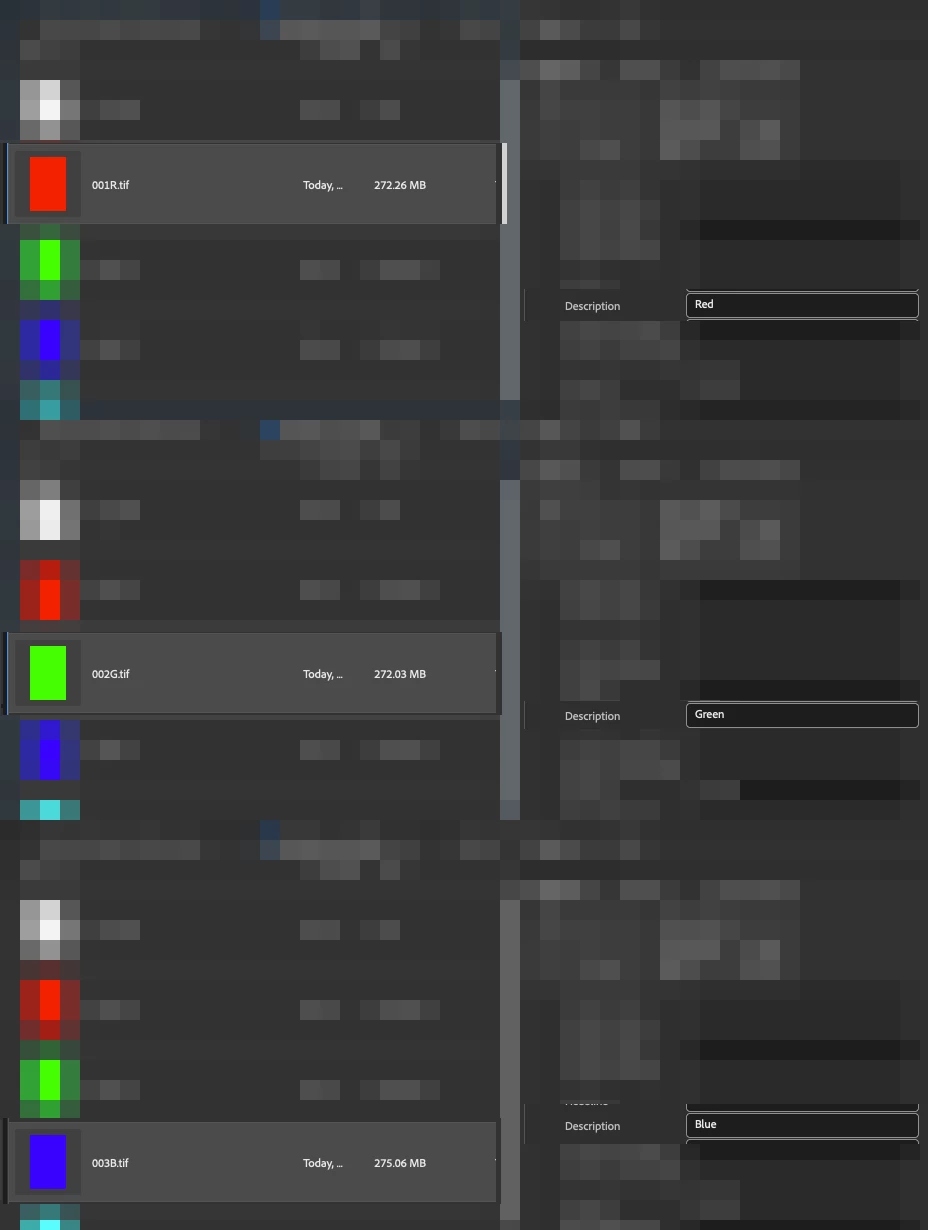


Now, in this example, I wish to add a common extra description to the 3 multiple selected files:


Before:

Red

Green

Blue


After:

Red_NEW TEXT

Green_NEW TEXT

Blue_NEW TEXT
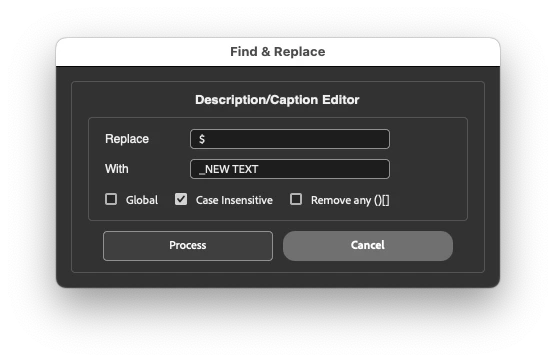


In the screenshot above, I have used a regular expression to find the end of the current text, which is the $ (Dollar symbol, Shift + 4)


The common text replacement is _NEW TEXT


Here is a screenshot of the final result:
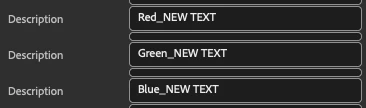


Where _NEW TEXT has been added to the end of all 3 selected files, retaining their original unique description and adding the new common description.


To add a common text entry at the start of the existing text, one would use the ^ (Caret symbol, Shift + 6) instead of the dollar sign.


4 replies

Stephen Marsh
Community Expert
Stephen MarshCommunity ExpertCorrect answer
Community Expert
January 1, 2025

@bersani_4639 


Here is an example of 3 files, each with different, unique Description metadata.


When all 3 files are selected, the Metadata Panel indicates "(Multiple values)" in the Description field.


Now, in this example, I wish to add a common extra description to the 3 multiple selected files:


Before:

Red

Green

Blue


After:

Red_NEW TEXT

Green_NEW TEXT

Blue_NEW TEXT


In the screenshot above, I have used a regular expression to find the end of the current text, which is the $ (Dollar symbol, Shift + 4)


The common text replacement is _NEW TEXT


Here is a screenshot of the final result:


Where _NEW TEXT has been added to the end of all 3 selected files, retaining their original unique description and adding the new common description.


To add a common text entry at the start of the existing text, one would use the ^ (Caret symbol, Shift + 6) instead of the dollar sign.


Participating Frequently
January 1, 2025

Thank you so much. the method is very slow. impossible to do without knowing the program thoroughly. isn't there a keyboard shortcut to speed up the process?
with lightroom just position the cursor after the bracket of the text (multiple values) and double click to add the new text without changing the previous one. what i don't understand is why in a program like bridge which is expected to intervene on the metadata there are no faster paths to perform the changes. thanks again

Stephen Marsh
Community Expert
Community Expert
January 1, 2025
quote

Thank you so much.


You're welcome!


quote

the method is very slow. impossible to do without knowing the program thoroughly. isn't there a keyboard shortcut to speed up the process?


I wouldn't call it very slow, however, it's definitely not as simple or fast as you mention in Lightroom. Yes, it does require extra knowledge and a 3rd party script, such is life and the benefit of these forums to learn from other's knowledge and experience.


quote

with lightroom just position the cursor after the bracket of the text (multiple values) and double click to add the new text without changing the previous one. what i don't understand is why in a program like bridge which is expected to intervene on the metadata there are no faster paths to perform the changes. thanks again


By @bersani_4639


Bridge predates Lightroom and has a different development team.


This is not to say that Bridge shouldn't be able to do what Lightroom does, just that it currently can't.


You can add feature requests here if one doesn't already exist that you can upvote:


https://adobebridge.uservoice.com/search?filter=ideas&query=description%20metadata 


Stephen Marsh
Community Expert
Community Expert
December 30, 2024

Try the script on copies of the original images to find/replace the text.

Participating Frequently
December 31, 2024

I don't think I'm capable of doing this operation

Stephen Marsh
Community Expert
Community Expert
December 31, 2024
quote

I don't think I'm capable of doing this operation


By @bersani_4639


Full instructions were provided in the link to my blog on how to copy and save the code and how to install it into Bridge, it's easier than you might imagine. Give it a go!

Stephen Marsh
Community Expert
Community Expert
December 30, 2024

The following script from Paul Riggott can find/replace in the Description:


https://github.com/Paul-Riggott/PS-Scripts/blob/master/Find%20and%20Replace.jsx


P.S. As this is an old script, the following version has been edited with cosmetic GUI updates for later versions of Bridge:


/*
https://community.adobe.com/t5/bridge-discussions/find-and-replace-function-for-bridge/td-p/12947572
*/
#target bridge
if (BridgeTalk.appName == "bridge") {
    ReplaceDescription = new MenuElement("command", "Find and Replace Description/Caption", "at the end of tools");
}
// Load the XMP Script library
if (!xmpLib) {
    if (Folder.fs == "Windows") {
        var pathToLib = Folder.startup.fsName + "/AdobeXMPScript.dll";
    }
    else {
        var pathToLib = Folder.startup.fsName + "/AdobeXMPScript.framework";
    }
    var libfile = new File(pathToLib);
    var xmpLib = new ExternalObject("lib:" + pathToLib);
}
ReplaceDescription.onSelect = function () {
    var win = new Window('dialog', 'Find & Replace');
    //g = win.graphics;
    //var myBrush = g.newBrush(g.BrushType.SOLID_COLOR, [0.99, 0.99, 0.99, 1]);
    //var myBrush = g.newBrush(g.BrushType.THEME_COLOR, "appDialogBackground");
    //g.backgroundColor = myBrush;
    win.orientation = 'column';
    win.p1 = win.add("panel", undefined, undefined, { borderStyle: "black" });
    win.p1.preferredSize = [380, 100];
    win.g1 = win.p1.add('group');
    win.g1.orientation = "row";
    win.title = win.g1.add('statictext', undefined, 'Description/Caption Editor');
    win.title.alignment = "fill";
    var g = win.title.graphics;
    //g.font = ScriptUI.newFont("Georgia", "BOLDITALIC", 22);
    g.font = ScriptUI.newFont("dialog", "BOLD", 13);
    win.p6 = win.p1.add("panel", undefined, undefined, { borderStyle: "black" }); //Replace
    win.p6.preferredSize = [380, 100];
    win.g600 = win.p6.add('group');
    win.g600.orientation = "row";
    win.g600.alignment = 'fill';
    win.g600.st1 = win.g600.add('statictext', undefined, 'Replace');
    win.g600.st1.preferredSize = [75, 20];
    win.g600.et1 = win.g600.add('edittext');
    win.g600.et1.preferredSize = [200, 20];
    win.g610 = win.p6.add('group');
    win.g610.orientation = "row";
    win.g610.alignment = 'fill';
    win.g610.st1 = win.g610.add('statictext', undefined, 'With');
    win.g610.st1.helpTip = "Leave this field blank if you want to remove the characters";
    win.g610.st1.preferredSize = [75, 20];
    win.g610.et1 = win.g610.add('edittext');
    win.g610.et1.preferredSize = [200, 20];
    win.g620 = win.p6.add('group');
    win.g620.orientation = "row";
    win.g620.alignment = 'fill';
    win.g620.cb1 = win.g620.add('checkbox', undefined, 'Global');
    win.g620.cb1.helpTip = "Replace all occurrences of";
    win.g620.cb2 = win.g620.add('checkbox', undefined, 'Case Insensitive');
    win.g620.cb2.value = true;
    win.g620.cb3 = win.g620.add('checkbox', undefined, 'Remove any ()[]');
    win.g620.cb3.value = false;
    win.g1000 = win.p1.add('group');
    win.g1000.orientation = "row";
    win.g1000.alignment = 'center';
    win.g1000.bu1 = win.g1000.add('button', undefined, 'Process');
    win.g1000.bu1.preferredSize = [170, 30];
    win.g1000.bu2 = win.g1000.add('button', undefined, 'Cancel');
    win.g1000.bu2.preferredSize = [170, 30];
    win.g1000.bu1.onClick = function () {
        if (win.g600.et1.text == '') {
            alert("No replace value has been entered!");
            return;
        }
        win.close(0);
        var sels = app.document.selections;
        for (var a in sels) {
            var thumb = sels[a];
            // Get the metadata object 
            md = thumb.synchronousMetadata;
            // Get the XMP packet as a string and create the XMPMeta object
            var xmp = new XMPMeta(md.serialize());

            if (win.g620.cb1.value && !win.g620.cb2.value) var patt = new RegExp(win.g600.et1.text.toString(), "g");
            if (!win.g620.cb1.value && win.g620.cb2.value) var patt = new RegExp(win.g600.et1.text.toString(), "i");
            if (win.g620.cb1.value && win.g620.cb2.value) var patt = new RegExp(win.g600.et1.text.toString(), "gi");
            if (!win.g620.cb1.value && !win.g620.cb2.value) var patt = new RegExp(win.g600.et1.text.toString());

            // Read existing dc:description property
            var Caption = xmp.getArrayItem(XMPConst.NS_DC, "description", 1);
            // Change existing dc:description property based on user input
            var result = patt.test(Caption.toString());
            if (result == true) {
                var newCaption = Caption.toString().replace(patt, win.g610.et1.text.toString());
                if (win.g620.cb3.value) newCaption = newCaption.replace(/["'\(\)]/g, "");
            }
            // Delete the dc:description property
            xmp.deleteProperty(XMPConst.NS_DC, "description");
            // Populate the new dc:description property and set lang to x-default
            xmp.appendArrayItem(XMPConst.NS_DC, "description", newCaption, 0, XMPConst.ALIAS_TO_ALT_TEXT);
            xmp.setQualifier(XMPConst.NS_DC, "description[1]", "http://www.w3.org/XML/1998/namespace", "lang", "x-default");

            /*
                // Paul Riggott's original write method
            md.namespace =  "http://purl.org/dc/elements/1.1/";
            var Caption = md.description ? md.description[0] : "";
            if(Caption == "") continue;
            var result=patt.test(Caption.toString());
            if(result == true){
                var newCaption = Caption.replace(patt,win.g610.et1.text.toString());
                if(win.g620.cb3.value)  newCaption = newCaption.replace(/["'\(\)]/g, "");
                md.description='';
                md.description = newCaption;
                    }
             */
            // Write the packet back to the selected file
            var updatedPacket = xmp.serialize(XMPConst.SERIALIZE_OMIT_PACKET_WRAPPER | XMPConst.SERIALIZE_USE_COMPACT_FORMAT);
            thumb.metadata = new Metadata(updatedPacket);
        }
    }
    win.show();
    //app.document.chooseMenuItem("PurgeCacheForSelected");
};


https://prepression.blogspot.com/2017/11/downloading-and-installing-adobe-scripts.html

Stephen Marsh
Community Expert
Community Expert
December 30, 2024

@bersani_4639 


Unlike Keywords/Subject, Description is a single string of text, so we can't append an item to a list of multiple entries.


This requires a Find/Replace in the Description metadata, which can be performed via a custom script.


Can you provide a before and after example of the edit you would like to perform?


Participating Frequently
December 30, 2024
bridge.tif