It doesn't, would you recommend installing Catalina & trying after that? I'm not sure what other options I have!
Well, one other option is to get a card reader. They are cheap and much better/safer than pugging in your camera. Plus they do not wear away on your camera's battery.
Also, you check for this but I'm not all that sure how a camera shows up in the finder, I've never looked. This was written as it you are looking at a folder on another drive or something.
In the Finder select the folder that your documents/images are contained in and press Command-i (i for information). A new window will pop up on the left side of the screen. On the bottom you will see a region called "Sharing & Permissions:"
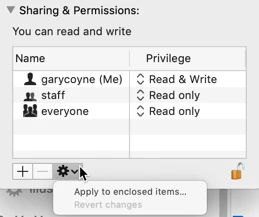
To do anything here, you need to unlock the padlock on the bottom right. Click it and a window will pop up asking you for your authorization (your Mac password). Once that's done, click on the "Everyone" and on the right change "Read only," to "Read & Write."
Now, if there are folders inside this, go to the dropdown gear below and select "Apply to enclosed items..." and you can save yourself some time.
HOWEVER: be judicious when you do this. This should ONLY be done if there are nothing but documents inside these folders. Never EVER do this if there are applications or preferences or other application-related files. Don't ask me how I know this to be true. Otherwise, Otherwise, I do this any time it's necessary.



 AdChoices