Participant
March 6, 2023
Answered

Bridge not loading any content on external Hard Drives

  • March 6, 2023
  • 1 reply
  • 5325 views

Hi there, Adobe Bridge is currreenblty not loading any content on any of my external Hard Drives. I'm using Mac OS Ventura 13.2.1 on a 16" Mac Book Pro with M1 Max Apple Silicon Processor. 


Bridge shows the contents of the actual computers files, (icons or list) but nothing shows up on my external drives any more. 


I've tried restarting, ejecting and reconnecting drives, using disk utility to do 'first aid' on the Mac. Nothing is working. 


Any tips very welcome. Thanks, Mark  
Correct answer gary_sc

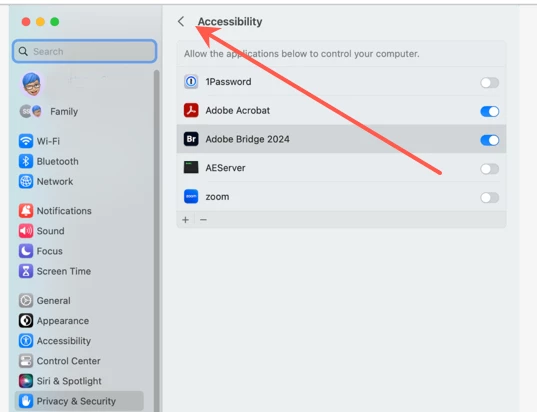
I'm in Privacy & Security but don't see Full Disk Access.


Hi @Sanford5C20 it took me a minute to see what the issue was, and there it was: you need to click on the arrow to back up.

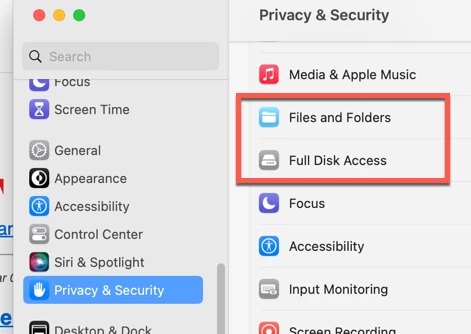
From there you'll see both File and Folder and Full Disk Access.


Let me know if this solves your issue.

1 reply

gary_sc
Community Expert
Community Expert
March 6, 2023

This sounds like you've not given Bridge permission for Apple's protection. Simply, this is an Apple protection issue, not Adobe's issue. The following was written for someone who needed (the same) help with Acrobat, just substitute Bridge and see if this solves the problem.


Go into the System Preferences and select the Privacy & Security tab on the left, then select the Accessibility tab top.


Now, click on the "+" button on the very bottom, which will open a Finder's window into the Applications folder. Select Acrobat Pro. Be sure to slide the On/Off button to On (to the right). You may need to enter your administrator's password at some point. You also may need to quit Acrobat and reopen.


Please let us know if that works or not.

Participant
January 8, 2024

This worked for me but I had to do one additional step after adding Bridge in the Accessability window as instructed. Next, still in System Settings/Privacy and Security, I had to go to Full Disk Access and add Bridge there as well. Only after doing both of these was I able to access the files on my memory card. 

Participant
January 10, 2024

Oh my gosh, your last instruction to go to Full disk access...game changer, thank you, I was pulling my hair out!! Cheers Mel 🙂