


picklers
New Participant
June 4, 2018
Answered

Can't rename a folder in Bridge

  • June 4, 2018
  • 1 reply
  • 1495 views

Hi - Using macOS 10.12.6

Can't create a new folder AND rename it in Bridge.

Files are stored on an external Pegasus 2 R6

Just won't take the letters. After hitting return it says "untitled folder"

I can go back to the source and make folders there.

I CAN make a new folder and rename it with files living on the internal drive.

Is this normal? Whats the fix?

thanks!
    This topic has been closed for replies.
    Correct answer gary_sc

    Hi Bobin,


    I have High Sierra and am not having this issue. Regardless, you are so that's what's important right now. Let's try this:


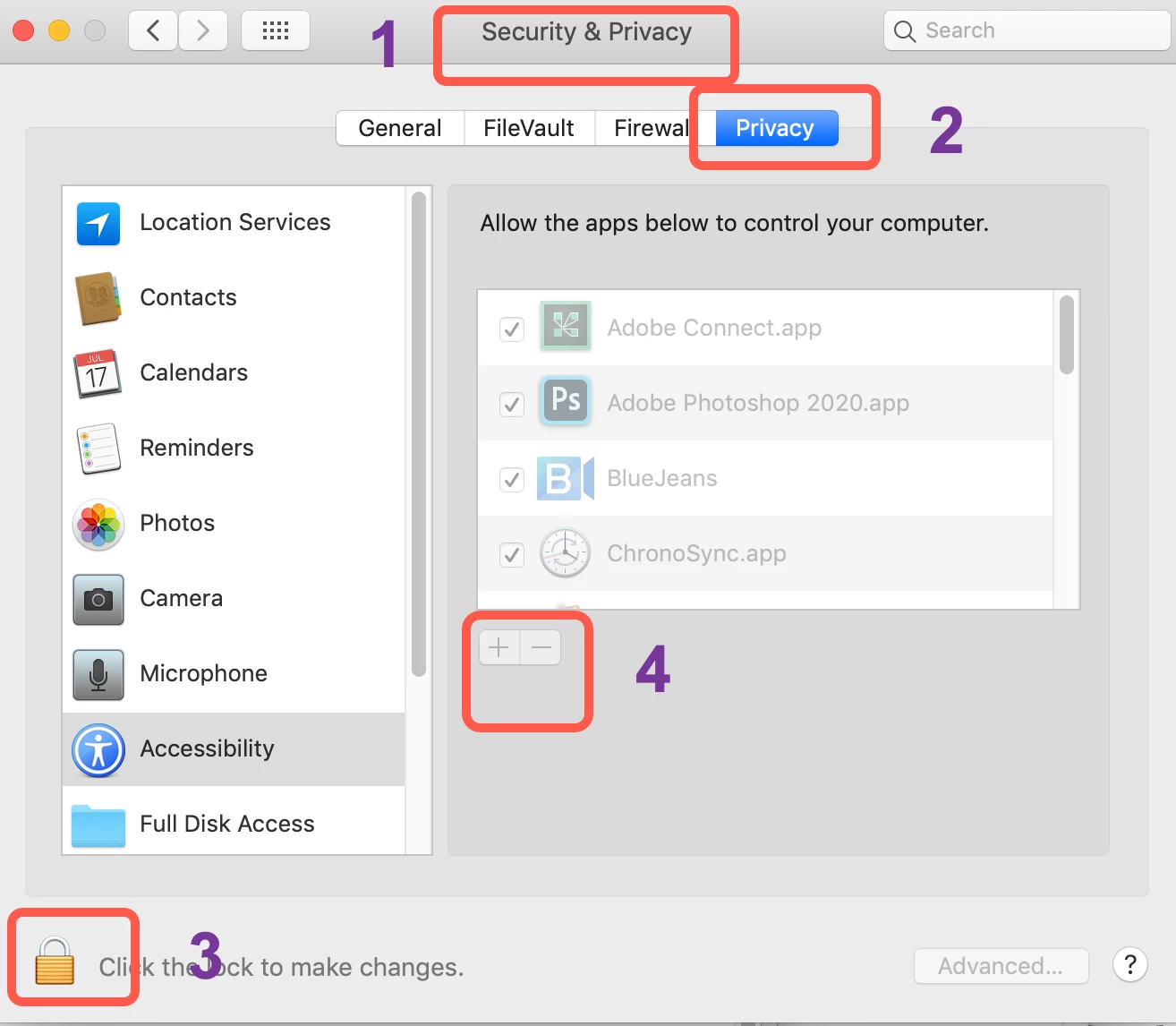
    Go to your System Preferences and select Security and Privacy (found in the top section). Now click on the Privacy setting (#2 below). Now click on the lock on the bottom left (#3) and provide your administrator code. Then click on the "+" symbol at #4. This will bring up the standard Mac Open window. Look for Bridge, select it, it will now appear in that window and make sure it's checked. Close everything down and see if that makes it all work.


    Please let us know if this works for you.


    1 reply

    Inspiring
    March 21, 2020

    I encountered the same problem after upgrading Mac OS to High Sierra and Bridge to 2020 (with Photoshop also to 2020) 

    The message said something to the effect that File not Found. so something definitely cj=hanged and nothing in Preferences provided a clue.

    So I guesst that it was an underlying filesystem issue (Bridge is still Broke) and in Brdge did a "create folder" as usual, then cliced on the "untitled" folder in Bridge and right clicked "Reveal in Finder" Lo and behold te finder window popped up and I was able to di the rename in Finder and it came back to Bridge.

    As I said Brdige is Broken on this but at least I know how to do this now. and BTW, the socalled Bridge manual does not mention renameing or creating folders. Unfortunately I cant go back to an earlier version to check. 

    gary_sc
    gary_scCorrect answer
    Community Expert
    March 22, 2020

    Hi Bobin,


    I have High Sierra and am not having this issue. Regardless, you are so that's what's important right now. Let's try this:


    Go to your System Preferences and select Security and Privacy (found in the top section). Now click on the Privacy setting (#2 below). Now click on the lock on the bottom left (#3) and provide your administrator code. Then click on the "+" symbol at #4. This will bring up the standard Mac Open window. Look for Bridge, select it, it will now appear in that window and make sure it's checked. Close everything down and see if that makes it all work.


    Please let us know if this works for you.