
Irisvideo
Inspiring
January 21, 2019
Question

Folder thumbnails are extremely small. is there a way tochange this?

  • January 21, 2019
  • 4 replies
  • 3885 views

I am working on Windows 10 and Bridge is version 8.0.1.282

the media files show well. but the folders are tiny, with no preview of the files within them, and this makes bridge less easy to use than the regular file explorer.

is there a fix?

Thanks
4 replies

New Participant
January 18, 2022

Solution: do not use bridge, use SageThumbs

I used Bridge for a long time, only to see the PSD thumbnails, cuz Adobe removed the support to see the psds in windows x,/7/8/10 for some reason....


New Participant
October 15, 2021

This matter is not solved . 

its really big problem.  so much needed for my work flow .i have thumbnails changed so i can recognize the content faster but so tiny in bridge compared to others 


Morazan
Known Participant
November 12, 2021

2019: Adobe: "Great suggestion, we'll definitely review for future versions of Bridge!"

2021:

New Participant
May 14, 2021

Really need this to be a feature.

jane-e
Community Expert
January 21, 2019

Hi Iris,

There is a slider in the status bar (bottom right) to increase the size — it will increase both the thumbnails and the folders.

To see the items in the folders, you can either open a folder or go to View > Show Items from Subfolders. This is a toggle, so you can turn it back off again.

Jane

Irisvideo
IrisvideoAuthor
Inspiring
January 21, 2019

Thanks for the response Jane,

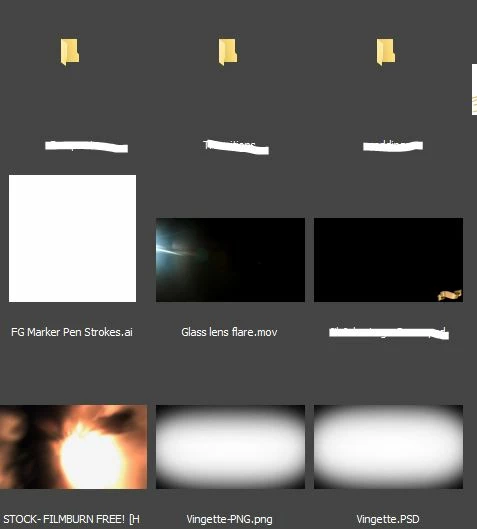
however, as you can see in the photo that i have attached, the slider is up, the media thumbnails are large but the folder thumbnails remain small.

maybe on Mac its different but Im on PC.

As for the "show items from subfolders", it isnt what i meant (although its a very useful feature!) what i meant was that, like in windows explorer, when u look at a folder thumbnails u can see previews of the files within it too.

New Participant
February 16, 2021

I find it highly useful and I'll explain how i started using it, to help me sort through my folders.

i have many folders containing transitions. but whenever i had to look at them, i had to read the text to see what each folder contains, which was annoying. and you are right about windows choosing the preview files randomly, so at first it is totally useless, such as in this photo:

having a visual representation would have been much simpler and thats what i wanted.

i tried changing the folder icon picture itself but this doesnt work well at all in windows 10.

so what i did what create a special jpg in each folder that would function as a preview, and to force windows to display that jpg i stuck all other files in a subfolder.

so yeah that took a little bit of work but its extremely easy on the eyes now and i instantly recognize which folder contains which transitions. having the ability to see this display in Bridge too would be something very useful, and quite in accord with what bridge isset to offer a visual design professional


It really frustrates me that Bridge doesn't have this option! I love seeing the preview of what's in my folders. It's the number one reason I don't use Bridge as much as I want to, and when I do have I have to use Bridge and Windows file explorer to find what I am looking for. Please please please add this feature to Bridge!!!