

Participating Frequently
January 14, 2023
Answered

How do I Increase font text size in Bridge 2023

  • January 14, 2023
  • 1 reply
  • 2867 views

The text is too small and would like to increase the text size. Cant find where to do it

thanks Shannon

This topic has been closed for replies.
Correct answer gary_sc

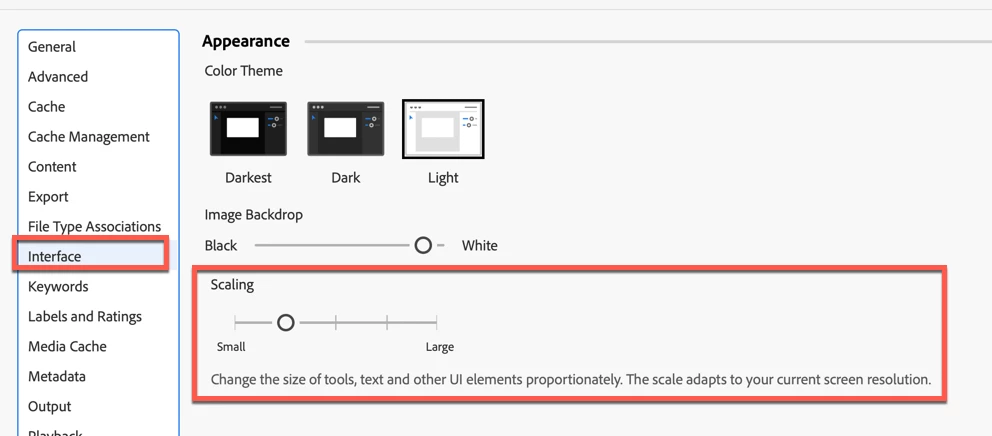
Hi @NOW06, Go to your Preferences and go to the Interface tab. Then slide the bottom slider to the right for bigger, and left for smaller. Unfortunately,  you have to quit and restart to see what you get.
 

1 reply

gary_sc
Community Expert
gary_scCommunity ExpertCorrect answer
Community Expert
January 14, 2023

Hi @NOW06, Go to your Preferences and go to the Interface tab. Then slide the bottom slider to the right for bigger, and left for smaller. Unfortunately,  you have to quit and restart to see what you get.


Fabiantech
Inspiring
June 15, 2023

There is no such 'Scaling Slider' in my version (most current version 2023-06-15).

Was it 'rationalized away' by Adobe? 😞

gary_sc
Community Expert
Community Expert
June 15, 2023

Hi @Fabiantech it SHOULD be there. If it isn't, you have either a bad instillation or you need to reset your preferences. 


Alternatively, are you using a "frankin-computer? Did you build your computer yourself? I am guessing here only because 30+ years ago, I had a frankin-mac that occasionally would work really strangely on some operations. 


Rebuilding Bridge's prefs:

Quit Bridge (if running). Just before clicking on Bridge in the Dock or double-clicking the application for the Mac, press Command-Option-Shift. For PCs, press Control-Alt-Shift. Then open Bridge BUT KEEP your fingers on those keys until you see a window pop up. From the window, choose “Reset Preferences," "Entire Thumbnail Cache,” and/or "Reset Standard Workspaces.” In your case, choose "Reset Preferences."


If you choose to reinstall, do this AFTER you've tried the rebuilding option (if it works, there is no need to do this also). After uninstalling, restart the computer and then reinstall.