Participant
November 10, 2023
Answered

How to remove characters in file name using batch rename in Bridge

  • November 10, 2023
  • 2 replies
  • 3736 views


I have a series of files that are like: 230167 firstname lastname.jpg
I would like to remove everything but the first 6 digits of the file name so that I'm left with 230167.jpg

Thanks

Enid
 

This topic has been closed for replies.
Correct answer Stephen Marsh

A copy/paste from my reply to your PM...


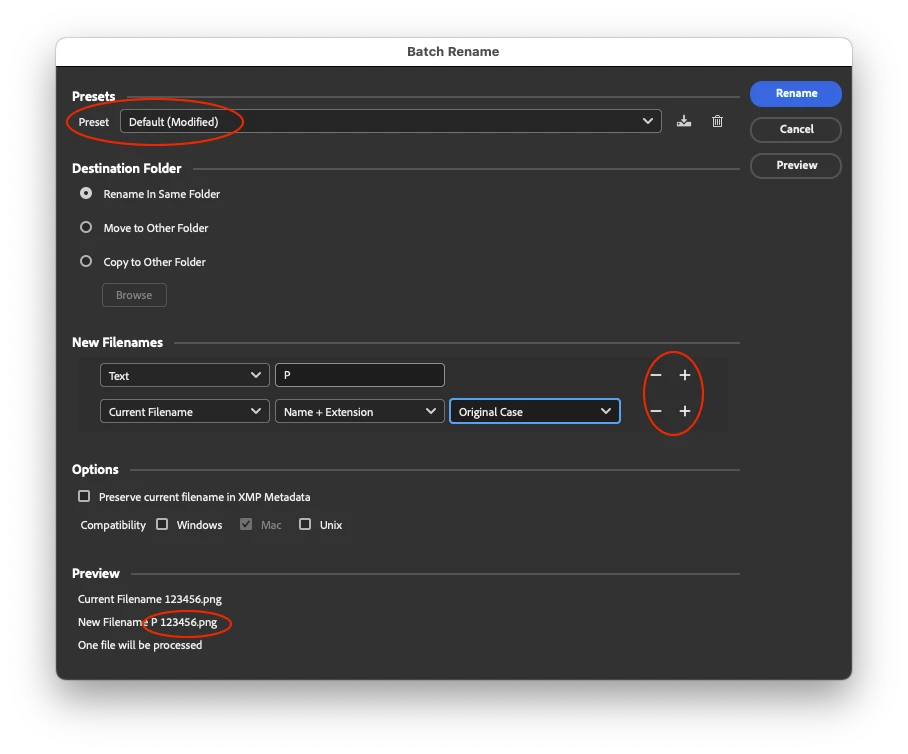
You can add a prefix the "default" way:


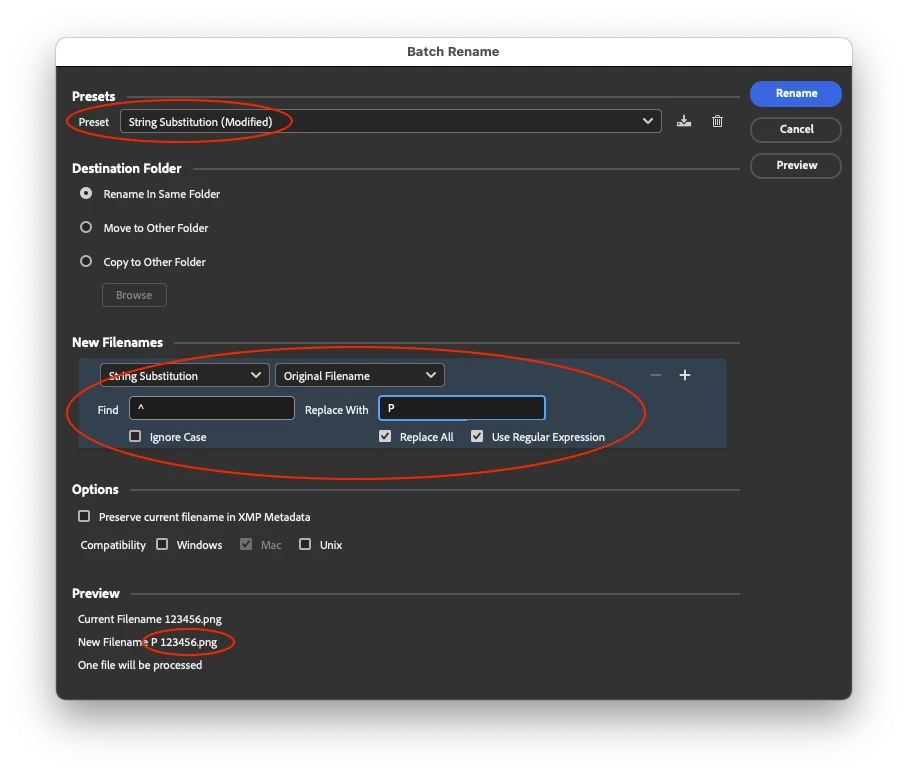
Or the alternative is what Adobe call "String Substitution" (find/replace with a regular expression option):

Find (start/far left of the text string):
^
Replace (P + space):
P


2 replies

Participant
November 16, 2023

Another question! I would like to add P to a file name. Example:

230167.jpg

Thanks for 

Stephen Marsh
Community Expert
Stephen MarshCommunity ExpertCorrect answer
Community Expert
November 16, 2023

A copy/paste from my reply to your PM...


You can add a prefix the "default" way:


Or the alternative is what Adobe call "String Substitution" (find/replace with a regular expression option):

Find (start/far left of the text string):
^
Replace (P + space):
P


Participant
November 17, 2023

Thanks so much!

Stephen Marsh
Community Expert
Community Expert
November 11, 2023

@Enid26229849jlhv – try the following:


Find using Regular Expression capture groups – starting with only 6 digits from the left + extension:

(^\d{6})(.+)(\.[^\.]+$)

Replace (using back-references to the capture groups):

$1$3


or


Find using Regular Expression capture groups – first 6 digits or characters from the left + extension:

(^.{6})(.+)(\.[^\.]+$)

Replace (using back-references to the capture groups):

$1$3


or


Find using Regular Expression capture groups – first word from the left + extension:

(^.+?\b)(.+)(\.[^\.]+$)

Replace (using back-references to the capture groups):

$1$3


Participant
December 19, 2024

Excellent Stephen, works perfectly. Many thanks. Would you mind explaining the operators you used and what they are doing? 

Stephen Marsh
Community Expert
Community Expert
December 19, 2024
quote

Excellent Stephen, works perfectly. Many thanks. Would you mind explaining the operators you used and what they are doing? 


By @NMT


I posted a couple of times... Are you referring to the post marked as a correct answer?