


Inspiring
January 19, 2021
Answered

How to view file name and label in filmstrip?

  • January 19, 2021
  • 1 reply
  • 1299 views

Hello. In Bridge how can I view file name and label of an image file in filmstrip? Right now the file name and label is shown in the Preview pane, but the image thumbnails in the Content pane are blank, there's no info (except for folders which do have their name displayed). If it matters, the filmstrip is shown in vertical mode. Also, if I view all the thumbnails in Essentials, the file name and label are displayed. Thanks for any help!
This topic has been closed for replies.
Correct answer gary_sc

Hi JB Sling,


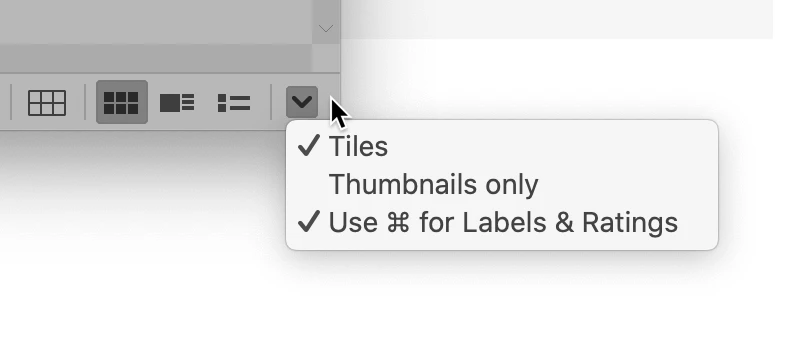
I'm pretty sure you need to go to the bottom right corner and uncheck thumbnails only.


Let us know if this is what you're looking for

1 reply

gary_sc
Community Expert
gary_scCommunity ExpertCorrect answer
Community Expert
January 19, 2021

Hi JB Sling,


I'm pretty sure you need to go to the bottom right corner and uncheck thumbnails only.


Let us know if this is what you're looking for

JB SlingAuthor
Inspiring
January 19, 2021

Hi Gary, thanks for your prompt reply. Oddly, I only see the icons in your screenshot when I'm in Essentials; in Filmstrip those aren't visible. I was able to find Thumbnails only in the View menu in Filmstrip, so all is good. Thanks again for your help. Stay well!