


Known Participant
August 11, 2023
Answered

Maybe add file ordering to all content views?

  • August 11, 2023
  • 2 replies
  • 378 views


Bridge needs to have sort by ( Name 🔼🔽 / Date Created 🔼🔽 / Size 🔼🔽  / Type 🔼🔽 ) also added to Content Window: Details, Thumbnail, and Grid views.

 
At present it is only in Content > List view. 
 
Current methods are awkward if you are in Details, Thumbnail, and Grid views and want to reorder files:
 
1.  Go to bottom of Content Window > List View > Date Created > Ascending/Descending - then back to previous Thumbnails view  ( 3 clicks )
 
2.  Go to top of application screen View > Sort > By Date Created > Descending Order, ( 4 clicks to sort by type etc 4 more clicks, back again to select change ascending/descending, total: 8 clicks )
 
It would be much quicker to stay in Grid/Thumbnail/Details and simply click ( Name / Date Created / Size / Type ) to reorder files. I would prefer to huse content window in Thumbnail mode.
 
Solution: Add ordering to all views - ( Total: 1 click ). ( Much like finder windows in any computer OS )
 
Does that make sense?
This topic has been closed for replies.
Correct answer gary_sc

Hi, @DevilsAvocado, I'm not sure I understand. In ANY view, you can change the order of any of the items you mentioned plas a whole lot more.


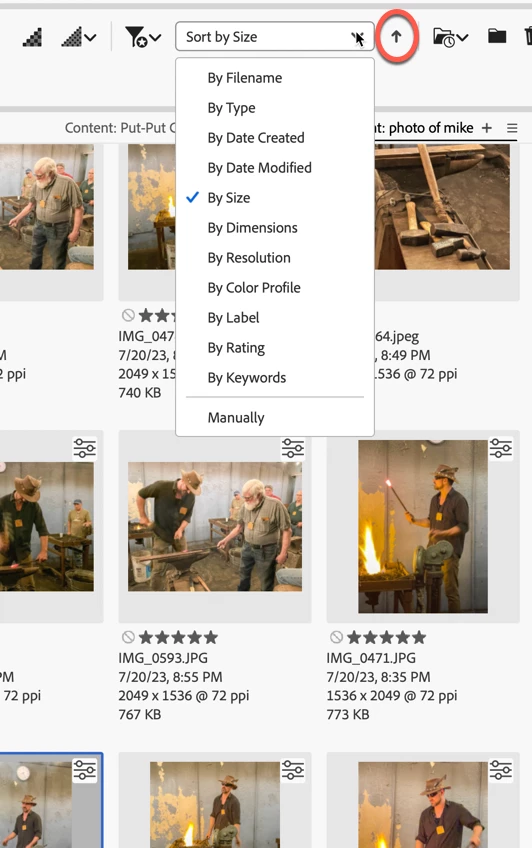
At the top of Bridge's window, you'll see the Sort by … that you can select which way to sort the content when looking at Any of the selected views. In addition, note the arrow to the right (circled in Red), which, if you click on, you can switch the sort order.


Is that what you were looking for/needing?


Let us know.


2 replies

Brainiac
August 11, 2023

I need Folders on top in Sort by Filename. This works in Windows and in the Finder but not Bridge. Sort by Type doesn't help as I work with both CR2 and CR3 files and those need to be sorted by Filename. I also don't want to keep toggling Show Folders as this is global and I usually want to see folders anyway.

gary_sc
gary_scCorrect answer
Community Expert
August 11, 2023

Hi, @DevilsAvocado, I'm not sure I understand. In ANY view, you can change the order of any of the items you mentioned plas a whole lot more.


At the top of Bridge's window, you'll see the Sort by … that you can select which way to sort the content when looking at Any of the selected views. In addition, note the arrow to the right (circled in Red), which, if you click on, you can switch the sort order.


Is that what you were looking for/needing?


Let us know.


Known Participant
August 11, 2023

Yes, that is indeed what I was looking for.  Doh! Hadn't spotted it so far to the right on my screen.


I expected it only at the top of the Content window, where it sits in List view...


Guesss I expected it to be like a system Finder window.

THis will speed up my workflow heaps. Thank you so much! 🙂