


davidc93692666
Participating Frequently
November 10, 2019
Question

Metadata: How to display video length in Bridge

  • November 10, 2019
  • 9 replies
  • 6863 views

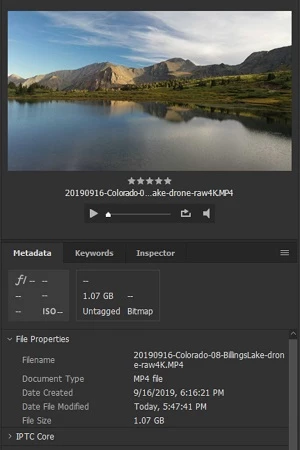
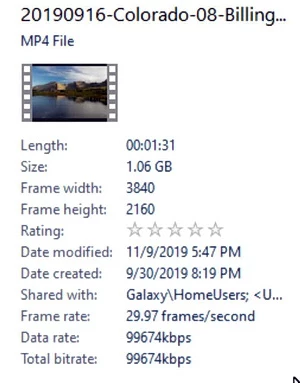
I'd like to see video length in Bridge metadata. Windows Explorer shows this. Why can't Bridge? All those metadata fields, and not one for clip length? To me that is an important datum when searching and sorting video clips. Windows also shows frame rate and dimensions right up front.
Left: Bridge
Right: Windows Explorer, same file
9 replies

Heathenlamb
Known Participant
January 12, 2025

2025 now ADOBE .... what the heck ?????????

Known Participant
January 17, 2025

This is never going to be done. All changes Adobe makes are designed to create as much aditional revenue as possible.

This means maximize access to your data. Images and audio files will all help the now stupid AI improve.  Essential graphics and essenitial sound offer files to help you at a price.  Bridge was not included in the deisign for generating more revenue so it has pretty much been forgotten.

Heathenlamb
Known Participant
May 10, 2024

Hello .... Adobe ? 2024 ????? Seriously ... what is going on over there ?

Participating Frequently
November 13, 2024

i was looking for this too, and thought it can't be true that this post is already from 2019. but indeed. there is simply no way to see video length in adobe bridge? EVERYTHING in terms of metadata can be seen, except the length of a video? is this really true? and why, adobe?

Known Participant
November 14, 2024

The only reasons I can think of are, a) If bridge looks simply at the number of frames in a clip, without knowing the frames per second, then it doesn't know the duration. 300 frames at 30fps is 10 seconds, but the same clip interpreted at 60fps is 5 seconds. So how does windows explorer of all things know...? Idk 😕😕  Or, b), They don't have a video professional (or a hobbyist, or even a child) working on the Bridge app who cares, or has even ever used the software and who only needs a single blindingly obvious piece of information: "I wonder how long this clip is?"

Participant
April 11, 2022

Chiming in too! Why the heck isn't this piece of data easily shown!? This seems so basic. Too bad. Hopefully someone will get going on this.  

Legend
April 11, 2022

This functionality is available via scripting, read through the thread for a link to my dropbox which has a video info script.

Participant
April 18, 2022

That's silly, pay good money for software and I have to go in and add scripting?  

Participant
April 5, 2022

Hello Adobe?  Are you listening?  Where is the most basic form of file information?  VIDEO FILE LENGTH!  What is the challenge?    Bridge offers a ton of usuless metadata fields but misses the most basic form of file comunication, a video file's length.  When can we expect this to appear?

DGinz
Participating Frequently
June 27, 2023

Nope. Still not listening... 2023. 

Known Participant
February 6, 2022

Just adding my (inconsequential) voice; how is this not native? I mean really, I can find out the Intellectual Genre of a clip; the ages of models and the Lat/Long of a clip in the metadata, but I can't see the CLIP DURATION? Seriously Adobe?


davidc93692666
Participating Frequently
August 19, 2021

I just updated the latest version of Bridge, and it STILL does not include length of videos two years after I raised the issue.


There are nearly 100 pieces of metadata when I click on a video file, but not the two most useful pieces of information: the length and the format (i.e., 4K, 1080p, 720p etc).


This makes Bridge basically useless for my needs, since I want to manage thousands of video clips as a bridge to Premiere Pro. I like the ranking and color coding, but cannot use Bridge without these key pieces of information.


Windows Explorer is more useful than Bridge. That info and more is right up front on the file details pane:

Dave


Legend
August 19, 2021

Post a feature request here:

https://feedback.photoshop.com/

PECourtejoie
Community Expert
Community Expert
August 24, 2021

Hi, I would rather suggest to post in Bridge's uservoice, for instance this post about metadata: https://adobebridge.uservoice.com/forums/905323-feature-request/suggestions/37998634-video-metadata

Legend
November 13, 2019

I'm going to add a polished-up version of the script palette below to my Utility Script Pack. In-progress now.

Participant
January 17, 2020

Sounds great! What's the ETA? 

Legend
January 20, 2020

Its released on Adobe Exchange.

Legend
November 11, 2019

EDIT: Better (still unpolished) script. Only displays properties that are present and fixes error when changing folders.


I cobbled together a script which is VERY unpolished and incomplete but should help. It displays a palette with video file info. Each time you click on a single video file, it will show updated metadata.
To add media types, edit line 47. I may work on it some more, testing to see if properties are present in the file and adding more properties.
You can continue development if you want, incorporating more properties (I copied some of the raw data from an mp4 and its commented out at the end.)

Copy/paste this into a PLAIN TEXT EDITOR (not RTF!) and save with a file extension of ".jsx" then copy into Bridge Startup Scripts (Preferences-Startup Scripts->Reveal button.) Relaunch Bridge and select from Tools menu.


------------------------------------------------------------------------------------


#target bridge
if(BridgeTalk.appName == 'bridge'){
try{
var VideoInfoPalette = new Object; //id object for this script
VideoInfoPalette.built = false;
if (ExternalObject.AdobeXMPScript == undefined) ExternalObject.AdobeXMPScript = new ExternalObject('lib:AdobeXMPScript');

var VIPcmd = MenuElement.create('command', 'Video Info Palette...', 'at the end of Tools');

VIPcmd.onSelect = function(){
viPalette();
}

function viPalette(){
this.paletteRefs = new Array();
var viWrapper = this;

function addviPalette(doc){
if(VideoInfoPalette.built == false){ //first run
var viScriptPalette = new TabbedPalette(doc, 'Video Info', 'vInfo', 'script', 'center', 'top'); //place in center temporarily
viScriptPalette.setLocation('right'); //move to final position, works around Bridge bug
viWrapper.paletteRefs.push(viScriptPalette);
viPanel = viScriptPalette.content.add('panel', undefined, '');
viPanel.alignment = ['fill', 'fill'];
viPanel.alignChildren = ['fill', 'fill'];
viPanel.txtField = viPanel.add('edittext', undefined, 'Select a video file', {multiline:true, readonly:true}); //default text
viScriptPalette.content.layout.layout(true);
VideoInfoPalette.built = true;
}

viScriptPalette.content.onResize = function(){ //dynamic resizing
var v = this.bounds;
viPanel.bounds = v;
viPanel.txtField.bounds = [v[0] - 10, v[1] - 10, v[2] - 25, v[3] - 35];
this.layout.resize(true);
viScriptPalette.content.layout.layout(true);
}
}

app.eventHandlers.push({handler: viOpenDocument}); //runs on `change in selections

function viOpenDocument(event){
if(event.object instanceof Document && event.type == 'selectionsChanged'){
try{
if(app.document.selectionLength == 1){ //can only show one file at a time
//add new video file extensions to preview those file types
var viList = app.document.getSelection('mp4, mov, avi, mpeg');
}
else{
viPanel.txtField.text = 'Please select a video file to display.';
var viList = [];
}
if(viList.length == 1){ //valid video file
viPanel.txtField.text = 'Video File';
if(viList[0].hasMetadata){ //only process files with metadata
var vfr = viList[0].synchronousMetadata.read('http://ns.adobe.com/xmp/1.0/DynamicMedia/', 'videoFrameRate');
var vfo = viList[0].synchronousMetadata.read('http://ns.adobe.com/xmp/1.0/DynamicMedia/', 'videoFieldOrder');
var vpar = viList[0].synchronousMetadata.read('http://ns.adobe.com/xmp/1.0/DynamicMedia/', 'videoPixelAspectRatio');
var vfs = viList[0].synchronousMetadata.read('http://ns.adobe.com/xmp/1.0/DynamicMedia/', 'xmpDM:videoFrameSize/stDim:w');
var vfh = viList[0].synchronousMetadata.read('http://ns.adobe.com/xmp/1.0/DynamicMedia/', 'xmpDM:videoFrameSize/stDim:h');
var vfd = viList[0].synchronousMetadata.read('http://ns.adobe.com/xmp/1.0/DynamicMedia/', 'xmpDM:duration/xmpDM:value');
var vfsc = viList[0].synchronousMetadata.read('http://ns.adobe.com/xmp/1.0/DynamicMedia/', 'xmpDM:duration/xmpDM:scale');
var vfdur = (eval(vfd) * eval(vfsc));
vfdur = (vfdur/60);
var vfdurmin = Math.floor(vfdur);
var vfdursec = (vfdur - vfdurmin);
vfdursec = (vfdursec * 60);
vfdursec = Math.round(vfdursec);
var viText = '';
if(vfs){
viText = vfs + ' px x ' + vfh + ' px\r';
}
if(vfr){
viText = viText + vfr.toString() + ' fps\r'
}
if(vfo){
viText = viText + vfo.toString() + '\r';
}
if(vpar){
viText = viText + vpar + ' aspect ratio\r';
}
if(vfdurmin || vfdursec){
viText = viText + vfdurmin.toString() + ' min ' + vfdursec.toString() + ' sec';
}
viPanel.txtField.text = viText;
}
}
else{
viPanel.txtField.text = 'Please select a video file to display.';
}
}
catch(e){
alert(e + e.line);
}
return{handled:false};
}
}
for(var i = 0;i < app.documents.length;i++){
addviPalette(app.documents[i]);
}
}
}
catch(e){
alert(e + e.line);
}
}


//~ xmlns:xmpDM="http://ns.adobe.com/xmp/1.0/DynamicMedia/"
//~ <xmpDM:videoFrameRate>29.970030</xmpDM:videoFrameRate>
//~ <xmpDM:videoFieldOrder>Progressive</xmpDM:videoFieldOrder>
//~ <xmpDM:videoPixelAspectRatio>1/1</xmpDM:videoPixelAspectRatio>
//~ <xmpDM:audioSampleRate>44100</xmpDM:audioSampleRate>
//~ <xmpDM:audioSampleType>16Int</xmpDM:audioSampleType>
//~ <xmpDM:audioChannelType>Stereo</xmpDM:audioChannelType>
//~ <xmpDM:startTimeScale>30000</xmpDM:startTimeScale>
//~ <xmpDM:startTimeSampleSize>1001</xmpDM:startTimeSampleSize>
//~ <xmpDM:videoFrameSize rdf:parseType="Resource">
//~ <stDim:w>854</stDim:w>
//~ <stDim:h>480</stDim:h>
//~ <stDim:unit>pixel</stDim:unit>
//~ </xmpDM:videoFrameSize>
//~ <xmpDM:startTimecode rdf:parseType="Resource">
//~ <xmpDM:timeFormat>2997NonDropTimecode</xmpDM:timeFormat>
//~ <xmpDM:timeValue>00:00:00:00</xmpDM:timeValue>
//~ </xmpDM:startTimecode>
//~ <xmpDM:altTimecode rdf:parseType="Resource">
//~ <xmpDM:timeValue>00:00:00:00</xmpDM:timeValue>
//~ <xmpDM:timeFormat>2997NonDropTimecode</xmpDM:timeFormat>
//~ </xmpDM:altTimecode>
//~ <xmpDM:duration rdf:parseType="Resource">
//~ <xmpDM:value>53116218</xmpDM:value>
//~ <xmpDM:scale>1/90000</xmpDM:scale>
//~ </xmpDM:duration>

Known Participant
February 6, 2022

Hi! Tried installing this in Bridge 2022. I can see the 'Video info' under 'tools', but nothing shows up when invoked...?


jbm007
Community Expert
Community Expert
November 10, 2019

Excellant suggestion.

Feature Request will be filed.

PECourtejoie
Community Expert
Community Expert
November 12, 2019

Hello!

And, in case David does not know, the best place to put a feature request is at: https://feedback.photoshop.com 

Post the link here, so that others can vote!