


Inspiring
April 9, 2023
Answered

modify bridge workspace

  • April 9, 2023
  • 2 replies
  • 641 views

Using latest version of Bridge:13.0.3.693  Windows 10 Pro 64 bit

I'd like to add a panel group vertically, i.e. add a "row" to a verical column of panel groups and can't figure how to do it nor find any google searches to show.  All of the preinstalled workspaces provide with bridge only show one or two vertical groups so I wonder if it's even possible.  See screenshot.
    This topic has been closed for replies.
    Correct answer gary_sc

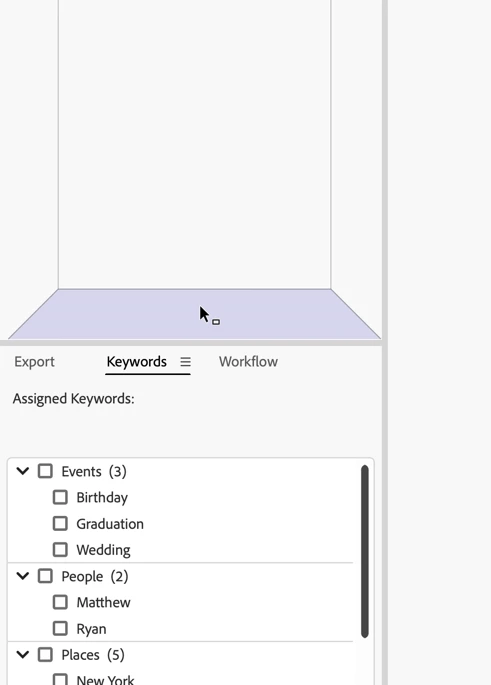
    Hi, @Nature Light, If you drag the Metadata panel until you see the following, you should get what you want.


    Let me know if this works for you.

    2 replies

    gary_sc
    Community Expert
    gary_scCommunity ExpertCorrect answer
    Community Expert
    April 9, 2023

    Hi, @Nature Light, If you drag the Metadata panel until you see the following, you should get what you want.


    Let me know if this works for you.

    Inspiring
    April 9, 2023

    So simple yet so elusive!  Thanks so very much.  I kept getting sidetracked by the blue borders typically used for repositioning.  Nothing in any of my searches explained that shading you showed.  You are much appreciated!

    gary_sc
    Community Expert
    Community Expert
    April 9, 2023

    Glad to help.


    If you'd be so kind as to tap my response as the Correct Answer, that will help others looking for the same issue.


    Thanks!

    kglad
    Community Expert
    Community Expert
    April 9, 2023

    in the future, to find the best place to post your message, use the list here, https://community.adobe.com/


    p.s. i don't think the adobe website, and forums in particular, are easy to navigate, so don't spend a lot of time searching that forum list. do your best and we'll move the post if it helps you get responses.


    <moved from using the community>

    Inspiring
    April 9, 2023

    You're correct.  Navigating the site and forums is a huge challenge and results in my only using as a total last resort.  I tried to post from the page of your suggested link before making my post but once there, I could find no button or dialog box or anything else indicating how to make a post.  Thanks for redirecting.