



paulc65657246
Inspiring
November 18, 2022
Answered

Nested, hierarchal keywording | Adobe Bridge | Query

  • November 18, 2022
  • 3 replies
  • 5760 views

Hi all,

I am trying to create nested hierarchal keywording in Adobe Bridge but having some difficulty. I want to create a keyword list in Excel and then import it into Bridge. So far I have only done a few lines of text in the Excel sheet for testing purposes, I have enclosed the Excel sheet that I have created herewith. And also the Tab-delimited Text (.txt) file I have saved from the Excel sheet. My problem which you can see in the attached screenshot, is I am not getting the england photography; paul andrew crutchley photography; into Bridge. I am obviously doing something wrong but unfortunately, I can't see it. Can anyone help me please and let me know how I need to create my Excel sheet to import into Bridge correctly, thank you.

Best regards Paul
This topic has been closed for replies.
Correct answer Rahul Saraogi

Hi rAHUL,

I want the keywords to be below one another

capturing that ltd edition moment;

england photography;

paul andrew crutchley photography;


Please try the following text file.


Keywords grouping is based on tab indentation.


How it works:

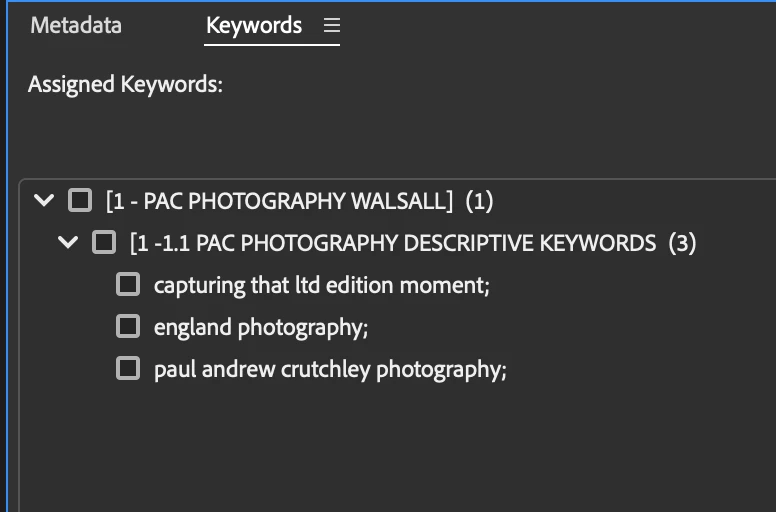
Consider the e.g. of keywords in the following screenshot:

[1 - PAC PHOTOGRAPHY WALSALL] has 1 sub keyword "1 -1.1 PAC PHOTOGRAPHY DESCRIPTIVE KEYWORDS" which has tab indent one more than [1 - PAC PHOTOGRAPHY WALSALL]. 

"1 -1.1 PAC PHOTOGRAPHY DESCRIPTIVE KEYWORDS" has  3 sub keywords which have tab indents one more than "1 -1.1 PAC PHOTOGRAPHY DESCRIPTIVE KEYWORDS"


[1 - PAC PHOTOGRAPHY WALSALL] has 0 tab

1 -1.1 PAC PHOTOGRAPHY DESCRIPTIVE KEYWORDS has 1 tab

capturing that ltd edition moment; , england photography; , paul andrew crutchley photography; has 2 tabs


similarly, you can create more keywords, subkeywords entries. Please take care of the tab indentations


3 replies

Mohit Goyal
Community Manager
Community Manager
December 22, 2022

Hi all,


We're happy to announce the release of Adobe Bridge Beta (13.0.2.630). This update includes the fix for this issue. Also, this Beta release includes several bug fixes done in the 13.0.1 public release. For details, see Fixed issues.


Steps to install/update


InstallGo to the Creative Cloud desktop app and select Beta apps in the left sidebar of the Apps panel. Then select install for your beta app.


Update: Go to the Creative Cloud desktop app, click on Update in the left sidebar of the Apps panel and Check for updates. Then click update for your beta app.


Let us know if this Beta release resolves the problem for those affected, and share your feedback.


Thanks,

Mohit

Brainiac
November 18, 2022

I just exported my existing list of keywords, deleted the keywords file, and then imported them all back in and it worked correctly. Follow the export format exactly and you should be fine. I have nested hierarchical keywords.

paulc65657246
Inspiring
November 18, 2022

Thank you, could you screenshot part of your list so I can see how it is organized, so I can see how to organize mine?

Brainiac
November 18, 2022

Try this, delete all your added keywords and let Bridge load the default set. Export that and look at the format.

Rahul Saraogi
Community Manager
Community Manager
November 18, 2022

Hello,


Thank you for reporting this. We are able to reproduce the issue on our end. Meanwhile, to unblock your workflow,  you can create a tab-indented text file like I shared "Sample_Keyword.txt". You can avoid unnecessary tabs after each keyword and add an extra new line after the final keyword.

paulc65657246
Inspiring
November 18, 2022

Hi Rahul,

Thank you for your help.

Best regards Paul