


Known Participant
February 6, 2021
Answered

No search results from external drives

  • February 6, 2021
  • 2 replies
  • 525 views

Hello,


I'm running up-to-date Big Sur on a 2020 iMac. Bridge is also up to date.


PROBLEM: Bridge does great with the iMac drive, and it RECOGNIZES my external drives. However. it does not bring back search results from the EXTERNAL DRIVES. This is a problem, of course, because I always considered that one of the chief "powers" of BRIDGE,


There is a message, however, saying "Indexing "/Volumes/Drobo/DocumentRevisions-v100". Does this mean it is currently going through a lengthy indexing process (that message has been up overnight)


Any suggestions?


Thanks


This topic has been closed for replies.
Correct answer gary_sc

Hi John,


First off great job of preliminary investigations and explanations.


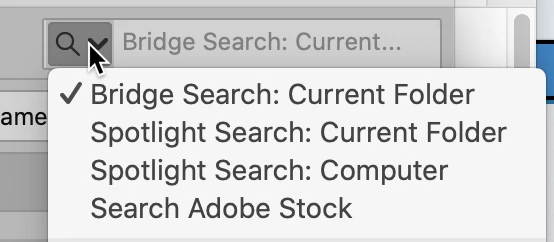
One quick question is have you gone to this dropdown in the upper right hand corner. Try the third option.

2 replies

gary_sc
Community Expert
Community Expert
February 6, 2021

Good I'm glad that that's helping.


But since you're a Mac user let me provide one other option: Houdahspot!


It is an amazing search application that puts all other searching options to shame. Capable of Boolean operations as well as searching within a single folder or excluding external drives. The guy who writes the program is amazing and answers all questions as well as takes idea and implements them into Houdahspot if he feels they will expand the capabilities of the application. 


Suffice it to say that I do not use searching in Bridge just like I would not use a scooter if I were in a car race. 


Let me add that I neither work for Adobe or Houdah software, I just like what they do.

JohnruexpAuthor
Known Participant
February 6, 2021

I looked at the Houdaspot website, adn I think you mighat have made a sale for them!


Thanks for your help today. Adobe bridge is limping along quite a bit better, and now I have a new geek tool to experiment with ...

gary_sc
Community Expert
gary_scCommunity ExpertCorrect answer
Community Expert
February 6, 2021

Hi John,


First off great job of preliminary investigations and explanations.


One quick question is have you gone to this dropdown in the upper right hand corner. Try the third option.

JohnruexpAuthor
Known Participant
February 6, 2021

Thanks!


I was more than a little worried when I saw your answer -- my BRIDGE SEARCH in that field was set to "current folder," though that did not seem to impact searches made in Smart Collections (it found every image file with the name "Kong" in it from my HD and Dropbox, for instance). 


FIRST TRY: No luck, however, with external drives (all connected by cord).


THEN, as I was prepping a followup, I suddenly got results somewhat like I expected. The results returned are SMALLER than they should be ("52 items" when I know there are about 500), but I also have an "indexing ..." notice at bottom left, so it could still be tabulating.

Hoping for "indexing" as the answer ...