


Participating Frequently
October 15, 2018
Answered

Thumbnails in Bridge went crazy after 2019 update

  • October 15, 2018
  • 69 replies
  • 22204 views

Okay, I installed all of the cc2019 updates and Bridge (worked normally on cc2018) started to behave crazy. I mean all works except preview thumbnails. I get some kind of "static interference" pattern instead of previews.

I completely uninstalled and reinstalled Photoshop and Bridge to solve the issue but no luck.

Computer is iMac Pro 27".

On my old iMac 27" (2011) it works normally after the update.
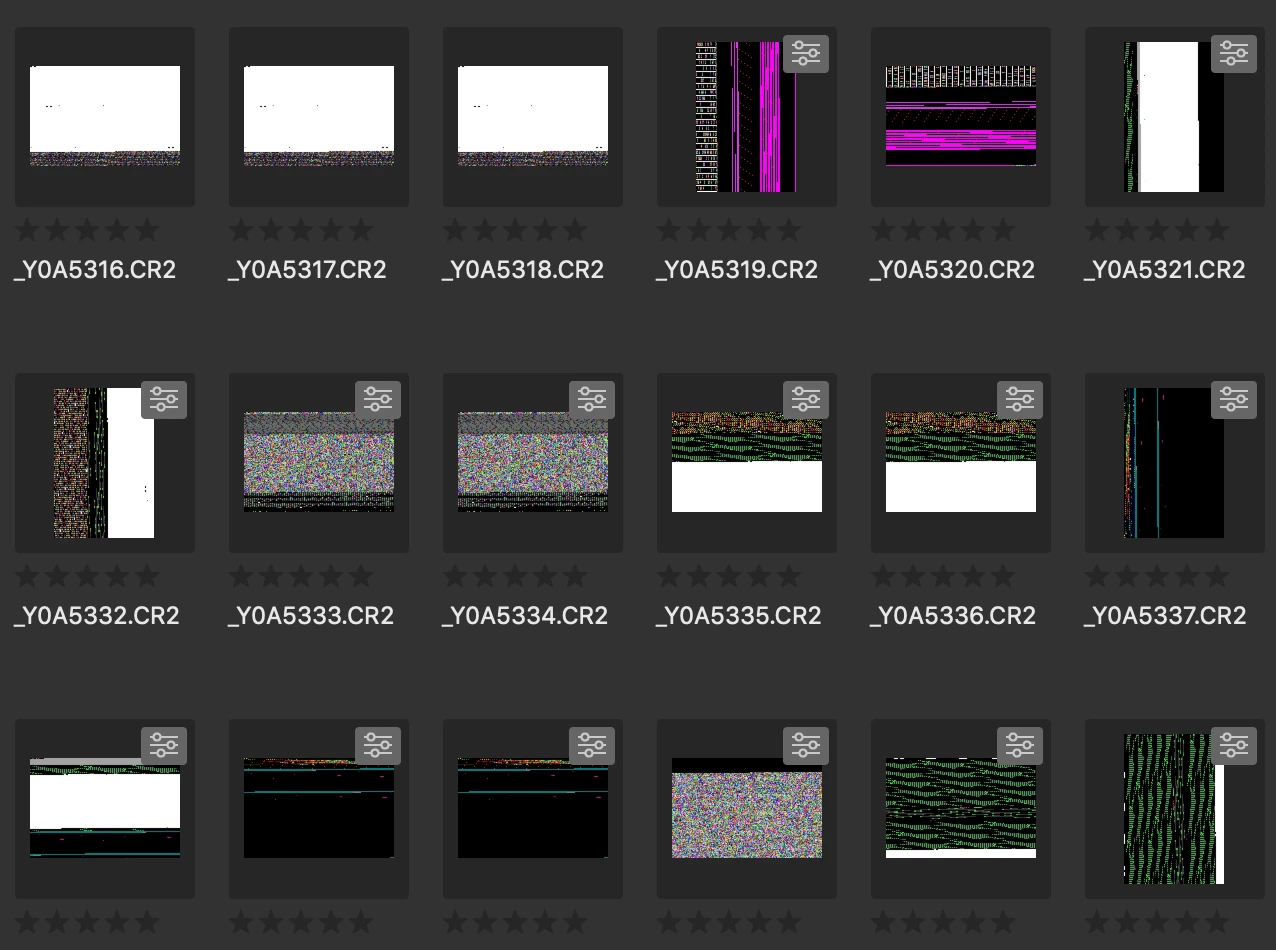
Any idea?

Thanks!

This topic has been closed for replies.
Correct answer siddharthsingh

Dear Users,

We have released a new version of Adobe Bridge (CC 2019) on 2nd November 2018. The new version build number is 9.0.1.216. This version is available to install via Adobe Creative Cloud application.

This Bridge update resolves the thumbnail rendering issue on iMac Pro devices and has few other bug fixes.

Please let us know if you face any issues.

Regards,

Siddharth

69 replies

WayneTeo84
New Participant
October 29, 2019

Still doesn't work both of my adobe bridge 2018 and 2019 with my macbook pro

Participating Frequently
May 1, 2020

I fixed NEF thumbnails not displaying by changing the default value of 10MB to 100MB in the Preferences...Thumbnails..."Do Not Process Files Larger Than..."  Newer camera, larger files.

New Participant
July 6, 2019

Will this update also happen for Windows, because I'm facing the same issue today, 07-05-2019, on Windows 10.

New Participant
November 12, 2018

I updated on the 8th of November.

It still does not work.

Only half of the pictures are visible?

New Participant
November 12, 2018

now it works - thanks

New Participant
November 3, 2018

So the Bridge update fixed the issue on my iMac Pro which is awesome but the new Photoshop update is still flawed...when I downgrade to the previous version that version works perfect.  In the newest update my Vector layers have large artifacts

Participating Frequently
November 2, 2018

Thanks for the update Adobe.

E_deJuan
New Participant
November 2, 2018

I have updated to the new version and now the previews are correctly seen

thank you !

Christine Holzmann
Known Participant
November 2, 2018

Thank you thank you thank you Adobe All seems to be working wonderfully now!!!! Thank you for fixing this up for us

Inspiring
November 2, 2018

Well done Adobe! All seems to work as of today. I haven't had a chance to take the new version for a real spin, but after emptying the cache, all the thumbnails rebuilt nicely. Thanks listening to us all freak out and taking action.

siddharthsinghCommunity ManagerCorrect answer
Community Manager
November 2, 2018

Dear Users,

We have released a new version of Adobe Bridge (CC 2019) on 2nd November 2018. The new version build number is 9.0.1.216. This version is available to install via Adobe Creative Cloud application.

This Bridge update resolves the thumbnail rendering issue on iMac Pro devices and has few other bug fixes.

Please let us know if you face any issues.

Regards,

Siddharth

Participating Frequently
November 2, 2018

Hi Siddharth

I am in Australia and when downloaded the update, it's the faulty version not version 9.01.216. Am I Missing something here ?

Regards

Bernhard

Abhishek_Seth2
Participating Frequently
November 2, 2018

Hi Abhishek

I got the right version this time, but it does not work with some of my Nikon D500&D850 NEF Files, depending on the Nikon version.

Bridge 2018 works with all my Nikon files.This version does not seem to be compatible with all Nikon Nef's

Please peruse attachment.

Regards

Bernhard


Hi ,

Can you please post the attachment again or share with abseth@adobe.com

Regards,

Abhishek Seth

New Participant
November 1, 2018

My Bridge has the same flaw plus photoshop now has a issue with zooming...a vector drawn layer when zoomed loses a square

The Pixelian
Participating Frequently
November 1, 2018

I doing a little further digging to see if there is a correlation between Bridge 2019 / OSX Mojave (10.14.1) and Photoshop previews.

Some PSB files (Large photoshop document) Do not preview correctly in the finder—similar kind of pixelated look as found in Bridge.

In some cases when the cache is purged, I can see the thumbnails for a second or so, then it switches out for the pixelated version. I have checked out the cache location folder (as pictured below). Looking in that folder in the finder I can see that bridge has indeed created a correct jpg file of the ones I'm viewing in Bridge.

Leads me to believe more in a display problem, maybe caused by the Vega Card in the iMac Pro.

Inspiring
November 1, 2018

I'm running an iMac Pro 2017 and an iMac 2015, both running High Sierra (I do not want to risk losing Bridge by upgrading to Mojave just yet). I do not have preview problems in Bridge 2019 on the iMac 2015, but I lose thumbnails entirely in Bridge 2019 on the iMac Pro. But on Both computers, PS 2019 files have corrupted thumbnails on the finder after saving on either one. They aren't corrupted as thoroughly as on Bridge 2019 on the Pro (just noise in the thumbnails) but they show layers that are turned off and are adversely effected by layer masks (not just alpha channels).

I just wanted to respond to your comment to make sure Adobe knows this isn't necessarily just a Mojave related issue.

Also, I had a somewhat productive conversation with Adobe via twitter yesterday and they assure me they are aware of both issues and working hard to correct them. We shall see.