


Known Participant
November 13, 2022
Answered

Unable to apply animation presets to AE 2023 layers using Bridge 2023

  • November 13, 2022
  • 1 reply
  • 2085 views

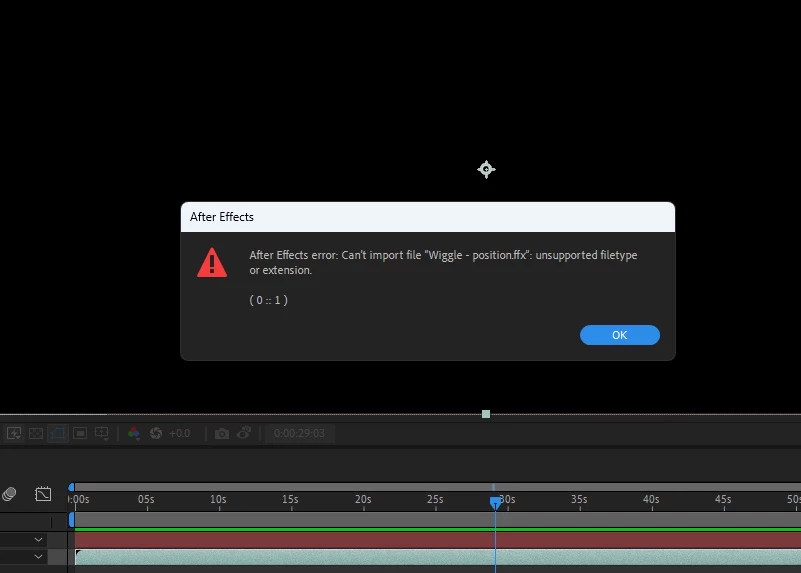
I'm experiencing this now with the Adobe After Effects 2023 and Bridge 2023.  I'm unable to import any of the animation background presets into any of my layers in AE because I get the error "unsupported file type."  I've restarted Bridge as well as AE several times as Bridge seems to freeze for about twenty seconds when it's first opened, but it hasn't made any difference.  I'm looking through forum posts and see that this was an issue in 2017 that was supposedly fixed, but I'm still experiencing it.  Any ideas as to how to remedy this?
This topic has been closed for replies.
Correct answer PECourtejoie

Hey, thanks for your response.  I uninstalled and reinstalled AE 2023, if I attempt to drag or doule-click on any files from Bridge to import them, getting the same error message:


My bad, right-click to have the option to apply them in Ae.

1 reply

ratt57Author
Known Participant
November 23, 2022

Not getting much of a response re: this, and I posted it two weeks ago.  I'm able to go into into my Adobe presets folder but it's empty (??), which is probably the issue.  I re-installed Bridge and it didn't resolve anything.  Can someone help me out with this? 

PECourtejoie
Community Expert
Community Expert
November 24, 2022

Hi, I would try reinstalling Ae 2023. Double-click on the presets to apply them, according to another user.

ratt57Author
Known Participant
November 27, 2022

Hey, thanks for your response.  I uninstalled and reinstalled AE 2023, if I attempt to drag or doule-click on any files from Bridge to import them, getting the same error message: