


Question
Where to permanently enable caption view in fullscreen?
Hi guys, reading the What's new popping up, I expected that to be better as in older versions but it isn't.
In media res:
- Can I activated that to be shown permanently? Couldn't find anything in the Bride settings. If there is a shortcut, why it isn't mentioned?
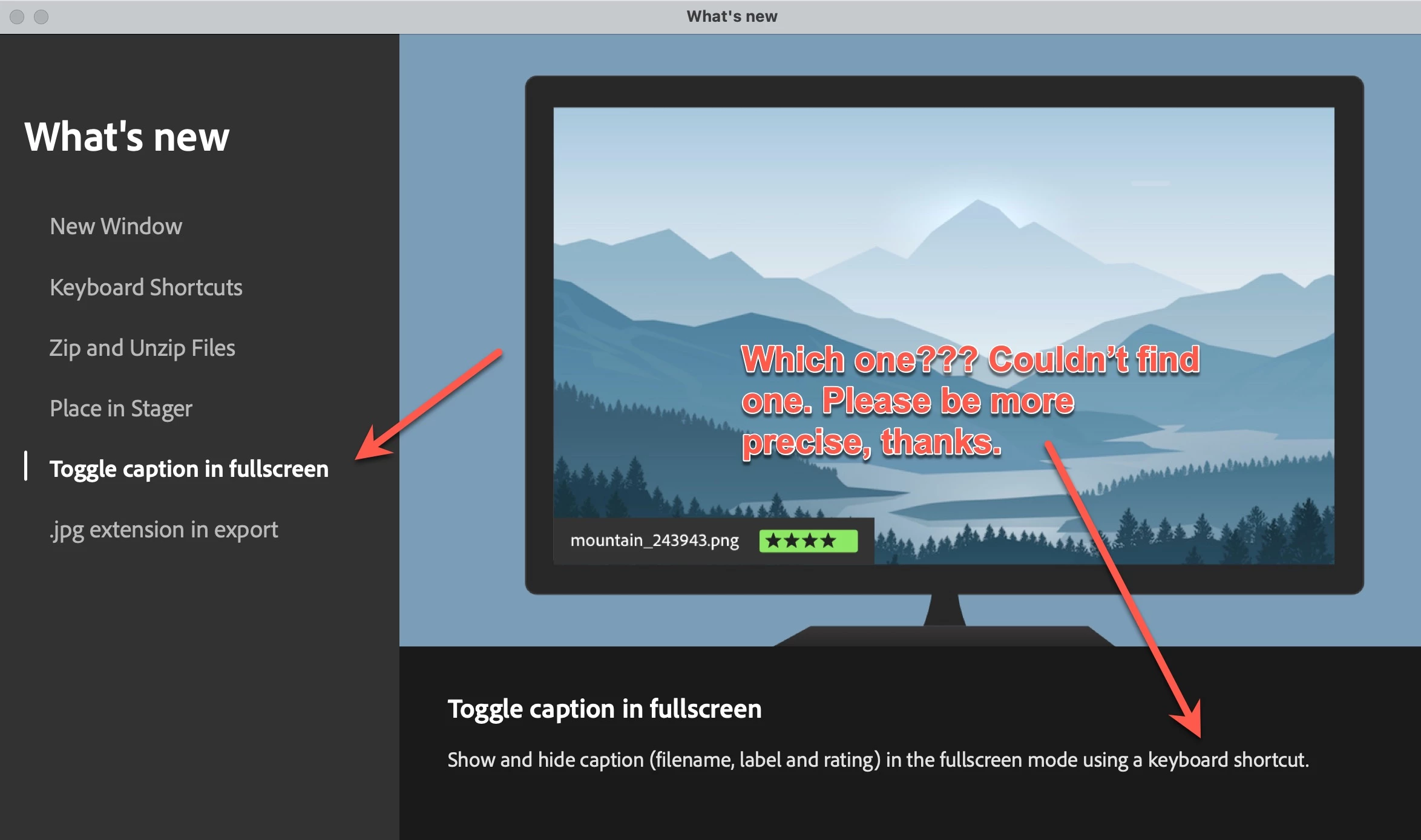
- If there is no star rating, colour labels are randomly shown in fullscreen
- Colour labels of LrC and Bridge still do not match. That's an issues I never understood. Instead of having values "behind the scenes" colour lables are by default in LrC Red, Yellow, Green, Blue, Purple, whereas in Bridge they are by default called Rejected, Review, Approved, Second, To Do. They are used literally, so if you work in LrC and Bridge as I do, that never matches. - The problem: they only can be changed in the Bridge settings but nowhere in LrC. Changing them in the Bridge settings is NO GO, because Bridge is used to exchange edits professionally international, that would be a disaster. As good the AI functions are, if it comes to trivial stuff, I always think at Adobe the left hand doesn't know what the right one is doing (that's a saying in German). I developed software for 35 years, normally you use a constant index value for stuff like that, e.g. 6,7,8,9,10 for that and relate it to a free naming in the user intreface. Not so at Adobe, there is the plain text literally used. The problems advance if you go international, in German e.g. Rejected is Abgelehnt. The next mess ahead. Also in LrC, where Red is Rot in German or Yellow is Geld. That never matches. This is just ultra bad style of software development and causes a lot of problem not existing if the developers would ever have been working properly.
- The performance is again incredibly bad with the current 2024 versions. I'm usindg an MBA M1 fully equipped, it has at least felt 10 x more performance as my prior Mac, a max. equipped 2019 Intel MBP16. Except for Adobe software, everything else such as Affinity Photo, Capture 1, FCP, DaVinci Resolve travel at Warp 8. In comparison, Adobe Software doesn't even touch 0.000001% speed of light.
OK, guys, that's sufficient of daily dose of rant 😉 I wish you merry stuff fixing.
Have a nice one,
Roland
 AdChoices