


Participating Frequently
March 22, 2021
Question

Zoom in and out Flimstrip mode

  • March 22, 2021
  • 7 replies
  • 1888 views

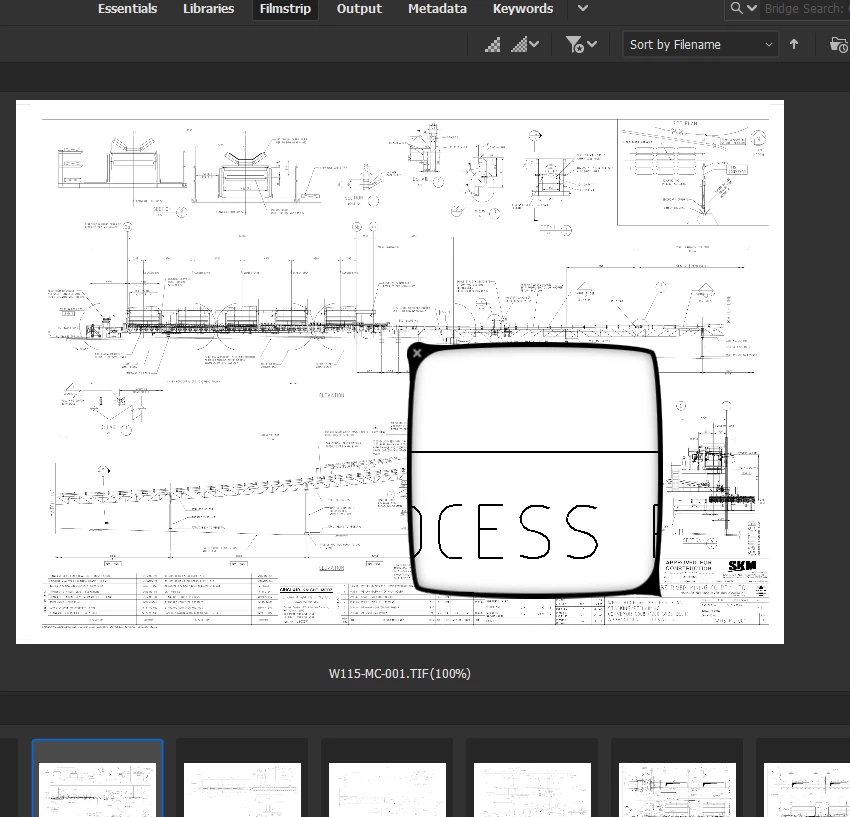
How do you zoom in and out when in the Filmstrip mode, in Adobe Bridge.

There is something which looks like a magnifying glass but this is not suitable. Firstly it's too small and zooming in/out using the "+" and "-" keys does not reach the zoom level required.

I've tried installing different versions of Bridge including version 8 and 11.
 

This topic has been closed for replies.

7 replies

Participant
April 14, 2024

The inability "Zoom to Fit" and any useful zooming ability for Bridge make me question decisions at Adobe. Again. 

Adobe Employee
December 11, 2023

Hi,


Thank you for the feedback.


You can try the Fullscreen/Slideshow mode in Bridge for zoom functionality.

Steps. 

1. Go to View menu

2. Select Fullscreen

3. Click on the image to zoom-in or use the +/- key on the keyboard. 


I hope this will help with your use case. Please let us know for any further feedback.  


Regards,
Bridge Team

Crazyhorse13836980
Known Participant
December 11, 2023

Thank you that is helpful.. what about the two keys for reject and fo assihgning a number?

id11Author
Participating Frequently
March 23, 2021

Thanks for clarifying.

Photoshop is not as suitable as Bridge though, since you can see everything in Bridge, and it's much easier to navigate to the next document. The metadata is available as a sidebar rather than having to look for it in a menu. Only issue was the zoom.

I will try Lightroom Classic.

David Popham
Participating Frequently
March 23, 2021

"I think I have tried Photoshop but this can't edit metadata."


Actually, you can edit metadata in Photoshop via File > File Info. You would want to zoom in to the necessary level in your image first because that opens a dialog that prevents you from doing anything else to the image while open, but you can resize and reposition the dialog. You could still use Bridge to navigate through the image thumbnails, and as long as Photoshop is set as your system's default editor for images, you can double-click the thumbnail to open in Photoshop.


Adobe Camera Raw is essentially a plug-in that works in both Bridge and Photoshop to perform image editing, but it doesn't allow metadata editing.


I haven't used it in quite a while, but I believe Lightroom Classic can zoom in up to 1600% and allow you to edit the metadata at the same time.

id11Author
Participating Frequently
March 23, 2021

Yes, I do know where to edit the metadata.

What I'm trying to say is that I need to zoom in and out to read the title of the document and edit at the same time as I can see it. So far Adobe Bridge has been the most suitable except that I can't zoom into the extents required.

I have a lot of documents to process.

id11Author
Participating Frequently
March 23, 2021

Test

gary_sc
Community Expert
Community Expert
March 22, 2021

Bridge has no actuall zoom capability other than the Loupe that you've already found. In fact, it cannot zoom in any more than 100% so if you have a low resolution image, that's it.


If you see an image that you wish to zoom into, you can do that either in Photoshop and/or Adobe Camera Raw.

id11Author
Participating Frequently
March 23, 2021

Thanks for advising then.

The program that I need requires 2 functionalities.

1. Zoom in/out so I can read text and see detail.

2. Be able to edit metadata such as Title.


I think I have tried Photoshop but this can't edit metadata.

Can Adobe Camera Raw do both things?

Or any other non-Adobe product.

gary_sc
Community Expert
Community Expert
March 23, 2021

For editing metadata, click on an image file and tap in Command/Control-i


This will bring up the metadata data file and all of the fields that can be changed can be changed here (and/or seen)