


New Participant
September 23, 2019
Answered

How do I Batch Rename to add a Prefix?

  • September 23, 2019
  • 4 replies
  • 6049 views

Hi there!

I have a ton of files in a folder that I would like to add on the prefix "Machine_".


For example:

Old: 482_PartyBus

New: "Machine_482_PartyBus"


I don't see a way of doing it in Bridge. Any suggestions? Thanks!!
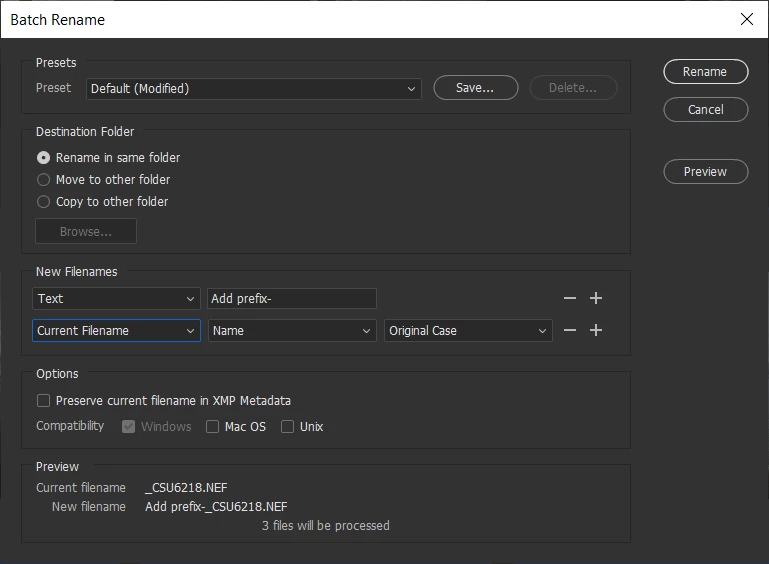
Correct answer Chuck Uebele

Just use a text field then the filename field in the batch rename:


4 replies

Pmaar
Participating Frequently
November 7, 2025

I'm trying to batch add numerical prefix, I've manually arranged my images and need the prefix to be numbered in order. I remember doing this in previous versions of Bridge, Is this no longer possible? I need to also keep the current file name and add the ascending numeral prefix. 


Pmaar
Participating Frequently
November 7, 2025

Just figured it out, had to add nex text inbetween the sequence number and current file name. Not sure why it works this way but...it does. Sorry for the bother forum persons.

Stephen Marsh
Community Expert
October 4, 2019

For completeness, an alternative that achieves the same result:


Joely10623436
Community Expert
September 24, 2019
  • I don't see a way of doing it in Bridge. Any suggestions? Thanks!!
Let me Google that for you, 1 second:

Themen


https://www.photoshopessentials.com/essentials/how-to-batch-rename-images/

Chuck Uebele
Chuck UebeleCorrect answer
Community Expert
September 23, 2019

Just use a text field then the filename field in the batch rename:


Participating Frequently
January 6, 2023

There is no Add Prefix otion in Bridge 2023, so how do we add a prefix to the original filename now, please?

gregreser
Brainiac
January 6, 2023

Add Prefix- in the above replies was just example text, not an option. You use the Text input and enter you prefix, then follow that with the Curretn Filename. It looks like you have it set up right, you just have to enter your prefix in the top text box