
saladdreesing
Participant
August 10, 2023

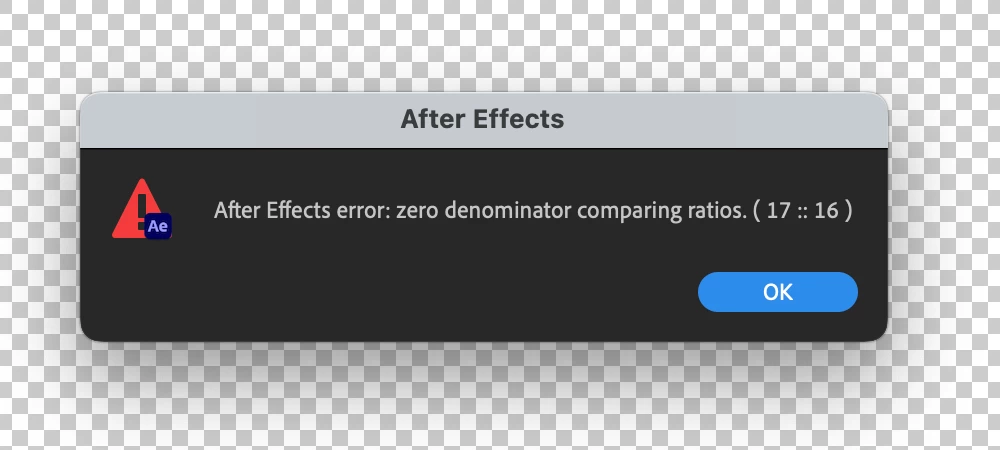
After Effects Error - Zero Denominator comparing ratios (17 :: 16) error in Ae version 23.6

  • August 10, 2023
  • 82 replies
  • 32837 views

Hey y'all, I'm really stuck.


This error keeps popping up for me and I have no idea how to solve it. It'll appear as I'm trying to play a sequence with an image in it. I made other sequences with images in them a few hours ago and rhey're all fine. But now when tryong to add anything new, it gives me this error and doesn't go away at all - no matter how many times I hit 'okay'. Any ideas?


Thanks!


Title edited by Mod.
 

82 replies

Postproduktion Founders
Inspiring
August 21, 2023

I imported two jpg-sequences in the latest AE under Windows 11. I googled the problem and set Color under "Interpret Footage" to "Preserve RGB". The fps are 25 in every sequence aswell as in the interpret footage. Now everytime I play I get bombarded by this error message "After Effects error: zero denominator comparing ratios. ( 17 :: 16 )".

This problem started since my last update of AE.


How it happened: Me importing a jpg sequence (1920x1080) I made in Blender. After Effects crashes while loading it. I need to force quit it. I restart After Effects and import the jpg sequence again. I press play and get bombarded by this message and I have to keep hitting Enter many times until it's gone.


Windows 11

AE: 23.6.0


I'd appreciate help.

Jenkmeister
August 21, 2023

Make sure the Classic 3D renderer is chosen and not the Cinema 4D renderer. 

j75305976
Participant
August 21, 2023

Hey, I got the same error when I upgraded. I am using just vectors.

Participant
August 19, 2023

Having the same issue whenever I try and play a comp,

Defintly not an issue with any specific project file or comp as I ran into this issue even in a brand new project with only an image in my comp.

Clicking Ok on the error message makes it disapear for a split second then reapear.

This is completly workflow breaking for me.

Error is persitant in 23.5 and 23.6


Fixed by rolling back to 23.4


Windows 10

Ryzen 9 5950x

128gb Ram

Nvidea rtx A5000 x2

Participating Frequently
August 18, 2023

I just had this error, it seemed to be related to a comp that only had an illustrator file in it, I trimmed the length of it in my timeline and it worked after that.

Participant
August 18, 2023

I got this error after updating to v23.6.
I tried changing the settings as recommended here and while it didn't pop-up as frequently, still kept happenning.
I've rolled-back to v23.5 and so far everything is OK, no pop-ups.

* MacOS 13.4.1

* Apple M1 Max

* 32GB RAM 

Participant
August 18, 2023

i have been getting the following error in afer effects (V 23.6) 
"After effects error: zero denominator comparing ratios. (17::16)" which prevents me from previewing the footage. 

has it been bothering anyone else and/or has anyone found any solution to this issue?

Jenkmeister
August 18, 2023

Can you share your project file so that we can see why the error may be occuring? 

Participant
August 17, 2023

I am also getting this error now (after updating my version of AE). 

- If I hammer the enter key, it will eventually stop reappearing. (guessing maybe 16 or 17 times?).
- i recreated it easily by creating a brand new project and importing a single photoshop generated png. (dragged image to timeline. i think error popped up when i hit space bar to preview playback... but it might have just popped up after drag).

CPU: 
Processor 12th Gen Intel(R) Core(TM) i9-12900KF 3.19 GHz
RAM:
Installed RAM 64.0 GB (63.8 GB usable) 
GPU: 
NVIDIA GeForce RTX 3090
OS:
Edition: Windows 10 Enterprise
Version: 22H2
Installed on: ‎7/‎1/‎2022
OS build: 19045.3324
Experience: Windows Feature Experience Pack 1000.19041.1000.0

Participant
August 17, 2023

(also, i did change renderer to Cinema 4D a couple weeks ago. Changing it back seems to fix this example .aep file. but i need C4D for project i was working on, which had text extrudes). (google how to change renderer brings up official adobe advice to just click in top right of your Composition Panel. which isn't true anymore. ugh. now it seems to only be accessible by enabling 3D on your layer, and choosing from pull down in bottom right of Composition Panel. Opening the Preferences > 3D window does not show it anywhere. huh)
(+ I did click to keep settings when upgrade happened. usually i say to forget whatevr older settings. haven't tried resetting yet. not sure how. bah)
(+ and I've been doing lots of layers of masking and displacement maps on footage shot at 120 fps, so i "interepetted footage > Main " to be 30 fps.then rendered that out and imported into new project. at first i figured it was the preview playback that was causing this error. because it only popped up when i hit space bar after making some edits. thought maybe some footage was at 29.97 still. but none was. everything at 30 fps. then thought that maybe AE was having trouble with this non standard frame rate)

rogerinlondon
Inspiring
August 14, 2023
nishu_kush
Community Manager
Community Manager
August 14, 2023

Hi all,


Sorry for your issue.

We're investigating the issue. Do you mind sharing the following details:

  1. What are your system specifications (CPU, GPU, RAM, OS version)?
  2. Are there any third-party plug-ins installed?
  3. Please share a project file that repeats the issue to help us to test the issue at our end. Feel free to DM me the download link if you don't want to share it publically.

Also, try changing the Renderer to Classic 3D in Composition Settings.

Let us know the results.


Thanks,

Nishu

Known Participant
August 14, 2023

Windows pc with Nvidia card. Renderer in Classic 3D. No third party plugins installed.
Same project playsback with no issues on Mac M2. 

Inspiring
August 11, 2023

I keep having this issue now across multiple projects. Some are new projects, some are editing old projects. Some have video footage, most don't. It's almost im possible to preview anything anymore. I can render with Adobe Media Encoder but that is ridiculous. 

rogerinlondon
Inspiring
August 14, 2023

I am having the same problem as well, new projects, old projects, nothing works. In a new project, you can play the timeline until you have put any keyframes in, and then this error message pops up.

Inspiring
August 11, 2023

Greetings all,

I am constantly getting this error on multiple projects.

Projects with video with footage and projects that are pure vector animation. It's making it impossible to preview animation.

Inspiring
August 11, 2023

I don't know that it matters but the numbers after the error are (17:: 16) Same error every tim