



AllmondPrinting
Participating Frequently
November 13, 2025

OK, Adobe, you have GOT to do better than this!!!

  • November 13, 2025
  • 12 replies
  • 140 views

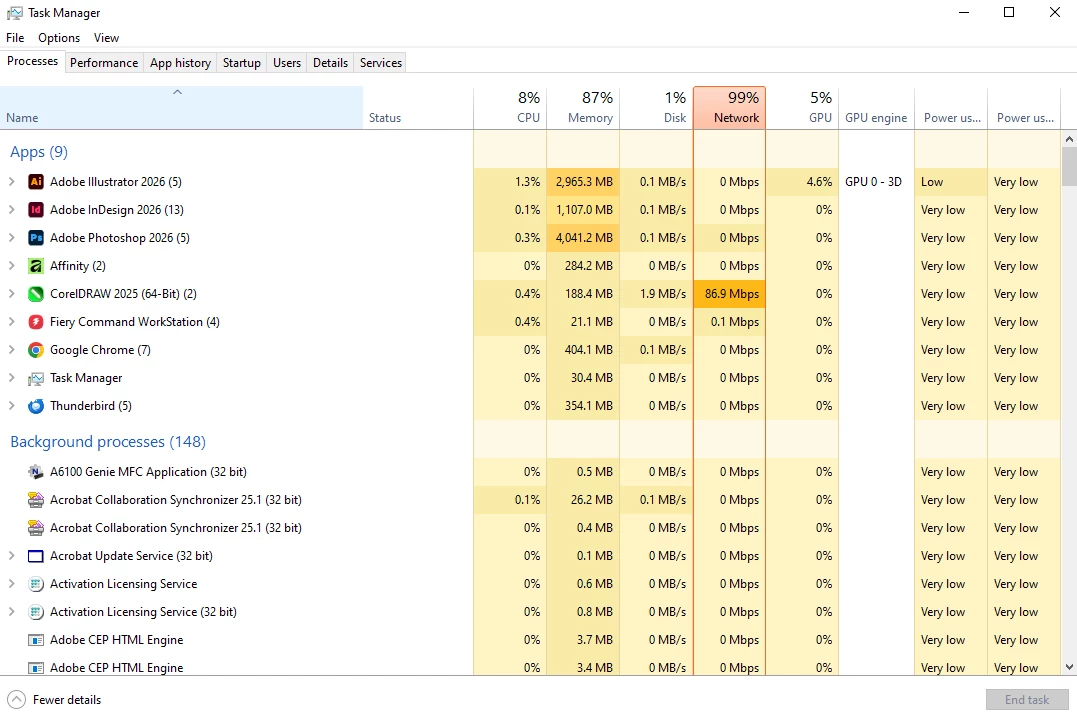
There are NO files open in ANY program on my computer, and Illustrator, InDesign, and Photoshop are hogging ALL of my RAM. Since the last update, my computer has been glitchy, so I had a little check this morning and see THIS. We pay entirely too much for this subscription to have it bring our computers to a halt this way. 
12 replies

kglad
Community Expert
Community Expert
November 14, 2025

post ai issues in the ai forum etc.

Participant
November 14, 2025

I have also get same problem with in my Imac after updating Illustrator. In some AI files when I open, my system get stuck and after a mintue got black screen and showing relogin.

kglad
Community Expert
Community Expert
November 14, 2025

you can post in the individual forums and see if other ps, ai, id users think that's unusual.

AllmondPrinting
Participating Frequently
November 13, 2025

I guess I should say this is on a Windows 10 machine and it is the most current version of all three programs.

kglad
Community Expert
Community Expert
November 13, 2025
AllmondPrinting
Participating Frequently
November 13, 2025

That helped, but they are all still running over 1.5 GB RAM usage each and nothing open.

kglad
Community Expert
Community Expert
November 13, 2025

if the libraries are synced clear your recently opened files list.

AllmondPrinting
Participating Frequently
November 13, 2025

And it says Libraries Synced.

AllmondPrinting
Participating Frequently
November 13, 2025

Where? The only place I see Sync is in the Creative Cloud App itself.

kglad
Community Expert
Community Expert
November 13, 2025

then each is likely trying to sync something problematic.  see if you can suspend syncing in each.