


New Participant
July 20, 2023

P: Point curve settings are missing when creating a preset

  • July 20, 2023
  • 27 replies
  • 7753 views

I am trying to save a preset I have created, however when I apply the preset on an image the point curve setting is missing. I am not sure why this is happening as I've previously successfully saved presets without settings being missed.


My Lightroom CC is up to date (V6.4), I have restarted it too.


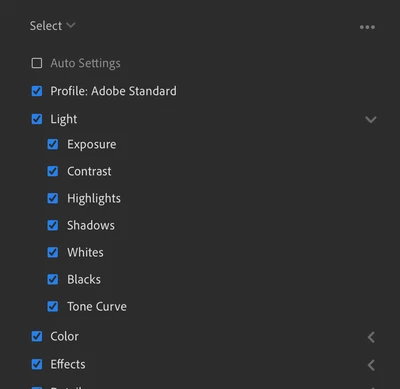
This is what the selection looks like when I press "Create Preset" as you can see the tone curves are ticked
 

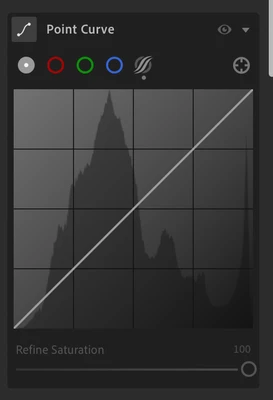
However, when I apply the preset, the point curve doesn't change.
 

Please could someone give me some advice, thank you.

 
This topic has been closed for replies.

27 replies

Rikk Flohr_Photography
Community Manager
Community Manager
December 14, 2023

@Arjun Lall  Thank you for confirming!

Rikk Flohr: Adobe Photography Org
New Participant
December 14, 2023

Thank you! I can confirm this now works as expected.

Rikk Flohr_Photography
Community Manager
Community Manager
December 14, 2023

Greetings all,


Updates for the Adobe Photography Products have been released.  The December 2023 updates contain an update for this issue. 

If you do not see the update in your Creative Cloud Application, you can refresh it by hitting [Ctrl/Cmd]+[Alt/Opt]+[ R ].

Note: It may take up to 24 hours for your update to be available in your Creative Cloud app.


Thank you for your patience.

Rikk Flohr: Adobe Photography Org
New Participant
November 29, 2023

This is still happening as of Lightroom 7.0 Desktop, no matter what I do my curve settings don't save to any profiles I create or update. However, on my iPad it works fine.


Created on my Mac (M1) Desktop app:

   <crs:ToneCurvePV2012>
    <rdf:Seq>
     <rdf:li>0, 0</rdf:li>
     <rdf:li>255, 255</rdf:li>
    </rdf:Seq>
   </crs:ToneCurvePV2012>


Created on my iPad:

   <crs:ToneCurvePV2012>
    <rdf:Seq>
     <rdf:li>0, 8</rdf:li>
     <rdf:li>64, 68</rdf:li>
     <rdf:li>130, 127</rdf:li>
     <rdf:li>192, 186</rdf:li>
     <rdf:li>255, 252</rdf:li>
    </rdf:Seq>
   </crs:ToneCurvePV2012>
New Participant
November 9, 2023

BTW I hadn't updated my lightroom two months ago when I saved my preset. The wrong logic was likely introduced shortly before Amani Ali created this post.

New Participant
November 9, 2023

HI I have the exactly same issue for LR, not classic, on both Windows 11 and MacOS Sonoma. It is not OS related and I believe it is related to how the program saves the preset.


If one exports the preset and use any text editor to look into the xmp file, you will see how this is defined.


For example, this is the Parametric Curve adjustment I have for one of my preset, which is saved a two months ago when this feature was still working.

If we look into the xmp file, we will see all of the points defined as they are. Each of the tags defines one point in the curve.


<crs:ToneCurvePV2012>
    <rdf:Seq>
     <rdf:li>0, 18</rdf:li>
     <rdf:li>71, 58</rdf:li>
     <rdf:li>126, 134</rdf:li>
     <rdf:li>188, 195</rdf:li>
     <rdf:li>255, 240</rdf:li>
    </rdf:Seq>
 </crs:ToneCurvePV2012>


But If I try to save the preset using the latest version of lightroom with a post-editing image, and then export it, I can only get two tags in the xmp file. 0,0 and 255,255, which means no info is saved.


However if I try to use an existing working preset, like the one I demonstrated above, and then copy all of my settings back, and then save the preset again, I will get a working preset with curve info.


My theory is, there might be some logic issue in preset saving for the new lightroom version. If I change the settings for a image in the new version and save it to preset, it won't contain any curve info. But If I apply an old preset, and then modify and save it to a new one, it creates a new one following the old preset logic, which makes it work. The is likely caused by the logic in how new Lightroom version saves preset from scratch.


BTW I am pretty sure the preset I created two months ago containing curve info, so the wrong logic was likely introduced in one of the newer versions after that.


Adobe please take a further look at this issue and solve it for us. This is causing some trouble for my photo editing, and I am just an amateur. No ones knows if any professional photographers is affected by this issue and it might cause a much more serious trouble for them. Thanks.


Inspiring
September 23, 2023

@Adam28289253kj33for me it always works from mobile devices. but cannot find a way to make it work from a computer.

New Participant
September 23, 2023

I found a workaround by updating the desired preset on Lightroom mobile via my phone. After a few attempts it finally syncs up and my preset saves the tone curve. Agree this is a new bug, never had this issue beforehand. 

Inspiring
September 16, 2023

@Cihad Aydın this did not work for me either:

New Participant
September 16, 2023

You can also try choosing "modified" option. That also works for me.