


Captivate-Noob
Known Participant
July 16, 2015
Answered

Cant save object-Style and cant open Object-Style Manager ERROR

  • July 16, 2015
  • 12 replies
  • 1675 views

Hy there,

I am confused. When trying to save a Style I can click on OK and nothing happens.

When trying to open the Style-Manager Captivate 8 is colapsing with a fatal error. (Captivate 8.01.242)

When I open Example-Projects I dont have this problem. It just happens when creating new projects.

What can I do?

greetings

Joachim
    This topic has been closed for replies.
    Correct answer Lilybiri

    What do you see in Themes? I see in German that button has the label 'Designs'? I'm just trying, totally stumped by your problem.

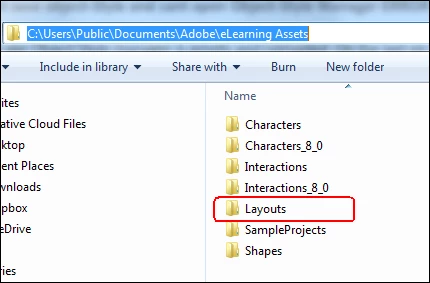
    The Layouts folder I was talking about seems to be corrupted. That is why I asked if you deleted it before reinstalling. The path is:

    12 replies

    Captivate-Noob
    Known Participant
    July 17, 2015

    So far, it looks like some of the files and flders were damaged. I dont know why because it was a brand new Installation. And I dont know if it will happen again.

    And I am not happy about the deinstallation-routine. If I click on "delete all preferences" as well it should wipe out all Files of Captivate.

    i have to check now if everything runs.

    Captivate-Noob
    Known Participant
    July 17, 2015

    I have small success...

    I installed it brand new, updated it to 8.0.1.242, and before I scanned the hole System for Captivate Folders. I deleted all of them by hand. They are located nearly everywhere. Found some in User-Profile, in Public-Folders, Programms, its a huge spread allover the Operating System.

    AND: They will not be deleted if you uninstall Captivate. Thats weak!!!

    After Insallation, I ran the Setup with "run as Administrator"... Captivate opens and shows the preset slide and the Object Manager NOT CORRUPTED.

    Lilybiri
    Brainiac
    July 17, 2015

    Maybe you deleted folders that shouldn't be. I know that the re installing could be smoother, didn't design it. I wrote another post, if you have to keep customisation when cleaning the Preferences.

    Captivate 8.0.1 Install? Keep your Customisation! - Captivate blog

    Lilybiri
    Brainiac
    July 17, 2015

    Someone, not me, another moderator, marked this thread as Assumed Answered. I think that is now finally done

    Captivate-Noob
    Known Participant
    July 17, 2015

    Lilybiri
    Brainiac
    July 17, 2015

    OK, it is using the palette that is in the Gallery, maybe it will be copied to the Public documents after you used it, or if you edit it. Although I always recommend to save an edited theme under a custom name. What about the Object Style Manager? It should look OK now, I suspect you will be able to use the default styles.

    Captivate-Noob
    Known Participant
    July 17, 2015

    By the way... thank you very much for your Interest in my problem...

    I think the hint with the corrupted Folder and Styles are very good...

    I try something now....

    Its not the problem of Rights anymore, thats for sure.

    Lilybiri
    Brainiac
    July 17, 2015

    That looks OK. Can you check which Theme Colors are used (DesignFarben button)?

    Could you change a theme and check the Object Style Manager? A theme has 3 parts: object styles, master slides and skin.

    Captivate-Noob
    Known Participant
    July 17, 2015

    looks like that....

    Captivate-Noob
    Known Participant
    July 17, 2015

    Sorry for waiting, I just reinstalled it, deleted everything, the public Folders too, Creative Cloud and everything.

    I created a new local User Account with admin rights, aktivated the Administrator Account, and started with "run as Administrator".

    YOUR QUESTION:

    I see this:

    Lilybiri
    Brainiac
    July 17, 2015

    That looks OK, except for the Theme Colors, I see more theme colors, you have only the Shade Theme Colors. I explored them to write this: Theme Colors - Captivate blog

    The themes are normally linked with the Theme Color palettes that don't have 'Shade' in their names. I am using the English version of course. With all my experimentation I can have changed the content of the Theme Colors. The ones without 'Shade' are also in Gallery\Layouts\8_0\ThemeColors  under the installation folder. They are not copied to your Public folder. You could do it manually but I'm not sure it is necessary.

    How is it looking this time when you open the Themes (Design in your case) button?

    Captivate-Noob
    Known Participant
    July 17, 2015

    as you can see Object-Style manager is empty and corrupted. On the last pic you can see in the preferences that there is no style loaded. Its written custom. Normaly it starts with a prepared slide. This one is empty.

    Lilybiri
    LilybiriCorrect answer
    Brainiac
    July 17, 2015

    What do you see in Themes? I see in German that button has the label 'Designs'? I'm just trying, totally stumped by your problem.

    The Layouts folder I was talking about seems to be corrupted. That is why I asked if you deleted it before reinstalling. The path is:

    Inspiring
    March 30, 2016

    Lilybiri‌, you just saved my sanity. Thank you!!!

    Captivate-Noob
    Known Participant
    July 17, 2015

    I deleted all preferences and the programm itself.

    I always start the Programm as administrator. Its set in the preferences of the link for all users.

    Captivate-Noob
    Known Participant
    July 17, 2015

    1. Captivate 8 64bit is installed local on Win 7 pro 64bit. I reinstalled it completely with all preferences. Then I installed it again. I did not change anything.

    2. Both Folders (cache and produce) are located in C:\Users\*********\Documents\My Adobe Captivate Projects.

    3. I cant open the Object Style Manager in genereal, in no case. A blanc Windows appears, then fatal crash.

    4. All Standard Styles are not loaded. If I look on a Style from an Object in the preferences there is written "custom".

    5. I cant save my own Styles


    I logged in local and I logged in wiht a domain account. I logged in with a local administrator, activated the administrator account, deactivatet the User Acount Control.


    ITS NOT RUNNING.......


    Normally Captivate starts in a blanc project with a slide that contains three boxes for text and other stuff. All my slides are empty. There is no Style available and no Object Style Manager.


    can I upload some Screenshots here?

    Lilybiri
    Brainiac
    July 17, 2015

    Logging in with an administrator account (which I do as well) is not the same as Run as administrator, just wanted to check if you are doing that? You'll need to right-click on the CP-icon, choose 'Run as Administrator' or set it up permanently using the Advanced button.

    When you uninstalled and reinstalled did you delete the Preferences and Layouts folders before reinstalling?

    You can upload screenshots using the small camera icon in the browser version of the forums.

    Captivate-Noob
    Known Participant
    July 16, 2015

    I insert an Object, for example a circle, then I format it with colors and borders. Then in the Properties on the right I try to save it as a Style, "create new style". I can give a name but when clicking on "OK" nothing happens. I just can Abbort it.

    When opening the Object-Style-Manager (via Data) just a blanc Window appears and Captivate crashes.

    I spend some time on Adobe Support via bomgar... Problem is not solved.

    1000 Euro for a program and it sensate work. Thats bad... :-(

    Lilybiri
    Brainiac
    July 16, 2015

    May I repeat my questions: "Is Captivate installed on your system and are the documents and cache folders both on your system as well, not on networked drives?"


    Can you open the Object Style Manager when no project is open?

    Do you have a lot of fonts on your system? Some users had problems with corrupt fonts, when disabling them everything worked fine again.