


samamara
Known Participant
January 15, 2023
Answered

Help With Feedback Captions for Click Boxes

  • January 15, 2023
  • 1 reply
  • 2424 views

Hello all;

I am in need of some help, please. I am working in Captivate 2019 on a Mac.


I'm trying to work on a simple simulation where users need to click on a click box. If they get it right, they click to continue. If they don't: 

- first, they will get a box that tells them where they should have clicked and an arrow pointing to the same

- then they click a continue button that clears the screen of the hints so they can try again

- if they get it right the project advances

- if they don't get they get another text box that says sorry, click to continue. 


I was struggling with figuring a way to do this since you can't have more than one failure message on click box and I found this older post  that was very helpful in getting me started. 


1. I first made it so all elements on the screen (other than the click boxes) were hidden on entry. 

2. I created a user variable named cb_attempt with a value of 0.

3. Then, as directed in that post post I created one large click box that covered the screen (cb_false) that had unlimited attempts and an advanced action for success, and one proper click box (cb_true) where the user is meant to click. 

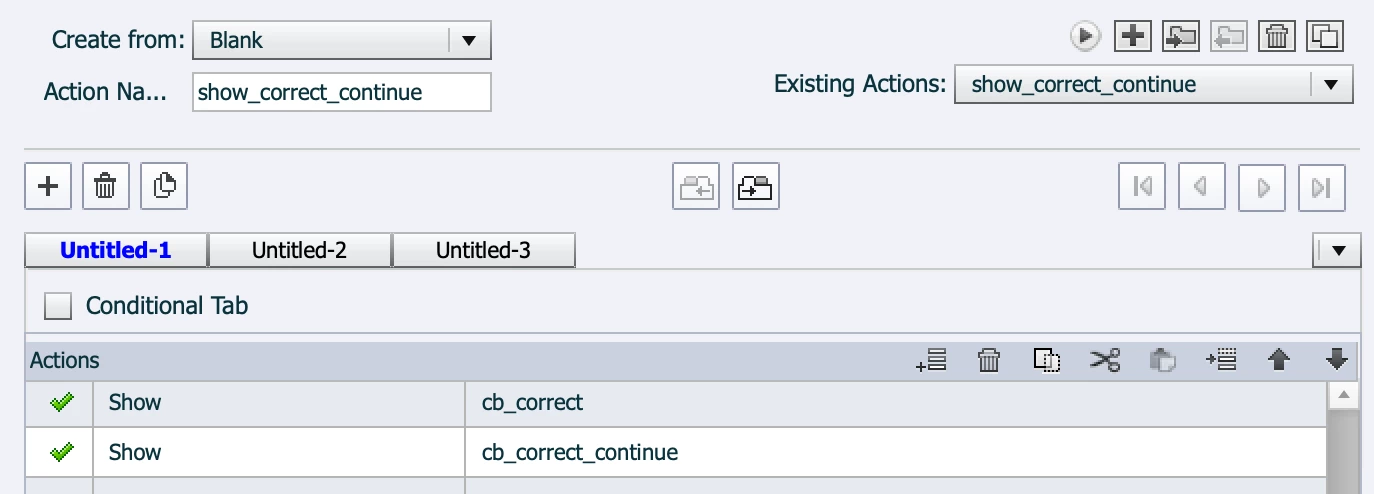
4. I created an advanced action so that when the user clicked the box correctly, a text box and a click button would show to advance the project: 
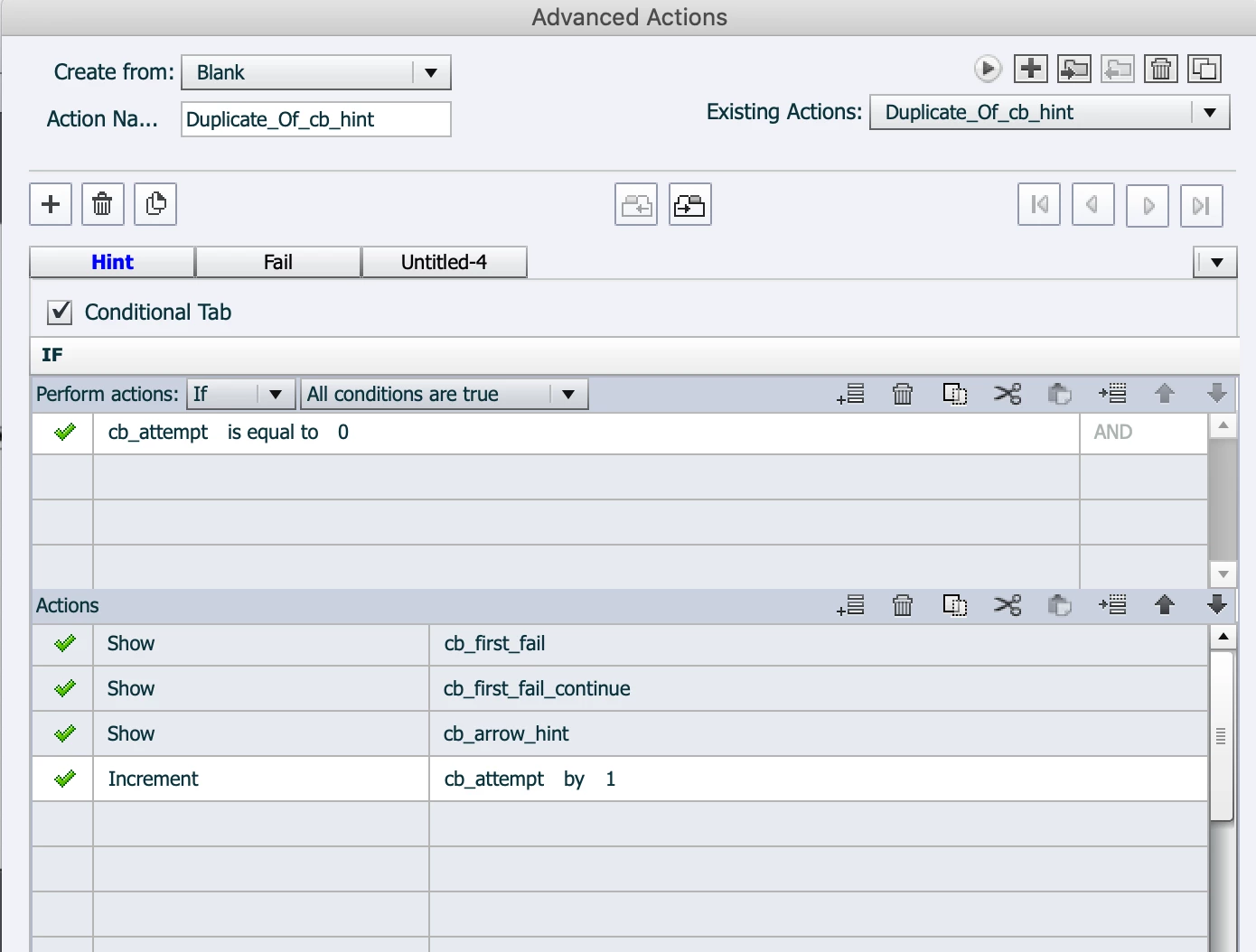
5. I created an advanced action (cb_hint) so that when the user clicks on the greater (false) click box they would get a first error message and a button to continue (see first decision below):
6. I created another advanced action so that when the user got that first error message and clicked on the button to continue to the second try, the screen would clear again:
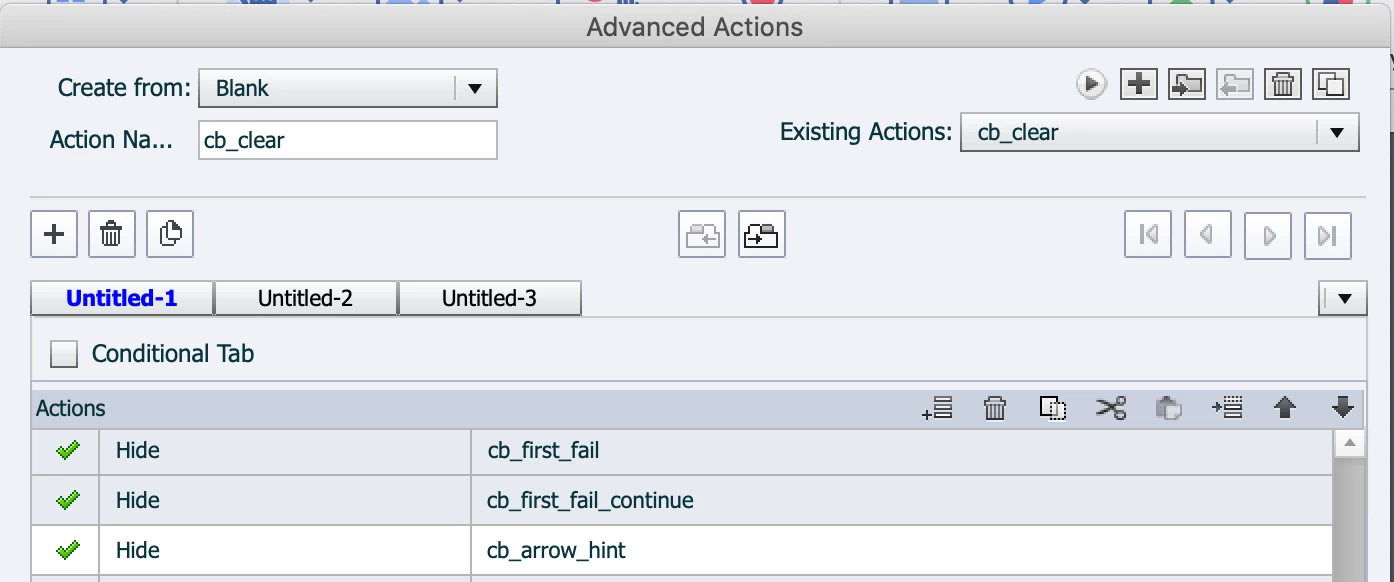
*Up to this point, everything works perfectly. After this step, though, things don't work. 


7. In the advanced action shown above in #5, there is a second decision. When learners click to clear the screen as desribed in #6, they get a second chance to click the box correctly. If they click correctly they get the get the box and continue button to advance as described in #4; if wrong, they are *supposed* to get a section failure message, which I tried to rig as a second decision on the advanced action cb_hint, but since this is where things stop working, I'm assuming it has something to do with the increments or condition in the Fail decision (I have tried to set the condition as "if cb_attemp is equal to __" 1 and 2 but nither worked): 
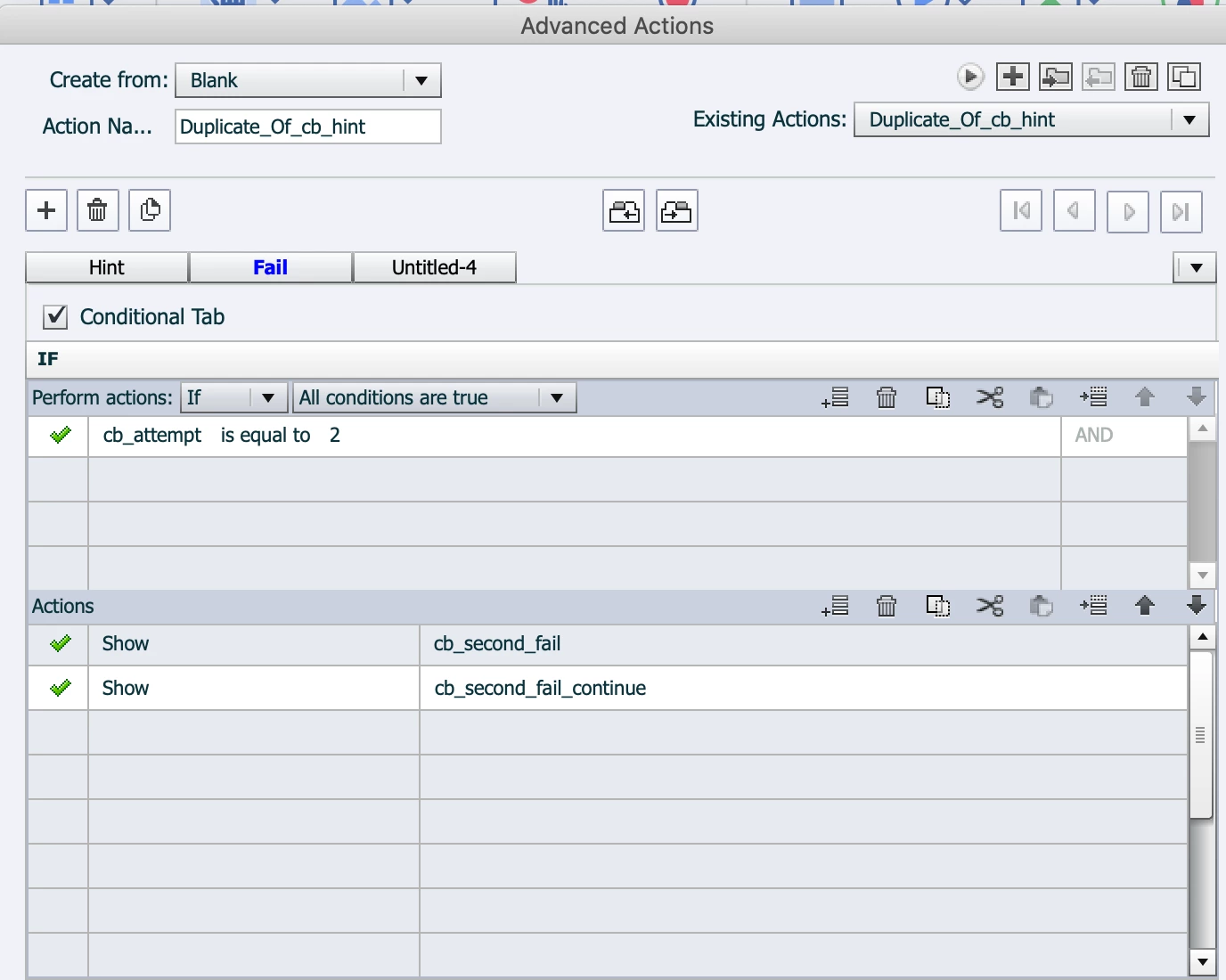
When the user click to clear the screen (point #6), the screen clears. But when the click in the wrong place a second time, nothing happens, i.e. the Fail decision above doesn't work. 


I've tried to figure it out but I can't seem to sort it. Does anyone have any ideas?


Here is the screen from my tester (ignore the white box, as it is there to cover the project for privacy, and it is under the main full-slide click box (cb_false):
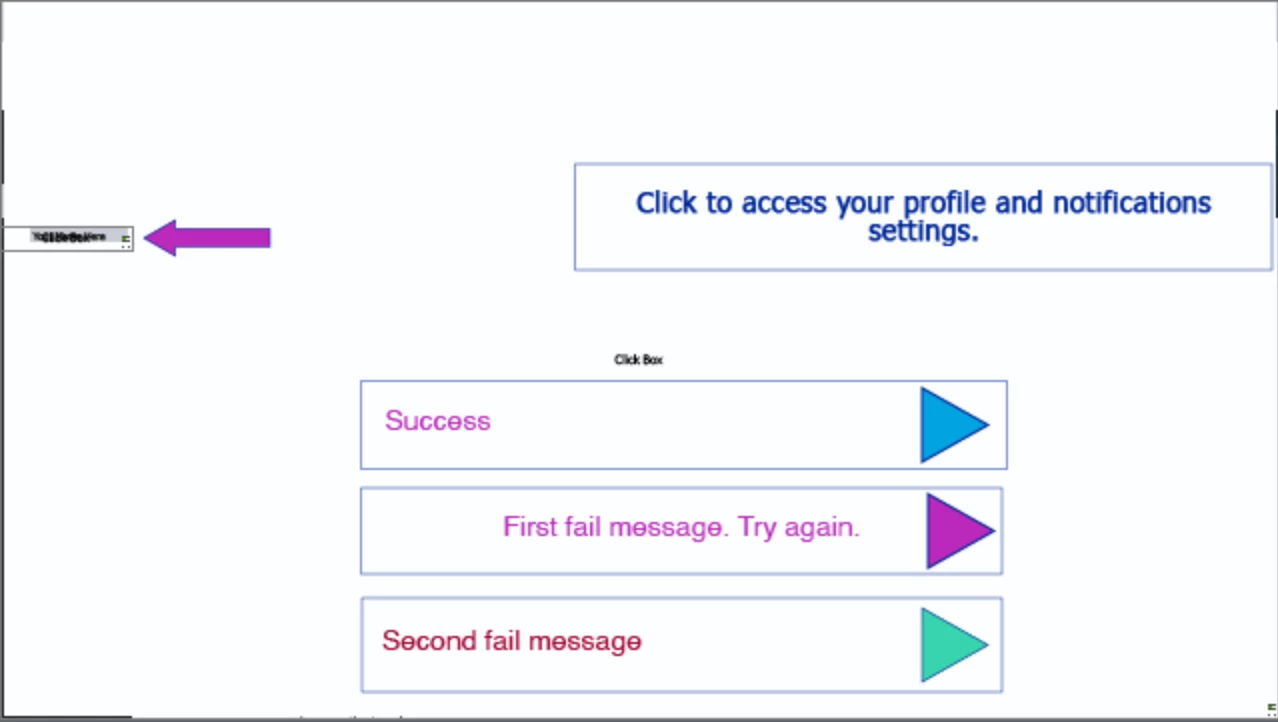


In the older post I linked to it did say the text boxes should all be in the same place and they have been - I just separated them here so you could see; it didn't help when they were all on top of each other. 


Finally, here's my timeline: 
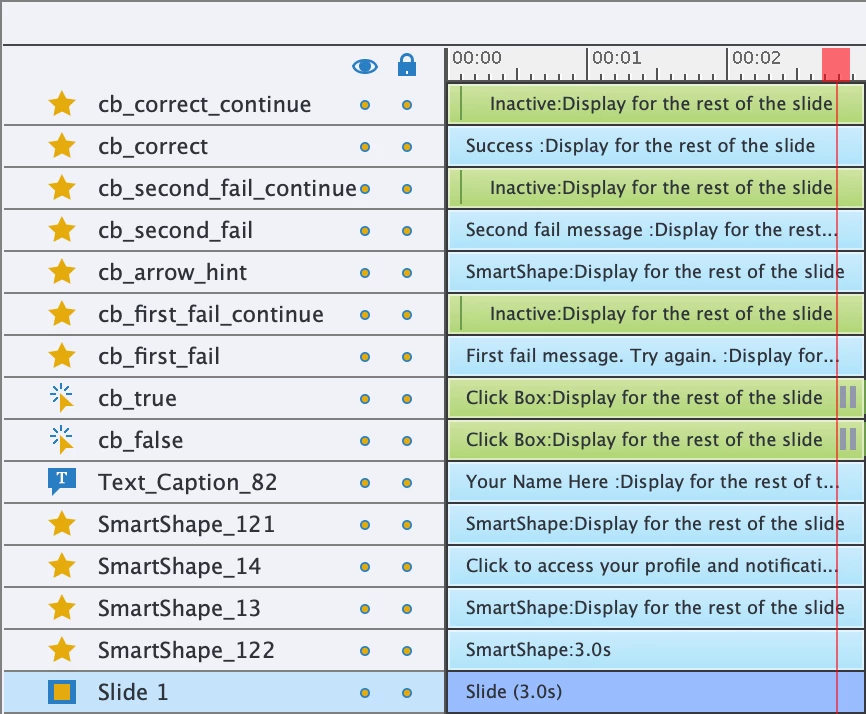
 

The elements under cb_false aren't relevant to this issue as they are design things (a small shape or image for example). 


If anyone has any thoughts or ideas here I'd appreciate it. I can't seem to understand why this process, which should be simple, isn't working. 


Thanks!

samamara


This topic has been closed for replies.
Correct answer Lilybiri

Thanks so much for your continued efforts on this @Lilybiri! It must be frustrating to have people steal your answers. I will look for the post on your blog and will conquer my fear and look at shared actions as soon as I get this project off my desk. Thanks again! 


I am stubborn, and have forced you in this workflow to use ONE shared action. Sorry...

Here is the link:

https://blog.lilybiri.com/multiple-failure-messages-for-shape-button

I can send you the shared action if you want, just send me a private message.


1 reply

Lilybiri
Brainiac
January 15, 2023

I will try to read everything very carefully tomorrow (is late here in Belgium). You referred to a very old post (2014) where I provided the correct answer but so much has changed since 8 years. My first intuition tells me to use a multistate object instead of several captions (shapes they should be now).

The idea of the big Click box is still valid but only for non-responsive projects. My most recent blog post used it for a slightly different use case, and Shared actions were used. You may have a look until I find the energy to dive into your present situation:

https://blog.lilybiri.com/software-assessment-different-failure-messages-slash-attempts

BTW: to show a multi-decision advanced/shared action, please use the Preview window for the screenshot, because it will show all decisions in one view. Use the button in this screenshot ot see that window:

That way we are able to see the complete advanced action instead of only one small part.


samamara
samamaraAuthor
Known Participant
January 16, 2023

Thank you for your reply @Lilybiri and definitely for the tip of showing the multi-decision shared action; that will be much more helpful to readers I'm sure. 

Also, yes, I mis-wrote: I used shapes, not captions. Regardless, it's not working and I'm sure I've messed up somewhere in the decision script or some other silly mistake. The idea of multi-state objects sounds interesting; I'm going to see if I can figure how to make that work since it seems the process I'm doing here is wrong/inefficient.

I will have a look at your link once I get to the office this morning. It was also very late here when I wrote that message, nearly 1:00am after I spent the night trying to make this (should be) simple process work.

Thanks again!

samamara

Lilybiri
Brainiac
January 16, 2023

@Lilybiri - yesss! That's exactly what I need to happen. How did you do it? Again, I really appreciate this 🙂


I is a bit similar to the blog post which I referred to, but I used a multistate object for the Failure messages and for the Retry button. I have at this moment duplicate advanced actions for the back shape (FailureActx), and for the Retry button (CleanActx). The reset action (On Enter) is the same for both slides. I am just wondering if it would be better to replace the duplicate actions by shared actions. 

Before writing out the workflow (probably in another post), to make it as efficient as possible, need to know:

  • Do you need this workflow in many slides? 
  • If yes, are those slides in sequence?
  • Do you need the same failure messages in each slide, or do you want a different message in each slide?
  • Do you allow the learner to revisit slides? If yes, what needs the situation to be on revisit? Same as the first time?

I solved this problem, including the creation of that small test project of course, in less than 1hr.  Writing out the post may even take longer. Just a reflection...