


Participant
March 27, 2025
Answered

adobe character animator how to create hand pose animation

  • March 27, 2025
  • 1 reply
  • 1713 views

I need to animate with voice over my own character which I have created, with that talking animation I want to animate with hand guestures. If I can creat some action animation so I can use as a trigger.
Correct answer TheOriginalGC

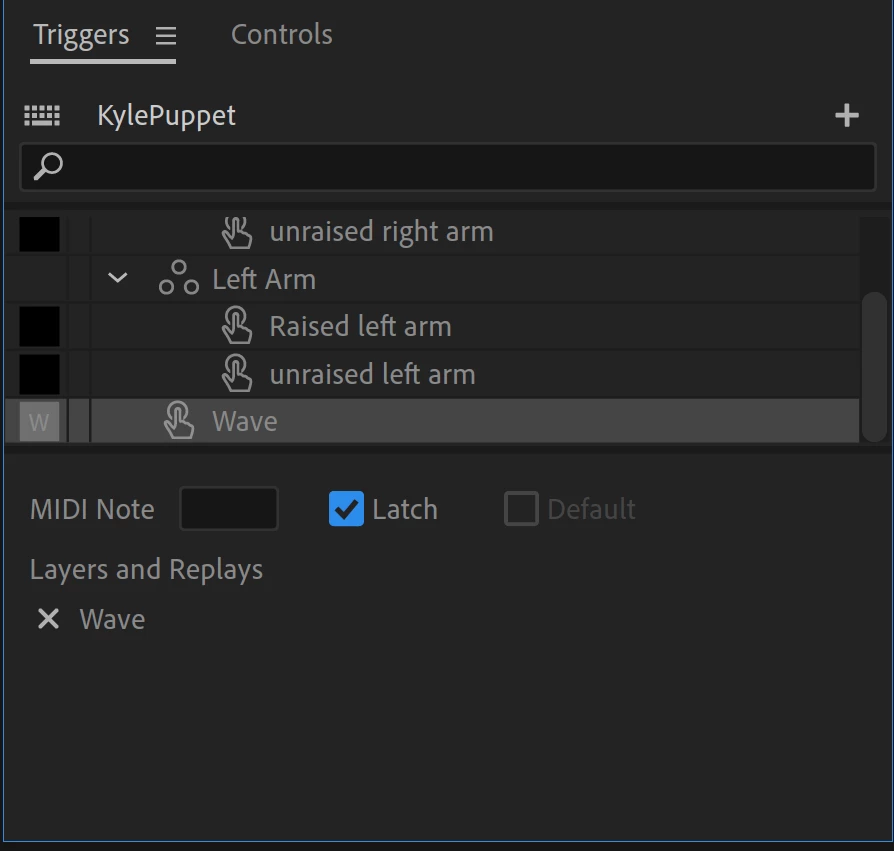
If you want to hold a trigger, you can use "latch." Then the trigger will toggle between the pose and the default position. You can also take advantage of "replay" to set up an animation to play when a trigger is activated. Setting up a replay is easy. Just select the animation in the timeline, right-click and select the option of "create replay" that suits your needs.


1 reply

TheOriginalGC
Community Expert
Community Expert
March 27, 2025

Do you need help creating the hand poses or setting up a swap set?

Participant
March 28, 2025

Yes, please asist me, I was traying to use Cycle layes for diferent hand poses, but there is no option to hold frame in that particalr key pose, only auto reverse play. I used trigger key set but it's looking very jerky for single frame. Then I wanted Cycle layer with extra key frames frame buy there is not manual control to hold at my main key frame, Then Tryed Auto-swap but not showing key frames. Please Help

TheOriginalGC
Community Expert
TheOriginalGCCommunity ExpertCorrect answer
Community Expert
March 28, 2025

If you want to hold a trigger, you can use "latch." Then the trigger will toggle between the pose and the default position. You can also take advantage of "replay" to set up an animation to play when a trigger is activated. Setting up a replay is easy. Just select the animation in the timeline, right-click and select the option of "create replay" that suits your needs.