My understanding of the layer mesh is it shows how Character Animator understands the layer. If Ch needs to distort the mesh (to make an arm bend etc), then it needs to get the mesh correct. A contour mesh follows the outline of the object (which is generally what you want). Sometimes Ch struggles in "auto" mode and falls back to a rectangle. I think I read this happens more if the layer is not contiguous (has unconnected things in it). Rectangle distorts badly (does not look natural).
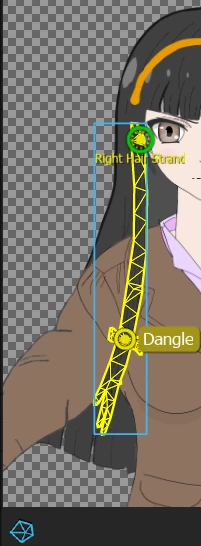
If you click the little mesh icon when rigging or when in a scene preview, you can see what the mesh structure is. For example, here is a good mesh for a strand of hair dangling at the front. See the little mesh icon at the bottom.
Here is a bad mesh (I manually set "Layer Mesh" / "Mesh Shape" to Rectangle for demonstration purposes).
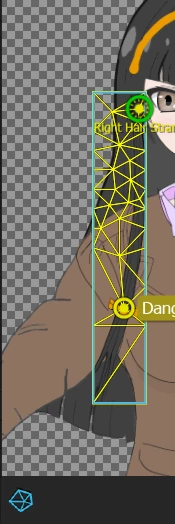
When Ch bends the shape it can look more distorted if the mesh does not align nicely with the object.
Basically you don't need to touch meshes normally - just check to make sure Ch worked out the contour correctly. Oh, and the dangle handles etc need to be inside the mesh for them to work.




 AdChoices