



ILJI
Inspiring
May 19, 2017
Answered

Any way to copy visemes as keyframes to After Effects?

  • May 19, 2017
  • 1 reply
  • 2403 views

I was wondering as Character Animator does this nice computing of lip sync from audio: I guess, the visemes are like keyframes triggering the mouth shapes. Is there a way to copy this information to After Effects to get like toggle hold keyframes, e.g. stating the corresponding key numbers for the 14 mouth shapes?
As Character Animator can benefit from AE's face tracker, it would be nice being able to copy data the other way around as well. 

Thanks!
    This topic has been closed for replies.
    Correct answer CoSA_DaveS

    Strange about the embeds - another try to upload at least the gif again. Thanks!


    Impressive workaround! Almost sorry to say that a new Copy Visemes for After Effects command (right-click on a viseme take bar, just above the visemes themselves) has been added to the recently announced, soon-to-ship, version of Ch (1.1).

    1 reply

    oksamurai
    Community Manager
    Community Manager
    May 19, 2017

    Not yet. But this is a common request we hear at http://adobe.com/go/ch_wish - you're not alone, people want more data coming in from CH to AE. Like even if my handles came in as nulls...man that would be awesome for tracking purposes.

    Anyway, agreed - thanks for the feedback!

    ILJI
    ILJIAuthor
    Inspiring
    June 6, 2017

    As a follow up:
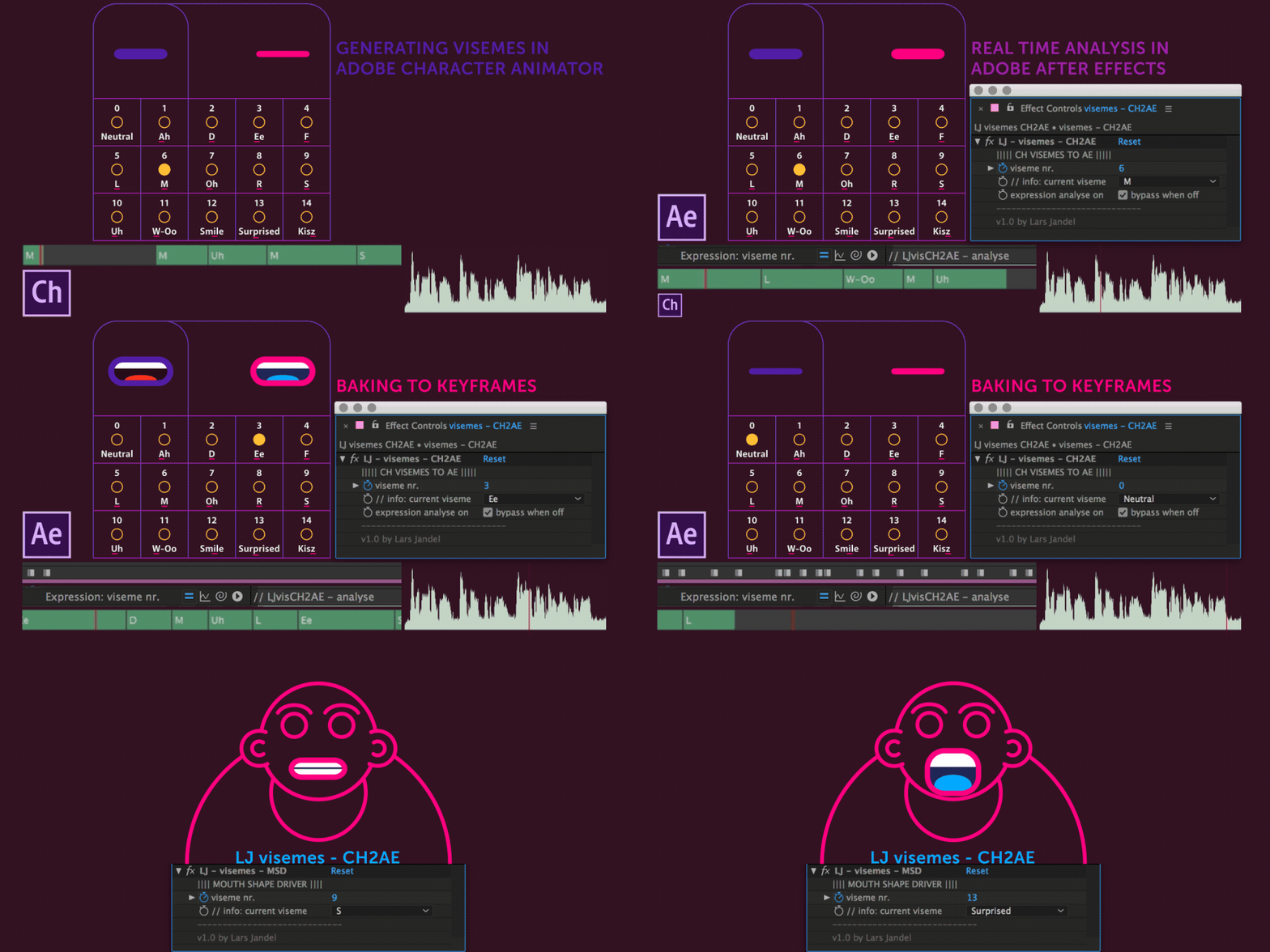
    I created a set up as a work around to create keyframes from visemes, computed in Character Animator.
    It's a simple idea: A special mouth puppet, which triggers little dots at specified positions - in addition to the animated mouth.
    These flashing dots can be read/sampled in AE via an expression, which again can be converted to keyframes.
    So you can implement CH in a workflow to drive the usual time remapped mouth shape layer in AE or use the keyframes to trigger other stuff.  

    I made these preset files - PSD-template for CH + AE file - available for free: https://gum.co/StzUP
    and did a tutorial video well.

    LJ visemes - CH2AE - tutorial from Lars Jandel on Vimeo.


    [Mod note: For some reason the mod queue wasn't allowing this post to go through with the embedded imagry that was in it. I removed the two embeds and it finally went through. Looks like the links are fine, but the embedded video was a problem - Jon Fritz II]

    ILJI
    ILJIAuthor
    Inspiring
    October 8, 2017

    Impressive workaround! Almost sorry to say that a new Copy Visemes for After Effects command (right-click on a viseme take bar, just above the visemes themselves) has been added to the recently announced, soon-to-ship, version of Ch (1.1).


    Thanks! But of course all users are happy, when a feature request gets properly implemented and a right-click to do the whole thing is much more convenient than my workaround - keep new features coming - cheers!