Participating Frequently
November 20, 2018
Answered

Bicycle animation

  • November 20, 2018
  • 1 reply
  • 6452 views

I'm wondering whether anyone has any ideas regarding animating a character riding a bike. I know this can be done in After Effects (or Animate even...), but seems like it would be a nice thing to do in Character Animator. I'm thinking about bringing in a puppet for the bike, and applying walk behaviour to a character to get the leg movement.

    This topic has been closed for replies.
    Correct answer alank99101739

    Thinking more, I am not sure my idea above will work. Children don't control parent positions. So to have a rotating disk controlling the feet, you need to start with that at the top. Hmm. Maybe have a rotating disk at the top, then a child of that is the puppet attached at the feet to the spinning disk (so the feet go around in a circle. Then a pin on the rest of the body so that does not move.... My brain hurts!

    But note, its not that hard to do cycle layers in Illustrator moving the artwork around. There is a "puppet tool" now that allows you to distort in the same way CH does, so you can clone say 5 copies of the legs and use that tool to adjust each layer individually.
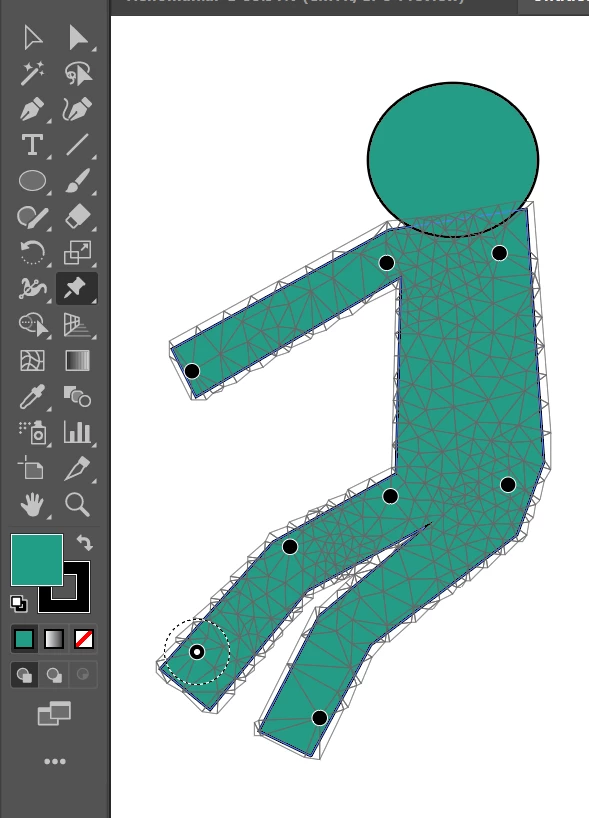
    You can put pins around the place then drag them to distort the legs etc.
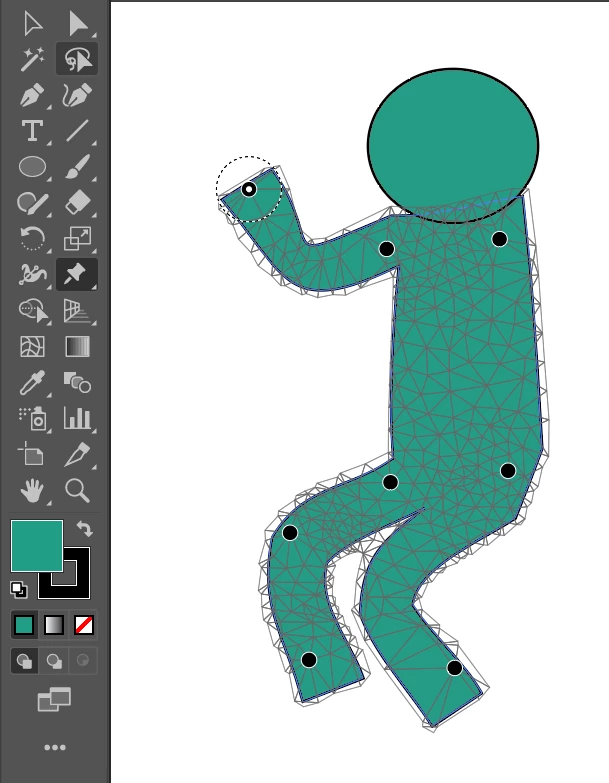
    It might need some fiddling to get right, but the puppet tool seems pretty useful.


    Ok, want some cringe factor! ;-)
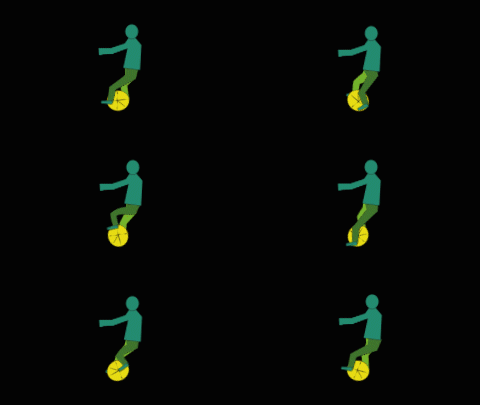
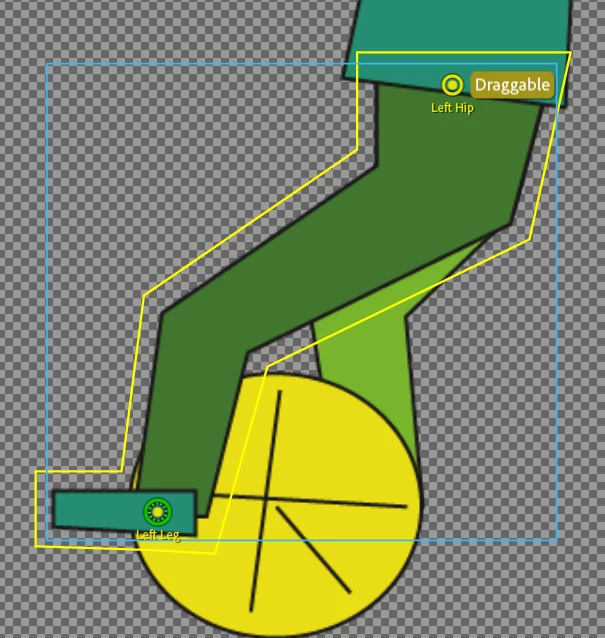
    The puppet structure. The wheel is a top level layer. The legs are attached using Hinge so the feet stay flat (pretty flat anyway). The body is also independent attached with hinge so the body does not fly around in cycles with the wheel. The wheel has a Transform behavior attached which is used to rotate the wheel.
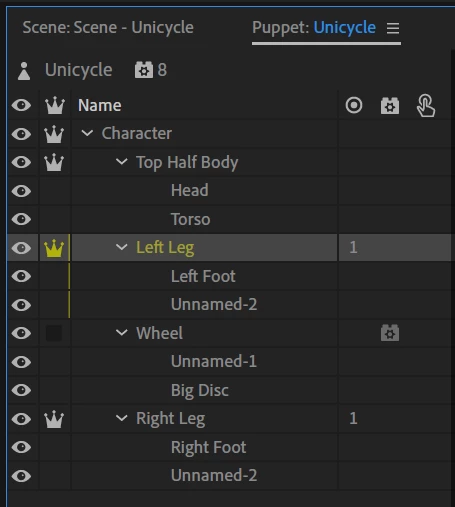
    The problem is the top of the legs cannot be attached to the torso. Pins etc are all ignored as far as I can tell. So the top of the legs move around in the same circle as the feet - they don't stay connected to the body.

    BUT (here is the cringe part), you can put a dragger on the top of the legs and record drags while the wheel is moving to manually keep the top of the legs near the body. You just have to line up the two recordings carefully.
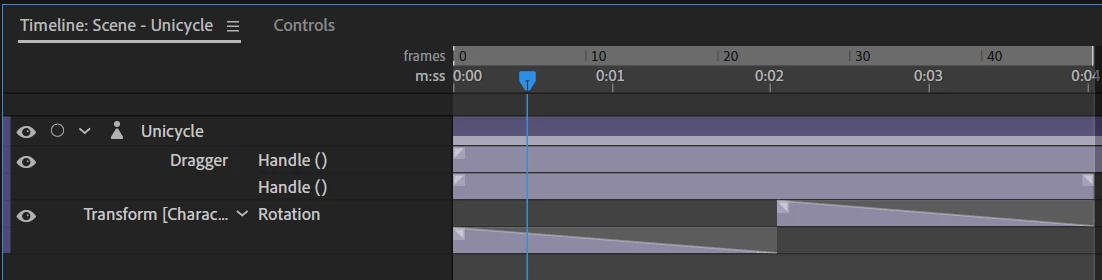
    So there is a blend to turn the wheel around smoothly from 0 to 360 degrees, then two manual draggers are recorded separately.
    I don't think this is a good solution, but it was the best I can come up with. CH only seems to allow one point to have a parent of layers, so you cannot have two separate parts of the puppet automatically get dragged in different directions that I can see. E.g. if feet are attached to parent, you cannot have a magnet somewhere else trying to attach a different part of the puppet.

    (And yes, I should have put sticks on the legs to keep them straighter.)

    1 reply

    alank99101739
    Brainiac
    November 20, 2018

    There may be some clever way, but it does not come to mind myself. The most reliable approach is to use Cycle Layers and draw several feet positions on pedals etc.

    The reason is today I cannot think of a way to have two parents (e.g. the center of the pedals that goes around and the legs of the puppet attached to the body) the stay connected. Magnets (new to v2) get close, but not quite. E.g. you cannot do a rope between two objects.

    The best I can think of to reduce overall effort is similar to a basket ball Character KJerry​ did in a recent post. Put a magnet on the pedals of the bike and the characters foot. But normally the character needs to then be a child in the artwork, not a feel standing character.

    What you could try is a separate puppet with bike and character combined. The top half of the character and the bike are drawn together (torso sitting on bike seat). The feet and legs hinge joint to the pedals, then try to use a pin or dragger to attach the top of the legs to the seat of the bike?

    Dunno. No easy way comes to mind. Cycle layers is most reliable - just draw several puppet positions by hand while peddling.

    KJerryK
    Brainiac
    November 20, 2018

    I tried the transform rotation and frame takes to get this for the bicycle. Still working on the rider.

    alank99101739
    alank99101739Correct answer
    Brainiac
    November 21, 2018

    Thinking more, I am not sure my idea above will work. Children don't control parent positions. So to have a rotating disk controlling the feet, you need to start with that at the top. Hmm. Maybe have a rotating disk at the top, then a child of that is the puppet attached at the feet to the spinning disk (so the feet go around in a circle. Then a pin on the rest of the body so that does not move.... My brain hurts!

    But note, its not that hard to do cycle layers in Illustrator moving the artwork around. There is a "puppet tool" now that allows you to distort in the same way CH does, so you can clone say 5 copies of the legs and use that tool to adjust each layer individually.

    You can put pins around the place then drag them to distort the legs etc.

    It might need some fiddling to get right, but the puppet tool seems pretty useful.


    Ok, want some cringe factor! ;-)

    The puppet structure. The wheel is a top level layer. The legs are attached using Hinge so the feet stay flat (pretty flat anyway). The body is also independent attached with hinge so the body does not fly around in cycles with the wheel. The wheel has a Transform behavior attached which is used to rotate the wheel.

    The problem is the top of the legs cannot be attached to the torso. Pins etc are all ignored as far as I can tell. So the top of the legs move around in the same circle as the feet - they don't stay connected to the body.

    BUT (here is the cringe part), you can put a dragger on the top of the legs and record drags while the wheel is moving to manually keep the top of the legs near the body. You just have to line up the two recordings carefully.

    So there is a blend to turn the wheel around smoothly from 0 to 360 degrees, then two manual draggers are recorded separately.

    I don't think this is a good solution, but it was the best I can come up with. CH only seems to allow one point to have a parent of layers, so you cannot have two separate parts of the puppet automatically get dragged in different directions that I can see. E.g. if feet are attached to parent, you cannot have a magnet somewhere else trying to attach a different part of the puppet.

    (And yes, I should have put sticks on the legs to keep them straighter.)

