


New Participant
May 14, 2021
Answered

Character Eyes Not Parallaxing

  • May 14, 2021
  • 3 replies
  • 1732 views

I'm having trouble with the parallax behavior. I've followed OkaySamurai's tutorial and referenced his Parallax puppet, but for some reason while the nose, eyebrows, and mouth parallax, the eye groups are not impacted by the behavior. Am I maybe missing a tag somewhere? Thanks in advance for the help! 
This topic has been closed for replies.
Correct answer k_oshiro

I translated Japanese into English with translation software.


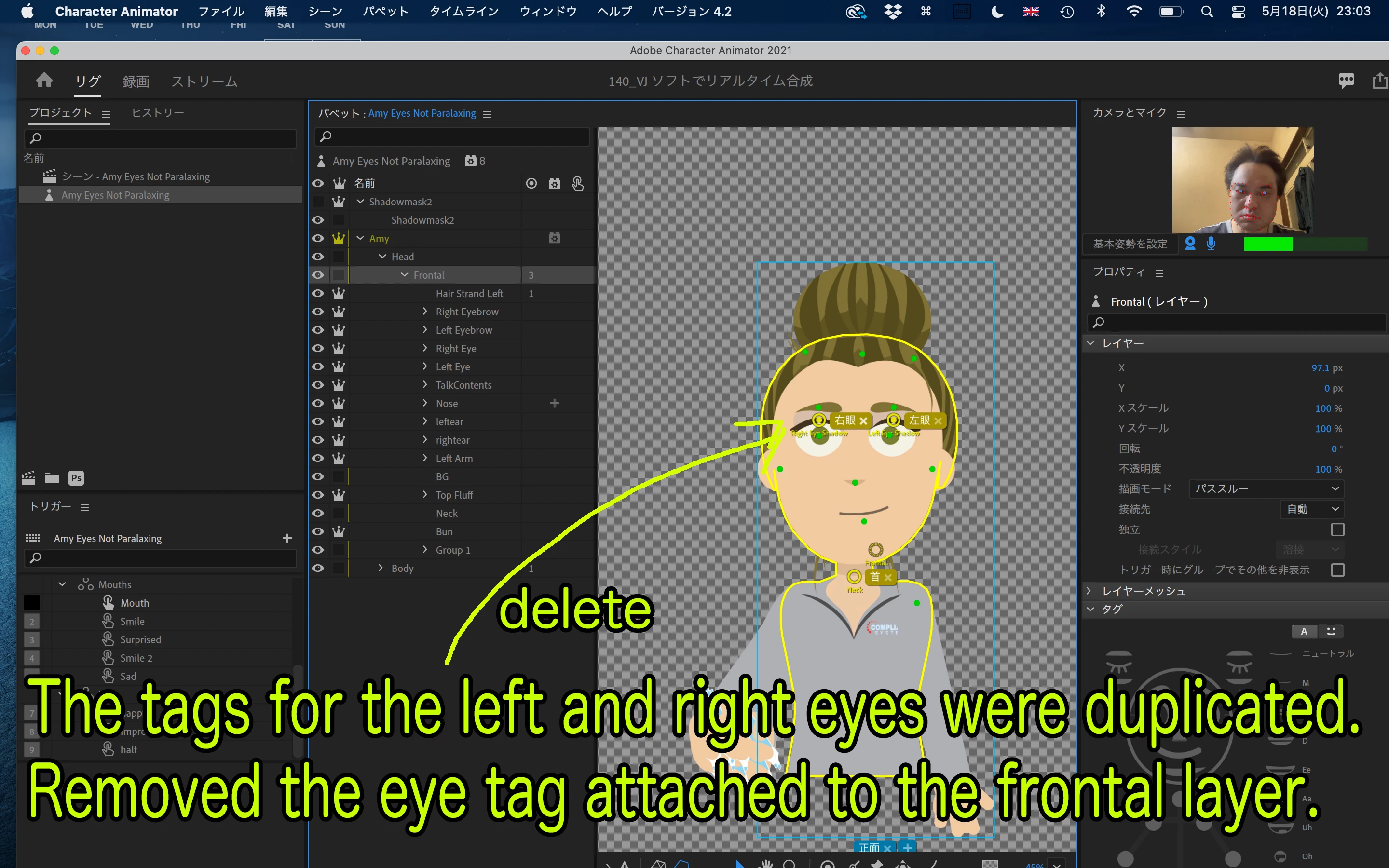
Your puppet had overlapping left and right eye tags.
Removed the eye tag attached to the frontal layer.


Fixed puppet


https://www.dropbox.com/s/wcry644qr85gj20/edit_Amy%20Eyes%20Not%20Paralaxing.puppet?dl=0


Commentary YouTube (Japanese)


https://youtu.be/NKsdBL10Bbs


Thank you.

3 replies

mauricionsantos
New Participant
October 6, 2022

To solve this, I did a simple thing: activated INDEPENDENT checkbox in each eye layer properties. 


k_oshiro
k_oshiroCorrect answer
Community Expert
May 18, 2021

I translated Japanese into English with translation software.


Your puppet had overlapping left and right eye tags.
Removed the eye tag attached to the frontal layer.


Fixed puppet


https://www.dropbox.com/s/wcry644qr85gj20/edit_Amy%20Eyes%20Not%20Paralaxing.puppet?dl=0


Commentary YouTube (Japanese)


https://youtu.be/NKsdBL10Bbs


Thank you.

New Participant
May 18, 2021

Ah thank you so much! The video was also very helpful. Arigato gozaimasu! 

k_oshiro
Community Expert
May 15, 2021

I used translation software to convert Japanese into English.

The attached image
Amy Record 2.jpg
It looks like only the two eyes are not moving.
Normally, if you make the whole eye independent, it should move.
However, looking at Amy Rig 2.jpg, you have both eyes independent.
This is strange.
If possible, please let me share your puppet on Dropbox or GoogIeDrive
If I see it in detail, I might be able to figure out why.
Thank you.

New Participant
May 18, 2021