


Participating Frequently
December 31, 2021
Answered

Is it possible to have the upper arm behind the torso and lower in front of the torso?

  • December 31, 2021
  • 3 replies
  • 1717 views

Hi!

I'm having trouble rigging my character's arms. 

I have a character of which the arms don't look good when put above the torso layer:
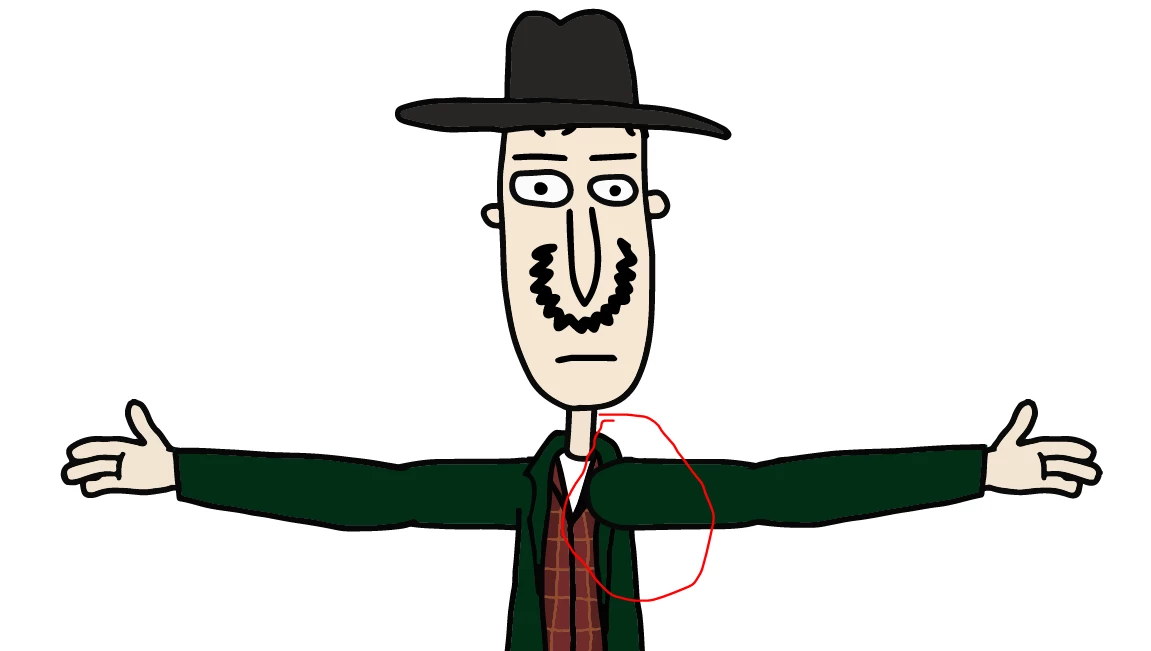
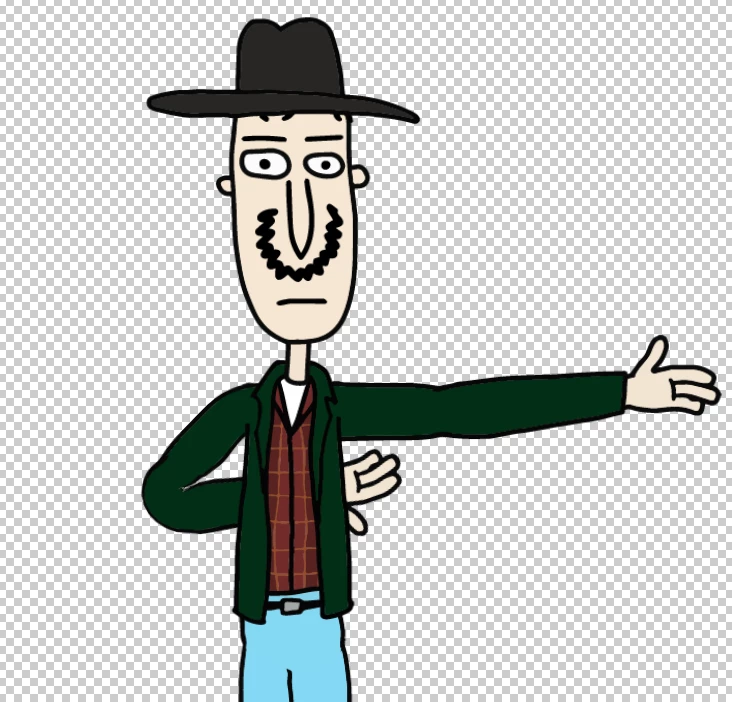
The easy solution would be to put the arm behind the torso, but that limits my expressivity - for example, I want my character to cross arms, but arms always go behind the back now:
 

Ideally, what I want is this:
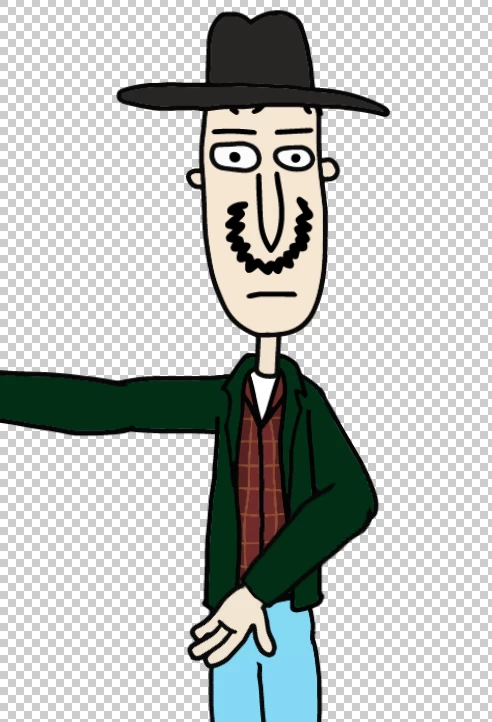
 But thus far I wasn't able to achieve it. It seems that no matter what I do, since the arm is spread out in two independent layers with no common parent, Character Animator does not treat it as one arm.


The layer structure is:


+Upper Left Arm

.. Upper Left Arm Artwork

Torso

+Lower Left Arm

.. Lower Left Arm Artwork

..Palm Artwork


Is there any way around this?


This topic has been closed for replies.
Correct answer k_oshiro

I translated Japanese into English.

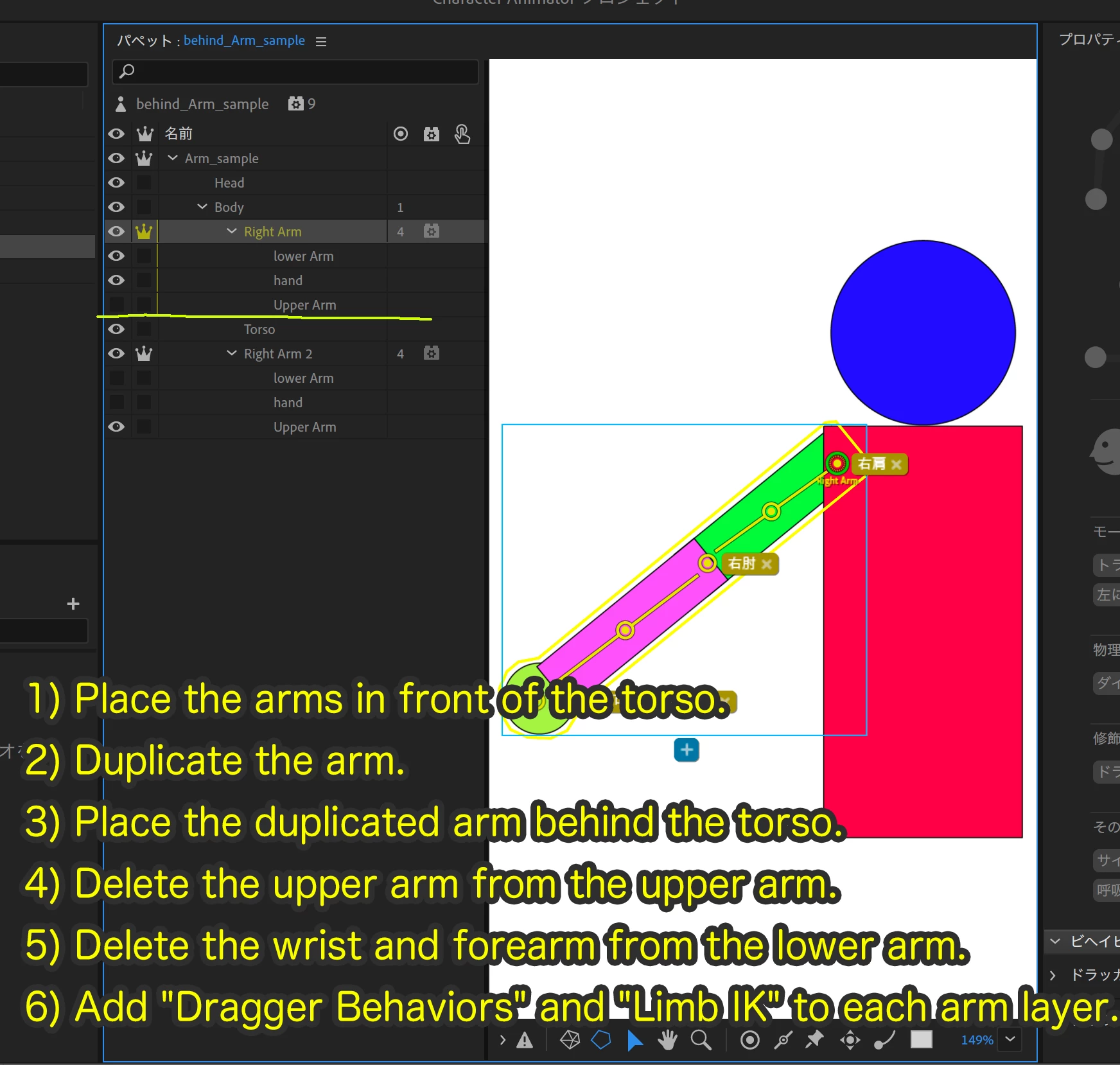
This technique is a bit difficult, but possible.

1) Place the arms in front of the torso.
2) Duplicate the arm.
3) Place the duplicated arm behind the torso.
4) Delete the upper arm from the upper arm.
5) Delete the wrist and forearm from the lower arm.
6) Add "Dragger Behaviors" and "Limb IK" to each arm layer.

You can find the explanation on YouTube in Japanese.

https://youtu.be/-anUlzgBIB0

You can also download sample puppets from Dropbox.

https://www.dropbox.com/s/y2ycoomys95l9fk/behind_Arm_sample.puppet?dl=0


Thank you.

3 replies

k_oshiro
Community Expert
k_oshiroCommunity ExpertCorrect answer
Community Expert
December 31, 2021

I translated Japanese into English.

This technique is a bit difficult, but possible.

1) Place the arms in front of the torso.
2) Duplicate the arm.
3) Place the duplicated arm behind the torso.
4) Delete the upper arm from the upper arm.
5) Delete the wrist and forearm from the lower arm.
6) Add "Dragger Behaviors" and "Limb IK" to each arm layer.

You can find the explanation on YouTube in Japanese.

https://youtu.be/-anUlzgBIB0

You can also download sample puppets from Dropbox.

https://www.dropbox.com/s/y2ycoomys95l9fk/behind_Arm_sample.puppet?dl=0


Thank you.

k_oshiro(AdobeCommunityExpert)
stava1Author
Participating Frequently
January 22, 2022

Thanks!

This worked perfectly for one arm, but I can't get it to work with 2 arms (looks like the dragger behaviors are making a mess - if the arms move, they move together). Do you know how to achieve this with 2 arms?

stava1Author
Participating Frequently
January 22, 2022

Ah, I think I get it now, when each hand has its own dragger, I can only animate it when it's the only dragger that's on "record" mode. Then it works.

TheOriginalGC
Community Expert
Community Expert
December 31, 2021

The most common way to achieve this is to have two complete arms (both upper arm and lower arm), with one set in front and one set behind. Put all of them in a swap set, using the trigger to switch between the front set and the rear set.

stava1Author
Participating Frequently
December 31, 2021

I wasn't able to acheive what I want with triggers: What you suggest allows me to switch between front/rear hands, but what I want to create is a "hybrid" hand where the upper part is behind the torso and the lower part is in front of the torso.

TheOriginalGC
Community Expert
Community Expert
December 31, 2021

All I can suggest is putting the arm in front and creating a mask that keeps the upper arm from appearing in front of the torso.

Smizzlez23
Inspiring
December 31, 2021

U can try swap set triggers, maybe.


Have your regular layered +arms in front of the body, the have the other set of +arms behind the body, and use triggers to differentiate the arms u want during performing.