


bekag2985108
Participant
August 31, 2020
Answered

libgit2 error

  • August 31, 2020
  • 4 replies
  • 3577 views

please help!! 
when I open my project, Im gettitng this error:
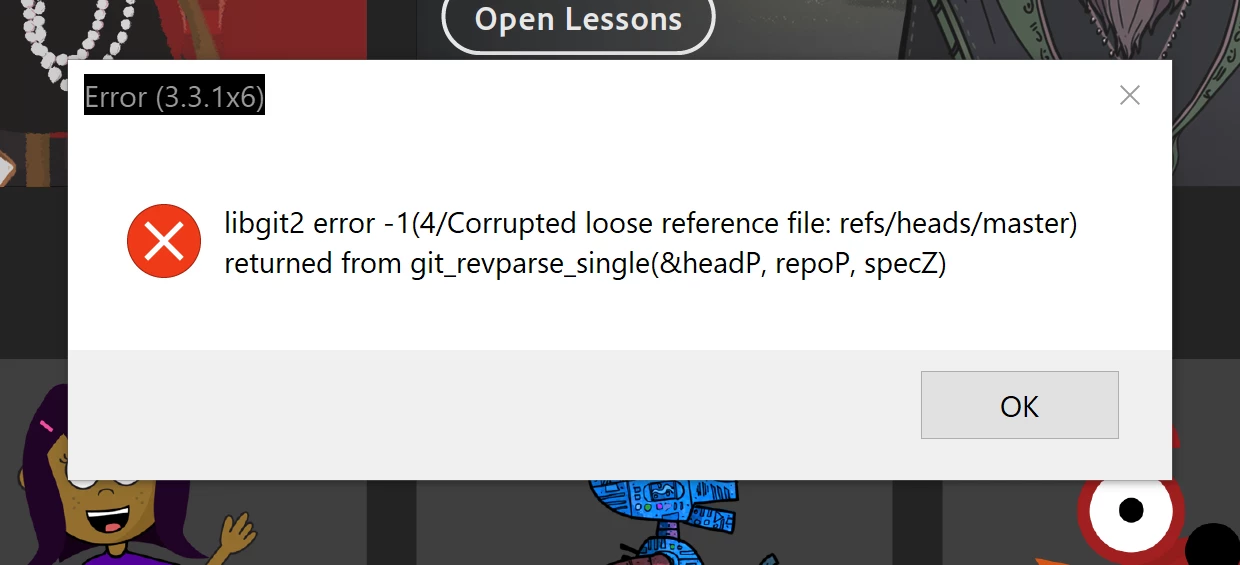
 

i had many puppets and other files in the project and it's very important for me to open it 😞

 

This topic has been closed for replies.
Correct answer dtull-adobe

If you open the file Ch Data/repo.noindex/refs/heads/master in a text editor and paste in the below string of letters/numbers and save it, the project should open again: 

0f99058b0912dd880db2d7a49910c99fdba6274e


DT


P.S. You may still want to look for other explicit or automatic save points in the history panel, but this one will at least get the project to open again (it was the most recent I found).

4 replies

Participant
November 28, 2022

have same issue but the only files ing folder are this 


CoSA_DaveS
Adobe Employee
Adobe Employee
November 29, 2022

Starting with version 4.0 we changed the project file format to fix almost all situations where this type of corruption can happen. What version of Ch are you using? OS version? Please share a screen shot of your exact errror.

Participant
April 8, 2023

Windows 11 Pro, OS build 22621.1413

All I want to do is save a project on my external USB drive.  I have git on my system, but there is no repository in this drive.

Participant
May 11, 2021

 Similar issue, though the solution mentioned doesn't work. Help please!!

Community Manager
May 11, 2021

Yes, the solution on this thread (the particular string of characters for that master file) will probably never work again, but if you want to zip up the Ch Data/repo.noindex folder and private message me a link to download it, I can probably help diagnose your issue and see if I can repair the project.


Dan Tull

Character Animator Team

Participant
January 2, 2023

Hello, I know you posted this reply a long time ago but I am having the same issue. I have attached a link to download my repo.noindex folder. Would you be able to take a look and attempt to repair the project? I am so worried that all the work I put in is gone. Also, I am using CH version 22.5. I can't upgrade to the new version because my hardware is outdated. If I do get new hardware and get the newest version of CH, will these old project files open? Thank you so much for your time. Here is the link:

https://drive.google.com/file/d/14mbSr42HDY8XBkRQtK9h-kI1Ghf0MNeA/view?usp=sharing 

bekag2985108
Participant
August 31, 2020

thank you so much Dan! 
could you tell me what causes this error? how can i protect my project to avoid this again?

Community Manager
August 31, 2020

Usually this kind of error only happens if the project does not get closed cleanly. It can sometimes happen if there's a power outage or other abrupt closure of the project. It could also happen if the project were on an external drive that was unplugged without unmounting it or (in rare cases) by an application crash, though usually it's a filesystem flushiing issue (like the power outage/disconnection cases).


DT

Community Manager
August 31, 2020

Hi, I'm a member of the Character Animator team. If you can post (or direct message) me a zip file containing the "Ch Data/repo.noindex" subfolder of your project, I may be able to help get it back in working order.


Dan Tull

Community Manager
August 31, 2020

Actually wait, I see you sent me a direct message already. I'll download that and take a look and get back to you soon.


DT

dtull-adobeCommunity ManagerCorrect answer
Community Manager
August 31, 2020

If you open the file Ch Data/repo.noindex/refs/heads/master in a text editor and paste in the below string of letters/numbers and save it, the project should open again: 

0f99058b0912dd880db2d7a49910c99fdba6274e


DT


P.S. You may still want to look for other explicit or automatic save points in the history panel, but this one will at least get the project to open again (it was the most recent I found).