

Answered
Make character walk into a different direction
Hi guys.
I made a few characters and they can walk from left to right with the arrowkeys.
but how can i make him walk the other way?
greetings, cris

Hi guys.
I made a few characters and they can walk from left to right with the arrowkeys.
but how can i make him walk the other way?
greetings, cris
Thanks guys for the quick answers.
i found my problem. and got another one. now it wont walk at all
so this is what maddys "views and handels" look like in CH
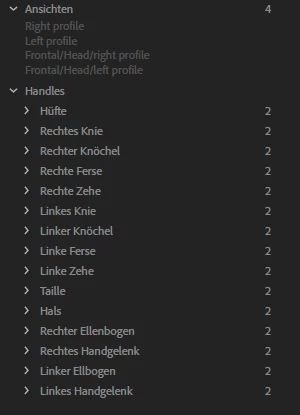
and this is what mine looks like
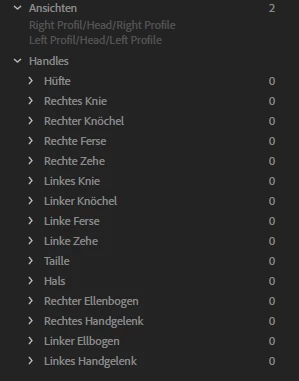
its seems like CH does not recognize my handels somehow.
i did create them and tagged them correctly i guess.
i'll upload my file tomorrow.
greetings
I think you are missing the tags on the top level profiles... oh! See you called them "Right Profil" (no "e" on the end). So that layer will not have been autotagged. Instead if found your head profiles and thought they were your body profiles! Then it looked for all the handles under the profile (which is Left Profil/Head/Left Profile in your case - a part of the head). Your handles are not under head (of course) so CH did not find them.
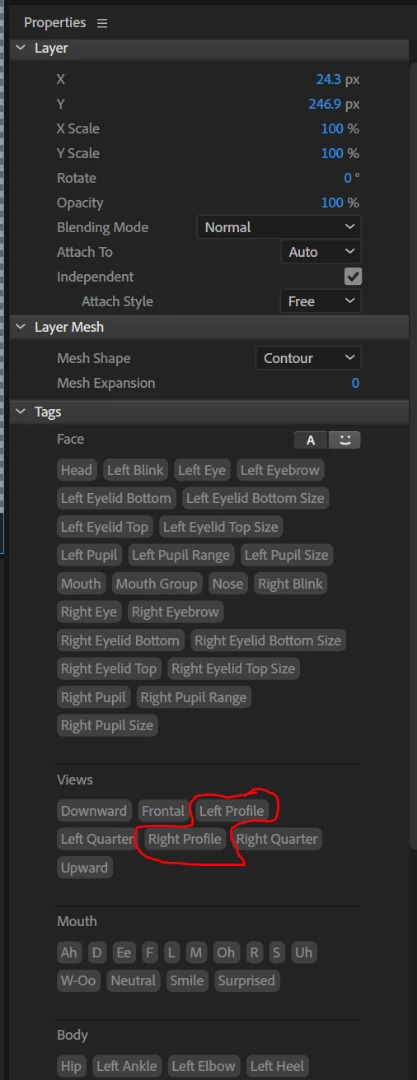
If you tag your "Right Profil" layer near the top with the "Right Profile" tag (in the Tags section of the puppet properties panel) and do the same for the left profile it will hopefully start working. (Or rename your layers so the autotagging kicks in - but that may loose any rigging under those layers.)
Already have an account? Login
Enter your E-mail address. We'll send you an e-mail with instructions to reset your password.
 AdChoices