SharonfromMD
Inspiring
July 8, 2018
Answered

Midi Keyboard-uses and "How To"

  • July 8, 2018
  • 1 reply
  • 1963 views

I'm actually a pianist with access to a lot of midi keyboards, and many years of practicing, so I have quite a lot of co-ordination in my fingers. I'm fairly new to CA and am learning to create movements to my children's songs that I've composed.

My questions-1. What are the advantages of using a midi-keyboard vs. a regular computer keyboard or a stream deck?

2. How do you program a midi keyboard to make movements, etc.?

3. What size of midi-keyboard is optimal?  All of mine are 60+ notes and large.

Thanks for all the information.
This topic has been closed for replies.
Correct answer KJerryK

Good questions -- I'll try some answers

1. The advantage of using a midi keyboard is that you can generate behavior triggers, and also tones (music) if desired.

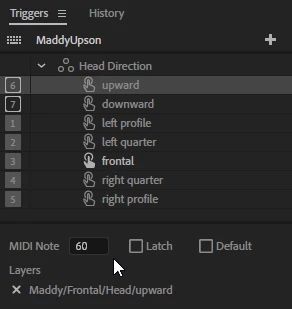
2. Each key on a midi keyboard sends a trigger signal, so when a triggered item is selected in the trigger panel, and a midi value is added  at the bottom, whenever that midi value is generated by the midi keyboard, or by recorded audio/midi file, that triggered behavior is activated. Also midi controllers have dials and sliders which can control behavior parameters.

   or 

3. There are small midi controllers with only two sets of keys, and options to choose where those sets are on a full keyboard. These also have the sliders and dials.

4. If you want to use the midi controls while live recording, good coordination is certainly a plus. Midi signals can also be pre-recorded in music apps, to sync with the music.

1 reply

SharonfromMD
Inspiring
July 8, 2018

Also-does the fact I have a lot of co-ordination make it any easier to control the puppets?

KJerryK
KJerryKCorrect answer
Legend
July 8, 2018

Good questions -- I'll try some answers

1. The advantage of using a midi keyboard is that you can generate behavior triggers, and also tones (music) if desired.

2. Each key on a midi keyboard sends a trigger signal, so when a triggered item is selected in the trigger panel, and a midi value is added  at the bottom, whenever that midi value is generated by the midi keyboard, or by recorded audio/midi file, that triggered behavior is activated. Also midi controllers have dials and sliders which can control behavior parameters.

   or 

3. There are small midi controllers with only two sets of keys, and options to choose where those sets are on a full keyboard. These also have the sliders and dials.

4. If you want to use the midi controls while live recording, good coordination is certainly a plus. Midi signals can also be pre-recorded in music apps, to sync with the music.

alank99101739
Legend
July 9, 2018

I had always thought it was just in case you ran out of keys on your keyboard - but hooking up a sound effect to a puppet cycle layer as well sounds useful, especially for live performances. I had not thought of sliders - are there midi joysticks? So can use a joystick or trackpad to adjust X and Y at the same time? That would be nice!