



Martinnel
Inspiring
February 28, 2018
Answered

"WARNING: Is project…already open?"

  • February 28, 2018
  • 1 reply
  • 2800 views

I've just experienced my first series of crashes in Character Animator. I'm really impressed I haven't had any sooner.

Upon restarting after the first (and subsequent) crash(es), I got this message.
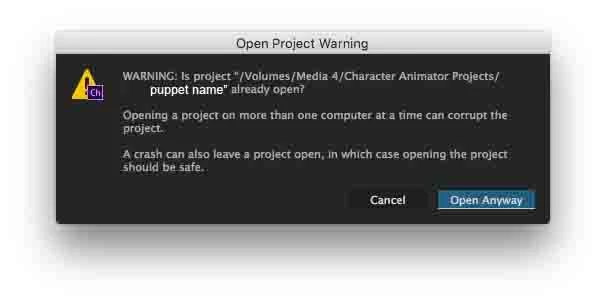
I can't find any way of closing this project and it keeps crashing shortly after open. I've done a full computer restart and I've even managed to open the project long enough to then formally quit it— would think that would close the project—and I still keep crashing on subsequent opens.

Any ideas anyone?

Martin

    This topic has been closed for replies.
    Correct answer alank99101739

    I would back up the project directory first, but the ”Ch Data” temp.noindex directories can be deleted - they will be rebuilt. If something in them is causing the problem that might help.

    Otherwise “restore from backup” or “find a friendly Adobe staff member on the forums” - they sometimes will look into a corrupted database to work out what went wrong (and manually fix it for you). Nice people! ;-)

    I frequently have it hang needing me to restart, but if it crashes shortly afterwards that is a problem.

    1 reply

    alank99101739
    alank99101739Correct answer
    Legend
    February 28, 2018

    I would back up the project directory first, but the ”Ch Data” temp.noindex directories can be deleted - they will be rebuilt. If something in them is causing the problem that might help.

    Otherwise “restore from backup” or “find a friendly Adobe staff member on the forums” - they sometimes will look into a corrupted database to work out what went wrong (and manually fix it for you). Nice people! ;-)

    I frequently have it hang needing me to restart, but if it crashes shortly afterwards that is a problem.

    Martinnel
    MartinnelAuthor
    Inspiring
    March 2, 2018

    Thanks Alan. I've been buried under a non-Ch related project. I will try this.

    Martin

    DanTull
    Adobe Employee
    Adobe Employee
    March 2, 2018

    Dan,

    Here's an update. After posting this the other night I still needed to complete a project. So, as best I recall, I managed to keep the project (project A) open long enough to export the relevant puppet. I then started a new project (project B), imported that puppet and recorded my last scene—the other necessary scenes had already been exported. I don't remember any crashes on the new project.

    OK, so today I opened up Ch and it automatically opened project B. The beachball was spinning, but I clicked Rig anyway to get it off Record as quickly as possible. Even with a reasonably fresh computer launch and no other particularly demanding apps running, this took an atypically long time. I mention this because this project does, essentially, have the same puppet I was working with in Project A.

    But everything seemed fine for a while. I then tried Project A. It also was fine for a while, but, just now, I attempted to open a scene and Ch quit. I pasted the Apple-generated Problem Report into a TextEdit document, but I won't clutter this site with it unless you ask for it.

    Is there a size limit on Ch projects? Project A has gotten to be 2.6 GB. Project B, by comparison, is 222 MB. A lot of the contents are early prototypes as I was learning the software (I still am, but now, I can at least walk). I don't want to throw any of the early puppets or scenes away and I don't see a means of migrating scenes to a new project.

    Dan, if you'd like to take a look, I'd be happy to share. Would I simply zip the project folder? And, given the size and also my desire not to make it public, how would I send it?

    Martin


    I pasted the Apple-generated Problem Report into a TextEdit document, but I won't clutter this site with it unless you ask for it.

    The Apple Crash Report content actually might be a good place to start (and smaller to post). It may give me some good initial clues.

    Is there a size limit on Ch projects? Project A has gotten to be 2.6 GB. Project B, by comparison, is 222 MB.

    A project will get slow/unwieldy well before any hard limits are reached. Out of curiosity, where is the size concentrated? In particular is it in Ch Data or Ch Media and within Ch Data is it repo.noindex or temp.noindex?

    I'd guess that over a long period temp.noindex could get fairly large (aside from disk usage, this is fairly harmless and as noted in alank's post above, this data can be deleted and it will regenerate as needed). Depending on what you're doing, the Ch Media folder can get fairly large as well with artwork and recordings. The Ch Data/repo.noindex folder is probably the least likely to get really big, but given enough time it can grow as well. Size doesn't necessarily constitute a problem there either, but because the undo system is persistent, long periods of use will cause it to get bigger.

    I don't see a means of migrating scenes to a new project.

    You can import a whole project into another one to migrate scenes. There's no equivalent to import/export puppet for a single scene, but you can use Save As to make a copy, delete the scenes you don't want and then import the resulting (stripped down) project into another one.

    One thing to note is that Save As leaves behind both the temp.noindex data and historical undo steps, so it has the side effect of compacting the project substantially while leaving the current state of all items (scenes/puppets) in the project intact.

    The longer time opening project B is probably due to needing to regenerate the caches in temp.noindex in order to render a scene. Once that regeneration happens, it'll probably be quicker again.

    DT