


Answered
Rearranging behavior in the behavior panel
Is it possible to rearrange the behavior in the behavior panel?

Is it possible to rearrange the behavior in the behavior panel?
No, sorry. This is a good idea, though, and something I've wanted to do more than once. You can request it on the Character Animator UserVoice site: https://adobe-video.uservoice.com/forums/911317-character-animator
If you file a feature request you should post the link back here so others who come across this post will add their vote to it (I'll do it too!).
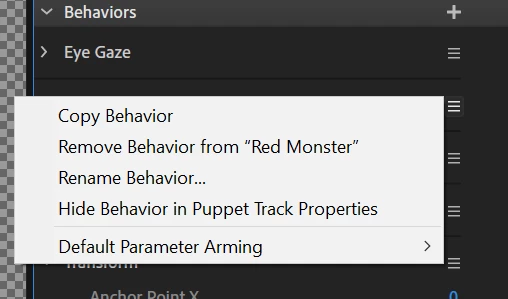
Lastly, if one of the reasons you want to reorder behaviors is to hide certain ones that are necessary for function, but not animating, you can click the flyout (hamburger) menu next to any behavior and choose "Hide Behavior in Puppet Track Properties." And if you want to get rid of one all together the same menu has an option called "Remove Behavior from "[Puppet Name]." This option is good practice to do anyway to prevent unused behaviors from bogging down your puppet performance.
Already have an account? Login
Enter your E-mail address. We'll send you an e-mail with instructions to reset your password.
 AdChoices