


Participating Frequently
October 22, 2018
Answered

Walk cycle error help

  • October 22, 2018
  • 4 replies
  • 797 views

Hi all,

I'm having some problems with a walk cycle. I've created a seated character and am trying to use the walk cycle as profiles of him looking left and right.

The model previously worked well however for some reason the trigger to look to the characters left isn't working the way I want it to.

Jerry facing phone 3.puppet - Google Drive

Here is the puppet.

When pressing the left arrow key - the character moves in the way I want. However when pressing the right arrow, the frontal view doesn't disappear in the same manner as the other direction?

Would love some help to spot why this problem is apparent! Alternatively - is there a better method to achieve this turning?

Thanks Adobe community!
    This topic has been closed for replies.
    Correct answer alank99101739

    I found two strange things in the puppet you shared if you wanted to stick with "walk" - the "Right Profile" layer was not hidden, plus there was an extra "Right Profile" tag on the body under the Right Profile layer - it picked that one instead of the parent. Removing that extra tag made it work.

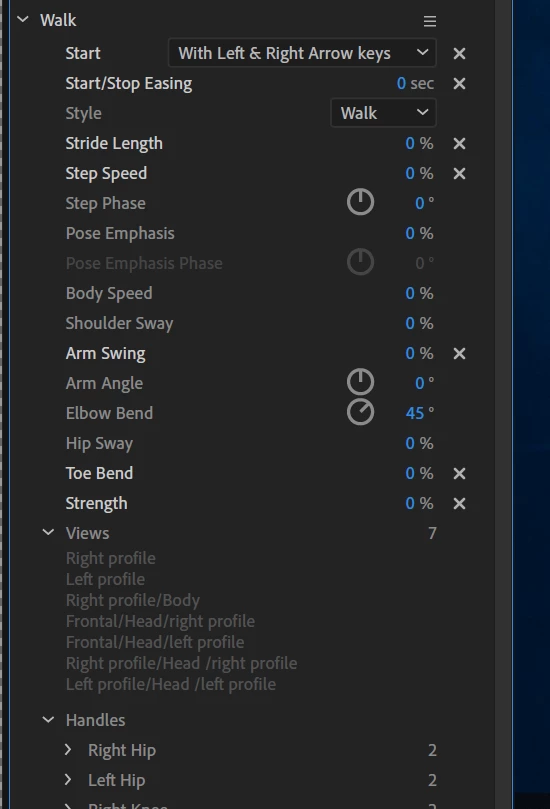
    How I debugged it was to use the "Views" of Walk in the properties panel.

    See there is a Right Profile/Body? Removing that tag cleared it up.

    So now you can use Walk or a Swap Set! (I would have used a swapset as well personally, but using arrows for profiles is easy to remember as well.)

    4 replies

    Participating Frequently
    October 23, 2018

    Thanks for the contribution too KJerryK!

    I recorded a scene and noticed that the characters body disappeared when rendered out. Was looking to recover the recorded session and fixing the walk function did it well for now!

    Likely going to swap to a Swap Set once I get this scene out of the way.

    Really appreciate the help on this one!

    Participating Frequently
    October 23, 2018

    Thanks for trouble shooting this one alank!

    KJerryK
    Brainiac
    October 22, 2018

    Here is what I get with this swap set

    alank99101739
    alank99101739Correct answer
    Brainiac
    October 22, 2018

    I found two strange things in the puppet you shared if you wanted to stick with "walk" - the "Right Profile" layer was not hidden, plus there was an extra "Right Profile" tag on the body under the Right Profile layer - it picked that one instead of the parent. Removing that extra tag made it work.

    How I debugged it was to use the "Views" of Walk in the properties panel.

    See there is a Right Profile/Body? Removing that tag cleared it up.

    So now you can use Walk or a Swap Set! (I would have used a swapset as well personally, but using arrows for profiles is easy to remember as well.)

    KJerryK
    Brainiac
    October 22, 2018

    That's an interesting use of the walk behavior, but I would use a swap set instead. I removed the walk and added a swap set for the three views. That seems to work.