


Aureliu
Inspiring
July 27, 2017
Question

Creative Cloud is using 40% of my CPU

  • July 27, 2017
  • 5 replies
  • 32798 views

Either Creative cloud (32 Bit) or Adobe Genuine Software Integrity Service is using my CPU all the time and I don't know why.

This is my situation for about a year now.

It is not 100% of cpu. But my hardware fans are making noise.

I created a .bat to kill all Creative Cloud processes, and when killing all, the fans instantly stop spinning.

But sooner or later Creative Cloud restarts itself.
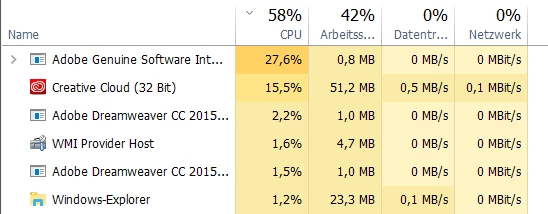
Anyone else is having this problem? Is this a normal behaviour?

5 replies

New Participant
May 8, 2023

Since I paid for Photoshop my computer slowed to a crawl.  I uninstalled all Adobe stuff, and Presto, it is a speed demon again.

This is so amateur.  I can't believe this is an issue in 2023.

kglad
Braniac
May 8, 2023

@Matthew227676307y1l 


did you pause syncing?

New Participant
May 8, 2023

did you pause syncing?

I have no idea what you are talking about.  What is that?  How do you do it?

StreamGuys
New Participant
May 30, 2022

Same problems still. Adobe can't fix it? 

I must replace the Adobe software ASAP. Time to abandon the bloatware

douglasp19877631
Participating Frequently
May 31, 2022

I've been using GDrive... Creative Cloud only for cloud docs.. Sync STILL
[cursing removed]

--
Douglas Priester
[phone removed]

New Participant
March 24, 2022

It's now March 2022... and this appears to STILL be a problem!  Is this for real?

I have Adobe photoshop and Adobe Lightroom installed, for just occasional use.  But my PC is sluggish for big periods of time when these applications are not running.  "Creative Cloud Desktop" is currently consuming between 30 and 35% of my CPU.  

This is incredibly annoying, what does it think it's doing?!  There is no disk activity, and no network activity for this aplication in task manager.

Adobe, you really need to sort this out.

CharlestonLake
New Participant
April 17, 2022

Yes I have the same problem. The latest Adobe apps on windows are dog slow as well. 

New Participant
April 17, 2022

I have "solved" (for me) the biggest problems of background processes slowing everything down - by disabling everything i can re the creative cloud.  I don't use the creative cloud and adobe give the options to turn off this functionality .....     For now at least, that appears to shut off the constant draining of the CPU.


The way that this functionality has been engineered seems very poor.   I have Dropbox installed for example, and that does similar stuff without crazy CPU load the whole time.


I have also doubled my PCs memory from 4gb to 8gb - as it seemed to me that 4gb was not enough for running even a single adobe application.  That seems to have helped a bit the terrible sluggishness when using the adobe products.

jamiep13466170
New Participant
April 8, 2020

Wake up Adobe! Two years later and l'm having the same problems described here.

New Participant
May 4, 2020

Me Too...same problem

kglad
Braniac
July 27, 2017

are your sync'g files or sync'g fonts?

Aureliu
AureliuAuthor
Inspiring
September 28, 2017

Looks like it has to do something with the "Elements" tab in the creative cloud app.

The wheel "searching update" is spinning all the time, and the memory usage is going up (memory leak).

After 5 Minutes of waiting the wheel is still spinning and the memory is at 1GB.

The app is up to date (reinstalled just yesterday).

kglad
Braniac
September 28, 2017

that's expected if there's a problem with sync'g.