


Inspiring
July 18, 2022
Answered

Ads showing as notifications from Creative Cloud Desktop app

  • July 18, 2022
  • 1 reply
  • 337 views

Is there any way to only block the ads pushed thru Creative Cloud Desktop notifications?


For example, the latest notification was about an upsell webinar, "Elevate your Ps + Ai work with 3D." I would prefer not to block the notifications I need to know about. I'm starting to feel as if Microsoft and Adobe merged.
This topic has been closed for replies.
Correct answer David_at_Summit

Found how. It's in a post titled simply, "Notifications." It didn't come-up when I searched for it, though I included the title as part of my search keywords.


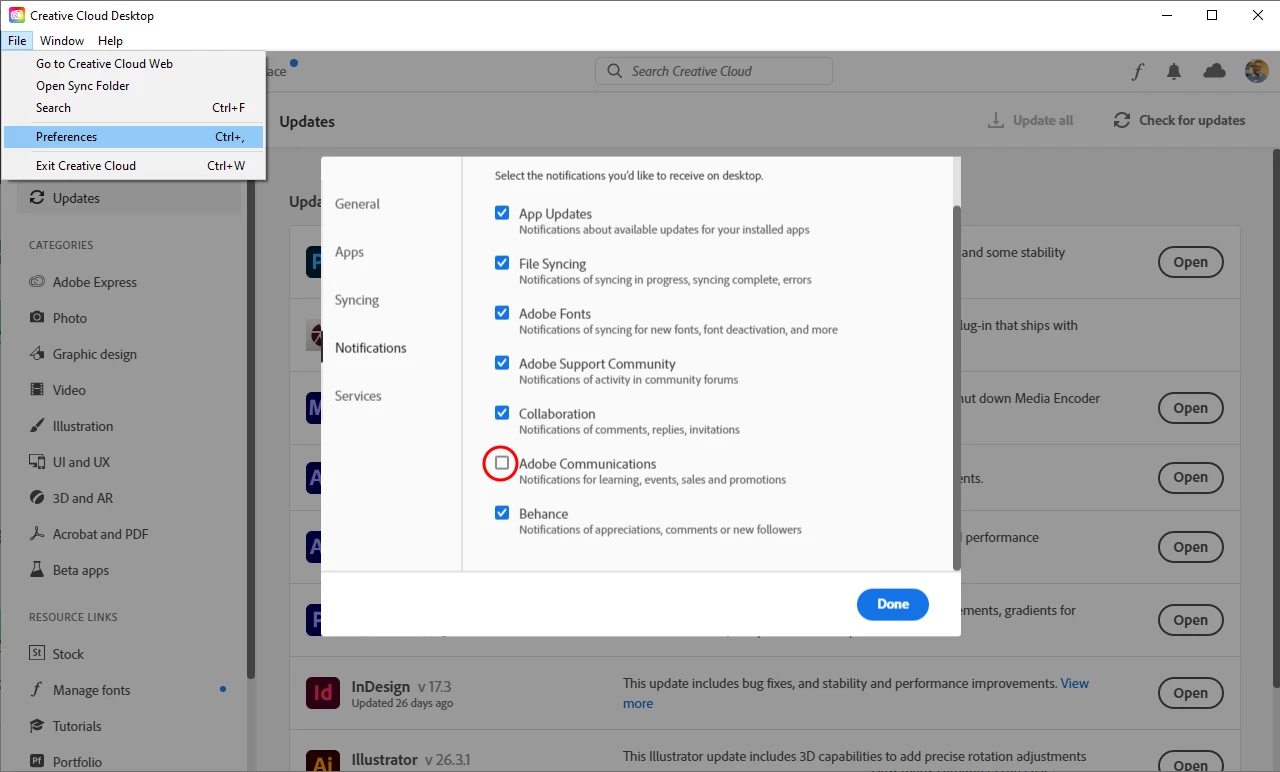
Anyway, from within the Creative Cloud Desktop app, select File, Preferences, and uncheck the box for "Adobe Communications." These notifications are all just ads.

1 reply

David_at_SummitAuthorCorrect answer
Inspiring
July 18, 2022

Found how. It's in a post titled simply, "Notifications." It didn't come-up when I searched for it, though I included the title as part of my search keywords.


Anyway, from within the Creative Cloud Desktop app, select File, Preferences, and uncheck the box for "Adobe Communications." These notifications are all just ads.