


New Participant
February 4, 2020
Answered

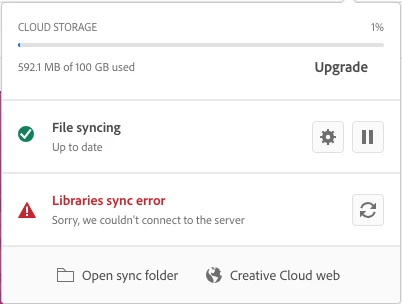
CC Libraries Sync Error

  • February 4, 2020
  • 23 replies
  • 82037 views

Hi,

I can not access the CC Libraries across my adobe applications because the error message keeps saying it cannot connect to the server. Please see attached screensot:

I have followed the advice and signed-out and signed-in back in Adobe Creative Cloud Desktop App yet the same issue is not being resolved. Help please! 🙂 
Correct answer kglad

I have the same problem but so many Senior thechnical Support when into my computer and NEVER solve the problem.So the not only it is recuring all the time sync error but NOW i have to put my paswword everytime the screen goes off :  


reset the cc desktop app by making sure it's in the foreground, then press:

Win: Ctrl + Alt + R
Mac: Cmd + Opt + R


if that fails, repair per https://helpx.adobe.com/download-install/kb/creative-cloud-install-stuck.html


if that fails, uninstall using the correct uninstaller from https://helpx.adobe.com/creative-cloud/help/uninstall-creative-cloud-desktop-app.html#sa_src=web-messaging and then reinstall using*


if that fails, do a clean cc install carefully following each applicable step:

uninstall every cc app including preferences per https://helpx.adobe.com/creative-cloud/help/uninstall-remove-app.html

then uninstall the cc desktop app, again using the correct uninstaller per https://helpx.adobe.com/creative-cloud/help/uninstall-creative-cloud-desktop-app.html#sa_src=web-messaging

clean your computer of cc files per http://www.adobe.com/support/contact/cscleanertool.html

check for, and if available, update your os

if windows is your os, repair all ms visual c++ versions that can be repaired (use google if you don't know how to do this)

if windows is your os update your ms visual c++, if it can be updated (use google if you don't know how to do this)

restart your computer (don't skip this)

reinstall the cc desktop app using the "alternative download links" at the bottom of the page at https://helpx.adobe.com/download-install/kb/creative-cloud-desktop-app-download.html

use the desktop app to install your cc programs/trials

NOTE: win 11 users that have trouble with the latest win 10 installer often have success with the older win 10 installer.

23 replies

Participating Frequently
April 5, 2020

This worked for me with the same issue. I had to do remove all the CC_LIBRARIES_PANEL_EXTENSION_xx_xx_xx, then follow the steps to use the cleaner tool (link below). I had some old software and removed it with the cleaner tool as well. So far, so good.

https://helpx.adobe.com/creative-cloud/kb/libraries-panel-not-working.html


scottqmarcus
Participating Frequently
April 6, 2020

Thanks all. Using the cleaner worked.

scottqmarcus
Participating Frequently
March 31, 2020

I am having the same problem. I followed the instructions on a mac but there is NO CEP folder in the Adobe Application support folder. What do I do?

Participating Frequently
April 5, 2020

There are 3 different Library's on the latest OS versions. Make sure you are in the Library folder directly on Macintosh HD – not in your User folder or your System folder. Do what sk_2019 suggests. If that doesn't work, use the cleaner tool as well. I made a comment with a link to it. Just be sure to only remove the Creative Cloud app unless you want to remove more than that. 

Adobe Employee
February 4, 2020

Hi,

Sorry, you are facing this problem. Could you please try below steps:


1. Delete all folders that start with “CC_LIBRARIES_PANEL_EXTENSION_xx_xx_xx” in this location:

WIN: C:\Program Files (x86)\Common Files\Adobe\CEP\extensions

MAC: Macintosh HD⁩ ▸ ⁨Library⁩ ▸ ⁨Application Support⁩ ▸ ⁨Adobe⁩ ▸ ⁨CEP⁩ -> extensions
2. Follow the steps of Solution 2 in this article: https://helpx.adobe.com/creative-cloud/kb/libraries-panel-not-working.html
Before trying the steps - please, make sure you killed the CCLibraries process in Task Manager / Activity Monitor, as well as you have quit all Adobe related products. This is mentioned in steps 1 and 2 of the article linked in step 2, but wanted to point out, because it is important.

Thank you,
Supriya
CCLibraries

New Participant
May 18, 2020

I just carried out this procedure which appeared to cure the fault. I then received notification of a Creative Cloud update being available. After I applied this update the same problem has reappeared.

Adobe Employee
May 18, 2020

I sent you a private message.