

New Participant
June 20, 2015
Answered

How to stop file syncing

  • June 20, 2015
  • 5 replies
  • 20376 views

I am trying to sync files for backup to Creative Cloud. Files are not that large, but it is taking hours. I can only pause syncing, how do I stop it? I don't need the files backed up that badly.

This topic has been closed for replies.
Correct answer Raimundo Illanes

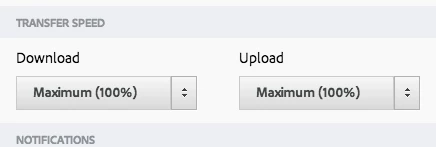
You only can stop all files or upload all files. No some large sizes ones. One thing you can do it's change your upload transfer seed if you like, that way CC ins't going to consume all your upload bandwith.
5 replies

New Participant
December 23, 2020

For Real Adobe READ THIS you are getting 56$ a month !!!! I'm Done with this Bull Crap!!!


Call me when you Stop Sync!!!!

New Participant
May 24, 2022

It's a year and a half later and Adobe is still forcing people to upload their files to their servers, and pay them to do it. Absolutely ridiculous and abysmal service, consider this has been on the radar for ages. It's clear this is a policy decision and they don't care. 

New Participant
July 28, 2016

Answer the goddamn question. How do you stop the sync?

Raimundo Illanes
Inspiring
July 28, 2016

Here you got the ****** answer.

Creative Clooud App > Preferences > Files > Sync OFF

New Participant
July 28, 2016

Yes. Thank you.

The reason that I got pissed off is that two people asked a very simple question (that turns out to have a very simple answer) andnot once, but twicethe answerer goes into a complicated answer that does not in any way address the question. This happens A LOT in these adobe communities, and it is frustrating as hell for the noobs.

 David Cherry

3519 Penwood Way

Houston TX 77023

713-855-5089

From: Raimundo Illanes <forums_noreply@adobe.com>

To: David Cherry <davec521@att.net>

Sent: Thursday, July 28, 2016 11:17 AM

Subject: How to stop file syncing

How to stop file syncing

created by Raimundo Illanes in File Hosting, Syncing, and Collaboration - View the full discussionHere you got the ****** answer. Creative Clooud App > Preferences > Files > Sync OFF If the reply above answers your question, please take a moment to mark this answer as correct by visiting: https://forums.adobe.com/message/8907032#8907032 and clicking ‘Correct’ below the answer Replies to this message go to everyone subscribed to this thread, not directly to the person who posted the message. To post a reply, either reply to this email or visit the message page: Please note that the Adobe Forums do not accept email attachments. If you want to embed an image in your message please visit the thread in the forum and click the camera icon: https://forums.adobe.com/message/8907032#8907032 To unsubscribe from this thread, please visit the message page at , click "Following" at the top right, & "Stop Following" Start a new discussion in File Hosting, Syncing, and Collaboration by email or at Adobe Community For more information about maintaining your forum email notifications please go to https://forums.adobe.com/thread/1516624. This email was sent by Adobe Community because you are a registered user.

You may unsubscribe instantly from Adobe Community, or adjust email frequency in your email preferences

Raimundo Illanes
Raimundo IllanesCorrect answer
Inspiring
March 23, 2016

You only can stop all files or upload all files. No some large sizes ones. One thing you can do it's change your upload transfer seed if you like, that way CC ins't going to consume all your upload bandwith.

New Participant
March 20, 2016

Iam having the same problem, I want to stop the syncing some large files and I do not see anyway to this.  Hope we can solve this problem. Good Luck.