


Participating Frequently
March 21, 2024
Question

Libraries panel not populating. Can not access files

  • March 21, 2024
  • 5 replies
  • 3911 views

It's been pretty bad this week. When we open a Library through the Libraries Panel it will populate, but at a snails pace or only some folders but not all.  Then other times nothing shows up for hours or ever.  When updating a larger Library file, the file will "break" and becomes unaccessible (I can't open the file to edit it).  When one Library decides to populate another Library will not. It tells me that all my files are synced even when nothing is showing up.  


Our team created a entire system around using CC Libraries, so this whole situation feels real bad right now.  
 

5 replies

Participating Frequently
February 20, 2025

Was this ever ficed for you?

Its jsut started happening to me this week and ALL of my lbiraries ar blank in every desktop app and its destroyed my week,  every fix ive tried from the online support suggestions hasnt worked and i hate how every bloody time the solution seems to be "uninstall and reinstall everything and waste a full day reloading your libraries"

Cmon adobe youre a multi billion dollar company, get your Shitake Mushrooms together, this is ridiculous.

Tarun Saini
Community Manager
Community Manager
February 21, 2025

Hi 

@Andreas28059408tjbp


Could you please share your Adobe ID with us? Please ensure you're using the updated version of the Creative cloud Desktop app.


Meanwhile, check this article and try the steps mentioned in it and let us know if that helps- https://adobe.ly/3D0N4GJ


Regards,

Tarun

Participating Frequently
February 24, 2025

How do i give you my email without it going public to the forum?

New Participant
May 11, 2024

I have the same issue. Photoshop and After Effects. May roll back a version. Illustrator seems to work ok.

Participating Frequently
May 1, 2024

Version of the app:
25.7.0 20240415.r.504 130b225 x64


Platform & OS version:

Microsoft Surface Laptop Studio
Processor 11th Gen Intel(R) Core(TM) i7-11370H @ 3.30GHz 3.30 GHz
Installed RAM 32.0 GB (31.8 GB usable)

Windows 11 Pro 22H2


Basic steps to reproduct the problem:

  1.  Launch Photoshop
  2.  Open Libraries Panel


Expected result:

Libraries panel loads all groups and assets saved in library


Actual result:

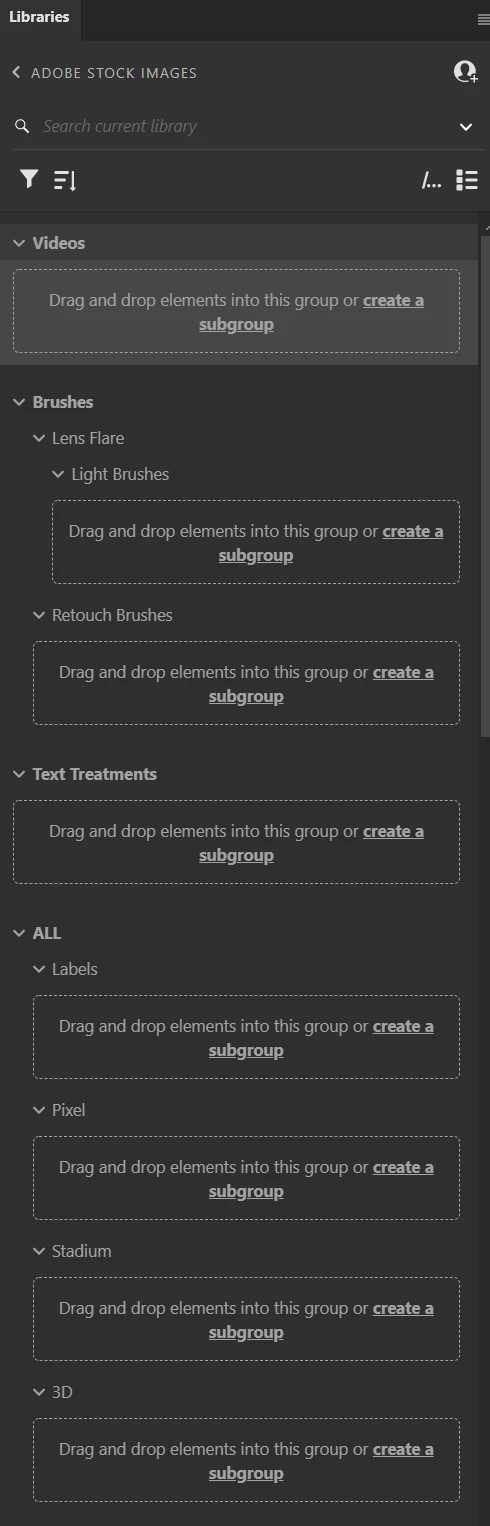
Libraries panel loads some assets in one group and shows empty groups for the rest


Steps we've attempted to alleviate the issue:

  1.  Relaunching Photoshop
  2.  Closing and re-opening the Libraries panel
  3.  Quitting all Creative Cloud and Adobe processes and relaunching
  4.  Running the Creative Cloud Cleaner Tool and performing a new install


Libraries load properly in Illustrator and InDesign. The problem is specific to Photoshop.


Photoshop Libraries panel:

Illustrator Libraries panel:


richardclubb
New Participant
May 3, 2024

I'm having the exact same issue. In addition to the above, I have uninstalled/reinstalled photoshop and did the "Recreate the libraries cache" in this link: https://helpx.adobe.com/creative-cloud/kb/creative-cloud-libraries-panel-doesn-t-load-in-desktop-products.html

Participating Frequently
April 11, 2024

I'm having the same issue since a few versions. Before it ran without problems.

Sometimes the library appears when I drag a new object in. But this isn't always working for me.

kglad
Community Expert
April 11, 2024

@rtom098 


did you try rolling back your ps version?

CosmoDogAuthor
Participating Frequently
March 22, 2024

I rolled back to previous versions

  • (25.31) : All libraries populated
  • (25.4) : One library populated or I did not wait long enough to see them populate (it had been over a minute)
  • (25.5) : All libraries populated - The fastest
  • (25.5.1) : Libraries populated but much slower than (25.5).  Any edit to the Library by adding/saving causes the entire library to refresh.  Gaining access during this process is painfully slow 
  • (25.6) :  Same issues as (25.5.1), but only one library populates, not all.


Solution for Photoshop:  Use older version (25.5)


I will test Illustrator next

kglad
Community Expert
March 22, 2024

thanks for the update 

kglad
Community Expert
March 22, 2024
CosmoDogAuthor
Participating Frequently
March 22, 2024

Yes, I could access files by downloading them to my local from a browser or the Creative Cloud app, but that defeats the purpose of the shared Libraries Panel imo.  We use it because it gives us the ability to edit Library files directly as well as any Library files that were linked within other files.  As well as, everyone sharing the Library would have the most up to date versions of files.  The problem with working with Box, Drop Box, Google Drive is making sure everyone is in sync.  People forget to upload/download latest files. 

kglad
Community Expert
March 22, 2024

you could try a cc desktop reset. i wouldn't go any further, though.


reset the cc desktop app by making sure it's in the foreground, then press:

Win: Ctrl + Alt + R
Mac: Cmd + Opt + R


if that fails, repair per https://helpx.adobe.com/download-install/kb/creative-cloud-install-stuck.html


if that fails and you have windows, open your control panel > add/remove programs > cc desktop app > repair

if that fails, uninstall using the correct uninstaller from https://helpx.adobe.com/creative-cloud/help/uninstall-creative-cloud-desktop-app.html#sa_src=web-messaging and then reinstall using*


if that fails, do a clean cc install carefully following each applicable step:

uninstall every cc app including preferences per https://helpx.adobe.com/creative-cloud/help/uninstall-remove-app.html

then uninstall the cc desktop app, again using the correct uninstaller per https://helpx.adobe.com/creative-cloud/help/uninstall-creative-cloud-desktop-app.html#sa_src=web-messaging

clean your computer of cc files per http://www.adobe.com/support/contact/cscleanertool.html

check for, and if available, update your os

if windows is your os, repair all ms visual c++ versions that can be repaired (use google if you don't know how to do this)

if windows is your os update your ms visual c++, if it can be updated (use google if you don't know how to do this)

restart your computer (don't skip this)

reinstall the cc desktop app using the "alternative download links" at the bottom of the page at https://helpx.adobe.com/download-install/kb/creative-cloud-desktop-app-download.html

use the desktop app to install your cc programs/trials