Inspiring
April 18, 2019
Answered

Wrong link on Outlook add in

  • April 18, 2019
  • 3 replies
  • 19731 views

After installing CC there appears a Send as Adobe Document Cloud link. The item sports a (?) link which links to a none existing page http://community.corp.adobe.com/chcservices/services/redirect?u=http://help.adobe.com&p=Acrobat_DC&l=en_US&id=AdobeSendP…

Could some tell Adobe that there is a bug ? In the mean time how do I get rid of this nonsense?

This topic has been closed for replies.
Correct answer LinSims

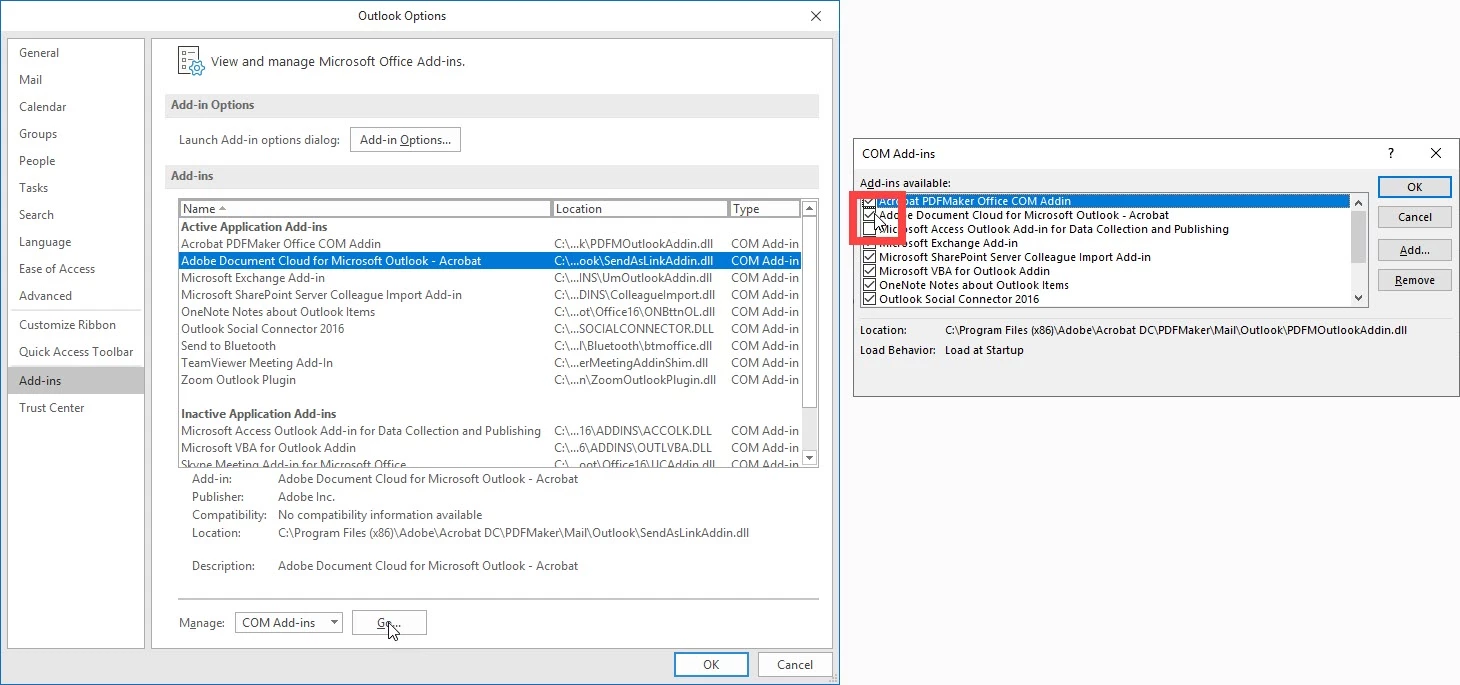
You turn it off like this: 

  1. Click File on the Outlook menu
  2. Click Options on the File menu
  3. Click Add-ins
  4. Select COM Add-ins from the Manage drop-down
  5. Click Go
  6. Deselect Adobe Document Cloud for Microsoft Outlook - Acrobat
  7. Click OK.


3 replies

LinSims
LinSimsCorrect answer
Community Expert
November 20, 2019

You turn it off like this: 

  1. Click File on the Outlook menu
  2. Click Options on the File menu
  3. Click Add-ins
  4. Select COM Add-ins from the Manage drop-down
  5. Click Go
  6. Deselect Adobe Document Cloud for Microsoft Outlook - Acrobat
  7. Click OK.


New Participant
November 20, 2019

That did it.  Thanks.

New Participant
November 20, 2019

Did you ever get the answer to this question? I aldo get the same link every time I attach anything to an outgoing Outlook email.  Annoying.

Abambo
Community Expert
April 18, 2019

Feature Request/Bug Report Form -- use this for your bug report.

ABAMBO | Hard- and Software Engineer | Photographer
wallaces6921353
New Participant
April 25, 2019

"Bug" or "Feature" I want to turn it off, never to be seen again.  How?

Abambo
Community Expert
April 26, 2019

I do not see that link, but I use both Acrobat and Outlook.

If it is an add-in, add-ins can be configured here (File->Options):

ABAMBO | Hard- and Software Engineer | Photographer