
Participant
February 24, 2021
Beantwortet

Libraries sync error

  • February 24, 2021
  • 1 Antwort
  • 5679 Ansichten

Frustrations mounting in regards to Library-sharing with my co-worker, as she is updating a library with logo files, color swatches. I am not able to see any updates she has made to this library. Any way you can help me resolve this? I am running on the Big Sur OS. I did not always have this issue.


Thanks,

Marv
Dieses Thema wurde für Antworten geschlossen.
Beste Antwort von Mariia Novikova

ID: AdobeLogs_20210225_164453_394-mac.zip


Hi,

We have delivered a new Libraries version to Production, it should be available for you now.
The problem should be fixed now, could you please confirm?
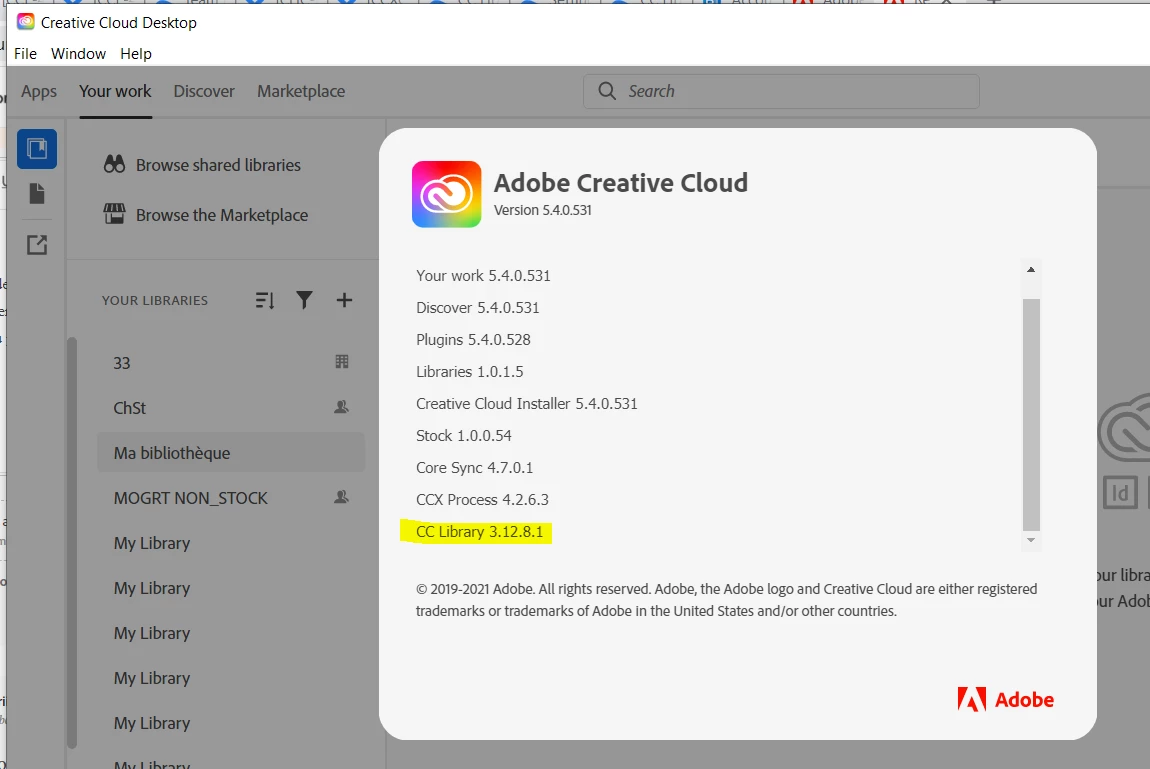
You can check the Libraries version on your machine via CCD, the fix is in 3.12.8-1.

1 Antwort

Mariia Novikova
Adobe Employee
Adobe Employee
February 24, 2021

Hi,

Sorry, you are facing it.
Do you see the Sync error in Libraries or in CCD? The Cloud icon is in the bottom of the CCLibraries Panel or the top right corner in CCD.
Could you please get the Logs via Log Collector?
https://helpx.adobe.com/creative-cloud/kb/cc-log-collector.html
Please, let us know the Logs ID.

Mariia

Known Participant
February 25, 2021

The designers at my company are having the same issue today. We used to be able to connect & utilize Creative Cloud Libraries. Today, we are getting errors in all our adobe software & creative cloud application in relation to Creative Cloud Libraries. What's weird is that I can still see them online @ assets.adobe.com but I cannot access them in my Adobe Software Programs.

Mariia Novikova
Adobe Employee
Adobe Employee
February 25, 2021

Hi,

Sorry you are facing this issue,

Could you please get the Logs so we can take a look what is happening? 
Is your company using Proxy environment?

Thank you,
Mariia