DKTR Jeroen
Known Participant
December 28, 2018
Answered

Adobe Application Manager Utilities?

  • December 28, 2018
  • 2 replies
  • 3676 views

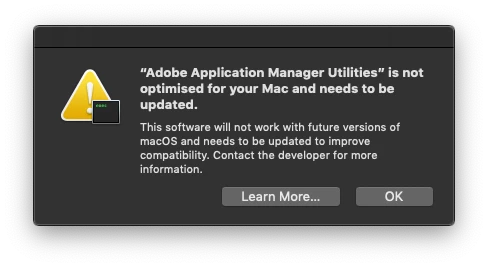
I just got this notification. Does anyone know what this is about?

Searched my system including inside package contents but can't find the app.

Maybe some leftover stuff from previous installations?

• macOS 10.14.2

• latest Adobe CC

This topic has been closed for replies.
Correct answer Bani Verma

Hi Studio57NL,

When you upgrade to the latest version of macOS or launch a Creative Cloud application for the first time on the latest versions of macOS, you may see a warning message that indicates Adobe software needs to be optimized for better performance.

This is due to some 32-bit components that we are working to address in a future Creative Cloud update.

Please note that no action is required from you at this time and your applications will still run as normal.

For more information, see 32-bit app compatibility with macOS High Sierra 10.13.4 and later - Apple Support.

Let us know if you have any more queries.

2 replies

Bani Verma
Community Manager
Bani VermaCommunity ManagerCorrect answer
Community Manager
December 28, 2018

Hi Studio57NL,

When you upgrade to the latest version of macOS or launch a Creative Cloud application for the first time on the latest versions of macOS, you may see a warning message that indicates Adobe software needs to be optimized for better performance.

This is due to some 32-bit components that we are working to address in a future Creative Cloud update.

Please note that no action is required from you at this time and your applications will still run as normal.

For more information, see 32-bit app compatibility with macOS High Sierra 10.13.4 and later - Apple Support.

Let us know if you have any more queries.

DKTR Jeroen
Known Participant
December 29, 2018

Thanks Bani Vera,

Just what I thought. But where is this app located? I can't find it anywhare on my system.

New Participant
October 16, 2019
I have Photoshop CS6 and I just cant locate Adobe Application Manager Utilities too been searching for a year now. Where the hell is it so i can delete it, i dont use the manager anyway
kglad
Community Expert
December 28, 2018

mac will only support 64bit programs in the future.  it's detecting a 32bit aam>update your aam/creative cloud desktop app, https://creative.adobe.com/products/creative-cloud