


pavelshubskiy
Participant
December 22, 2014
Answered

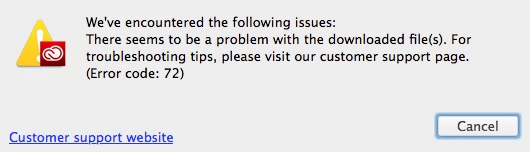
can't install cc on mac, error 72

  • December 22, 2014
  • 2 replies
  • 7705 views

Hello everyone

I'm on OS X Yosemite, macbook pro 2013.

I started having problems with Creative Cloud App. It showed exclamation mark near the icon in the system tray. When I entered application and switched to Apps inset, it didn't display anything there, except prompt to re-download Creative Cloud app. I did, but I can't install it, the installer says there was an error with downloaded files and quits with error 72. I've already checked if any of the Adobe processes are running, uninstalled the CC app. Nothing has worked.

I still have Adobe Photoshop and Lightroom on my system, afraid to uninstall them right now.
This topic has been closed for replies.
Correct answer Jeffrey_A_Wright

Moving this discussion to the Creative Cloud Download & Install forum.

Pavelshubskiy for information on how to resolve download errors please see Error downloading Creative Cloud applications - http://helpx.adobe.com/creative-cloud/kb/error-downloading-cc-apps.html.  Error 72 is a unique error so you may want to look at any installed security software settings and verify you have local administrator access on the computer.

2 replies

Jeffrey_A_Wright
Community Manager
Jeffrey_A_WrightCommunity ManagerCorrect answer
Community Manager
December 22, 2014

Moving this discussion to the Creative Cloud Download & Install forum.

Pavelshubskiy for information on how to resolve download errors please see Error downloading Creative Cloud applications - http://helpx.adobe.com/creative-cloud/kb/error-downloading-cc-apps.html.  Error 72 is a unique error so you may want to look at any installed security software settings and verify you have local administrator access on the computer.

John T Smith
Community Expert
Community Expert
December 22, 2014

A chat session where an agent may remotely look inside your computer may help

Creative Cloud chat support (all Creative Cloud customer service issues)

http://helpx.adobe.com/x-productkb/global/service-ccm.html