



Kent Barber GSG
Participating Frequently
December 1, 2022
Answered

Can't update or install new updates. Doesn't recognize Windows 21H2.

  • December 1, 2022
  • 2 replies
  • 5067 views

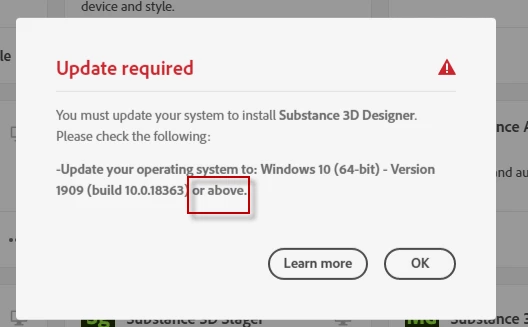
I have Windows 10 21H2. All my apps now say they are no longer compatible and that an update is required. They say I need to "Update your operation system to: Windows 10 (64-bit) - Version 1909 or above.


Version 1909 came out in 2019. I have 21H2 which was released November 2021.


Seems like the Creative Cloud App is not able to detect Windows 10 21H2, thinks it is an old version, and doesn't let me update or install anything.
 

This topic has been closed for replies.
Correct answer kglad

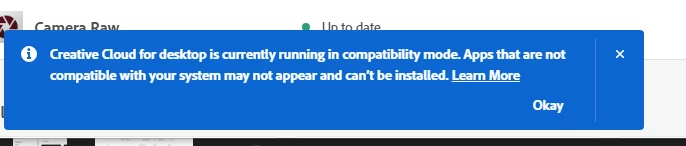
I did your reset trick. And it looks like my Create Cloud Desktop app is running in "Compatibility mode". Not sure what that is, or how it got in that mode. But this seems to be the reason why it is stopping software from being installed.


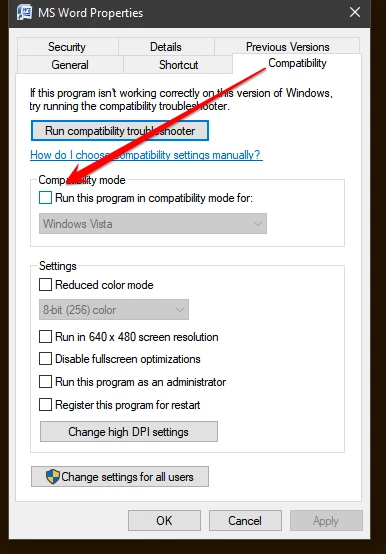
compatibility mode (with a non-current os) would do it.


right click your cc desktop app exe  > properties > compatiblity > untick compatibility mode > restart you cc app


2 replies

Kent Barber GSG
Participating Frequently
December 1, 2022

I wouldn't call one year old "behind the times". The issue is that the minimum specs for these apps are listed as Windows 10 1909. But it is not. So either all of the information displayed in the Creative Cloud App and websites are wrong, or the App itself has a bug in it.

kglad
Community Expert
Community Expert
December 1, 2022

the app is correct in that your os is too old for the latest cc versions.  but, you're correct, it is incorrect in its statement about what os is needed for the latest cc versions.

Kent Barber GSG
Participating Frequently
December 1, 2022

reset the cc desktop app: make sure it's in the foreground, then press:

Win: Ctrl + Alt + R
Mac: Cmd + Opt + R

if that fails, try to repair
https://helpx.adobe.com/download-install/kb/creative-cloud-install-stuck.html

if that fails go ahead and uninstall using the correct uninstaller from https://helpx.adobe.com/creative-cloud/help/uninstall-creative-cloud-desktop-app.html#sa_src=web-messaging and then reinstall

if that fails, do a clean cc install following each applicable step:

uninstall every cc app including preferences, https://helpx.adobe.com/creative-cloud/help/uninstall-remove-app.html

then uninstall the cc desktop app, again using the correct uninstaller, https://helpx.adobe.com/creative-cloud/help/uninstall-creative-cloud-desktop-app.html#sa_src=web-messaging

clean your computer of cc files per http://www.adobe.com/support/contact/cscleanertool.html

check for, and if available, update your os

repair all ms visual c++ versions that can be repaired.

update your ms visual c++, if it can be updated

restart your computer (don't skip this)

reinstall the cc desktop app, https://creativecloud.adobe.com/apps/all/desktop?action=install&source=apps&productId=creative-cloud

if you're unable to download the cc desktop app at this stage, use the "alternative download links" at the bottom of the page at https://helpx.adobe.com/download-install/kb/creative-cloud-desktop-app-download.html

use the desktop app to install your cc programs/trials


I did your reset trick. And it looks like my Create Cloud Desktop app is running in "Compatibility mode". Not sure what that is, or how it got in that mode. But this seems to be the reason why it is stopping software from being installed.


kglad
Community Expert
Community Expert
December 1, 2022

the update specs are behind the times.  you need to update your os if you want to install and run most of the latest cc apps.


if you're happy with your current app versions, you need not update anything.

Kent Barber GSG
Participating Frequently
December 1, 2022

I have Windows 10 21H2. All my apps now say they are no longer compatible and that an update is required. They say I need to "Update your operation system to: Windows 10 (64-bit) - Version 1909 or above.


Version 1909 came out in 2019. I have 21H2 which was released November 2021.


Seems like the Creative Cloud App is not able to detect Windows 10 21H2, thinks it is an old version, and doesn't let me update or install anything.
 

Kent Barber GSG
Participating Frequently
December 1, 2022

Appologize I posted this to the wrong forum. Feel free to delete from here, I will post in the Create Cloud Desktop section now.