


Participant
January 29, 2017
Answered

Cancellation of my Creative Cloud membership

  • January 29, 2017
  • 3 replies
  • 1817 views

Hello,

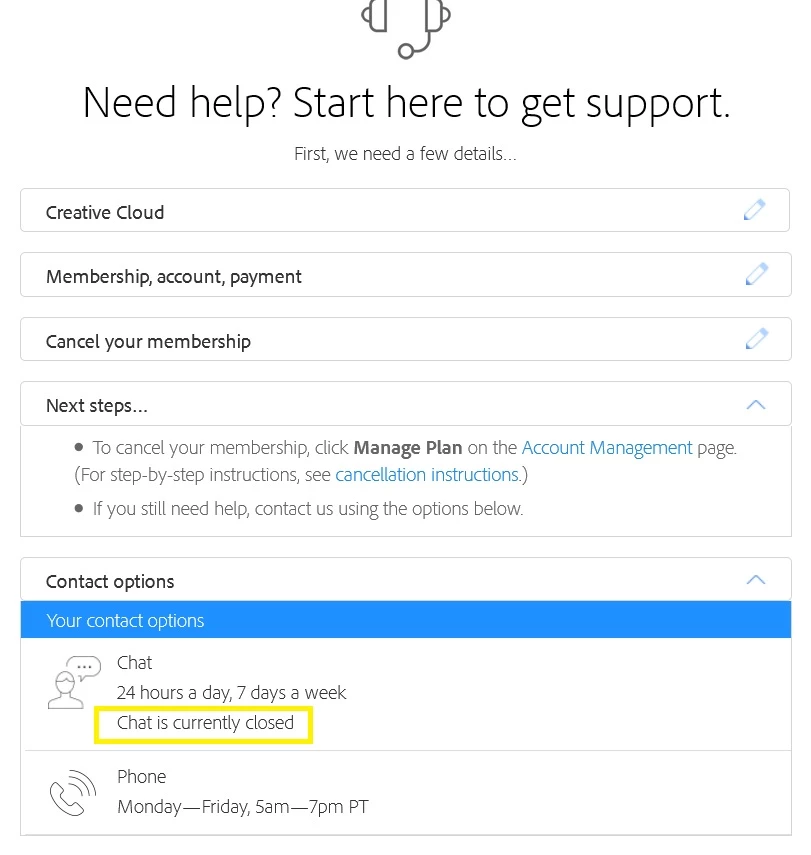
I want to cancel my current Creative Cloud membership. But I'm not able to! At my account page there's no "Cancel plan button". As i try to contact you i'm getting the error below, chat is currently closed / phone is available only on work days. My membership renewal date is today. Please help me!
This topic has been closed for replies.
Correct answer kglad

i'm able to start chat now.  i'm in the usa and using ff browser.

using a browser that allows popups and cookies,  contact adobe support during pst business hours by clicking here and, when available, click 'still need help', http://helpx.adobe.com/x-productkb/global/service-ccm.html

3 replies

Participating Frequently
March 19, 2022

Adobe hides the cancel button from you so that you must pay a years worth of their product. There is nothing wrong with the payment info, and the button will not show up in 24 hours. This is a scam and fully endorsed by Adobe and their employees. The best support you can get from Adobe is that you should have read the terms in the contract closer.

kglad
Community Expert
Community Expert
March 20, 2022

a lot of things are hard to find on adobe's website (until you learn to use a search engine like google to find what you want), but finding the cancel button is not one of them.  no search is required.


go to your account page (Adobe Account) > click manage plan > cancel plan


Participating Frequently
March 20, 2022

I know how to use google... the cancel button is still hidden after a month or so now. Support thinks that this is so simple yet they don't realize that not everyone can cancel online. I can't tell you how many times someone has said go to your profile and click the cancel button. A search is not required because there is no cancel button to find, do your research on a search engine on like google before answering (if you know how to use a search engine).

timp2384910
Participant
May 23, 2017

Obviously Adobe doesn't want you to cancel your subscription. This is why it is more of a process to figure it out.

Additionally, I find it completely unethical for Adobe to not allow a customer to set a future cancelation date for their subscription. I've been told by support an eerily similar reason of "The reason we're not able to cancel your subscription is because it would take effect right away" I was told that, that was the logical reason. I think it seems more logical, that a company that sells products and software would be able to make a very simple addition to the coding of their subscription and billing cycle that allows a customer, who has payed them a lot of hard earned money the simple ability to schedule a cancellation date at the end of their term.

I find it hard to believe that I'm the first person who has questioned this logic.

Adobe, Come on man!

Terri Stevens
Legend
May 23, 2017

I always thought the subscription plans were based on 12 month contracts after which you are sent a reminder to renew your subscription? There are also some plans that can be terminated without penalty at the end of each month. Admittedly, those plans are more expensive, but it allows the use of the products for short periods.

Ned Murphy
Legend
May 24, 2017

Subscriptions renew automatically.  It is, unfortunately, on the subscriber to keep track of when their renewal will happen if they wish to cancel it in time with the end of the current subscription term.

Ned Murphy
Legend
January 29, 2017

You should be able to cancel thru your account..

Manage your Creative Cloud membership

Cancel your Creative Cloud membership

alisinanAuthor
Participant
January 29, 2017

Well, yes i SHOULD. But i'm not able to. Also i SHOULD be able to get SUPPORT from Adobe, but I'm not. Also about 15minutes ago they charged me for the subscription...

kglad
Community Expert
kgladCommunity ExpertCorrect answer
Community Expert
January 29, 2017

i'm able to start chat now.  i'm in the usa and using ff browser.

using a browser that allows popups and cookies,  contact adobe support during pst business hours by clicking here and, when available, click 'still need help', http://helpx.adobe.com/x-productkb/global/service-ccm.html